MIT CADR and LM-3 application atlas
This atlas answers three practical questions for every D01-D60 catalog area: what would I use it for, how should I first approach it, and can the preserved System 303-0 band demonstrate it honestly? “Read” is a real tour outcome when the area is infrastructure, destructive, hardware-dependent, or absent from this band.
Start with the linear working-session tour, then return here when you want direct access by software area. Follow the linked dossier before using a facility on valuable guest state.
Animated gesture guide
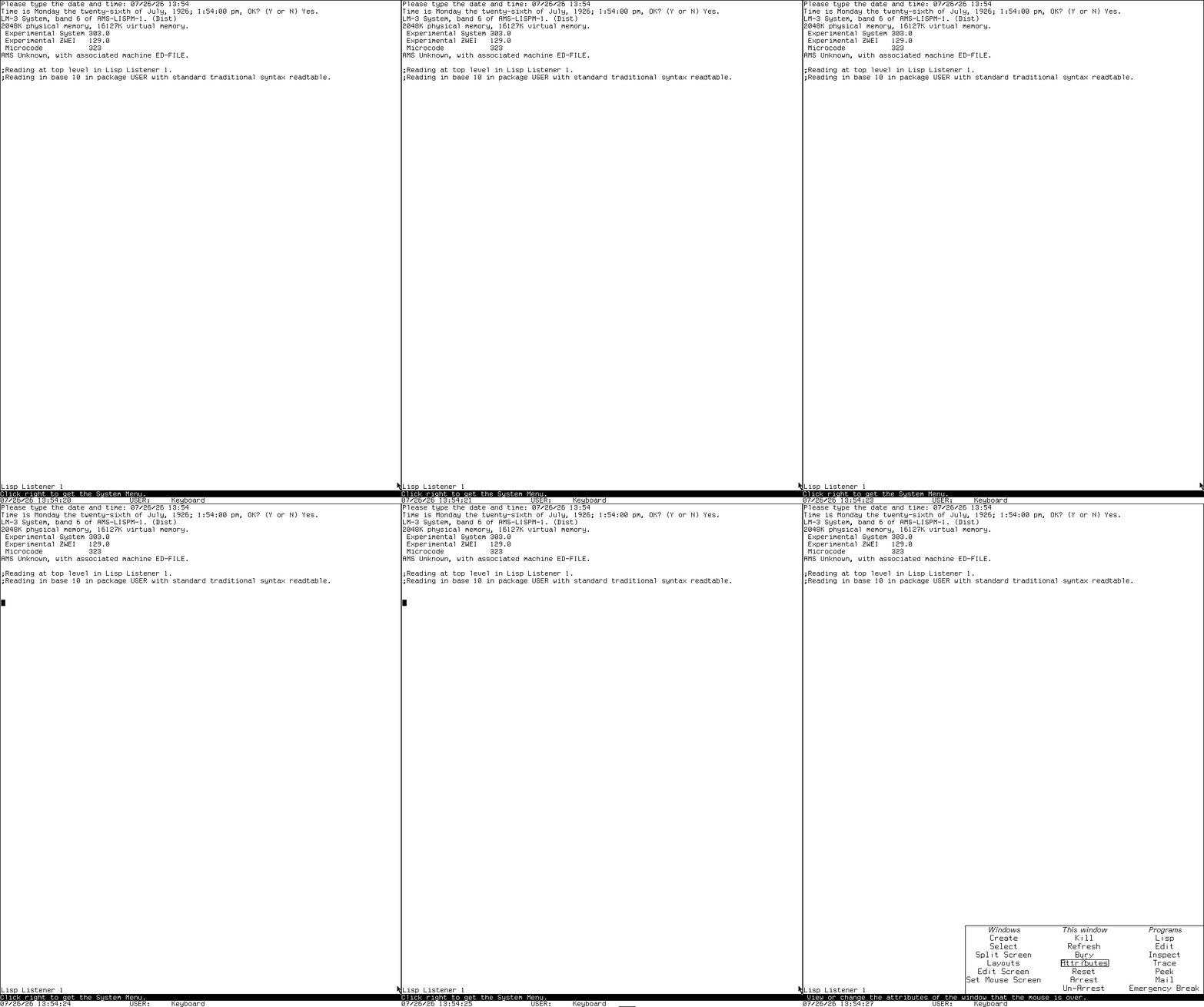
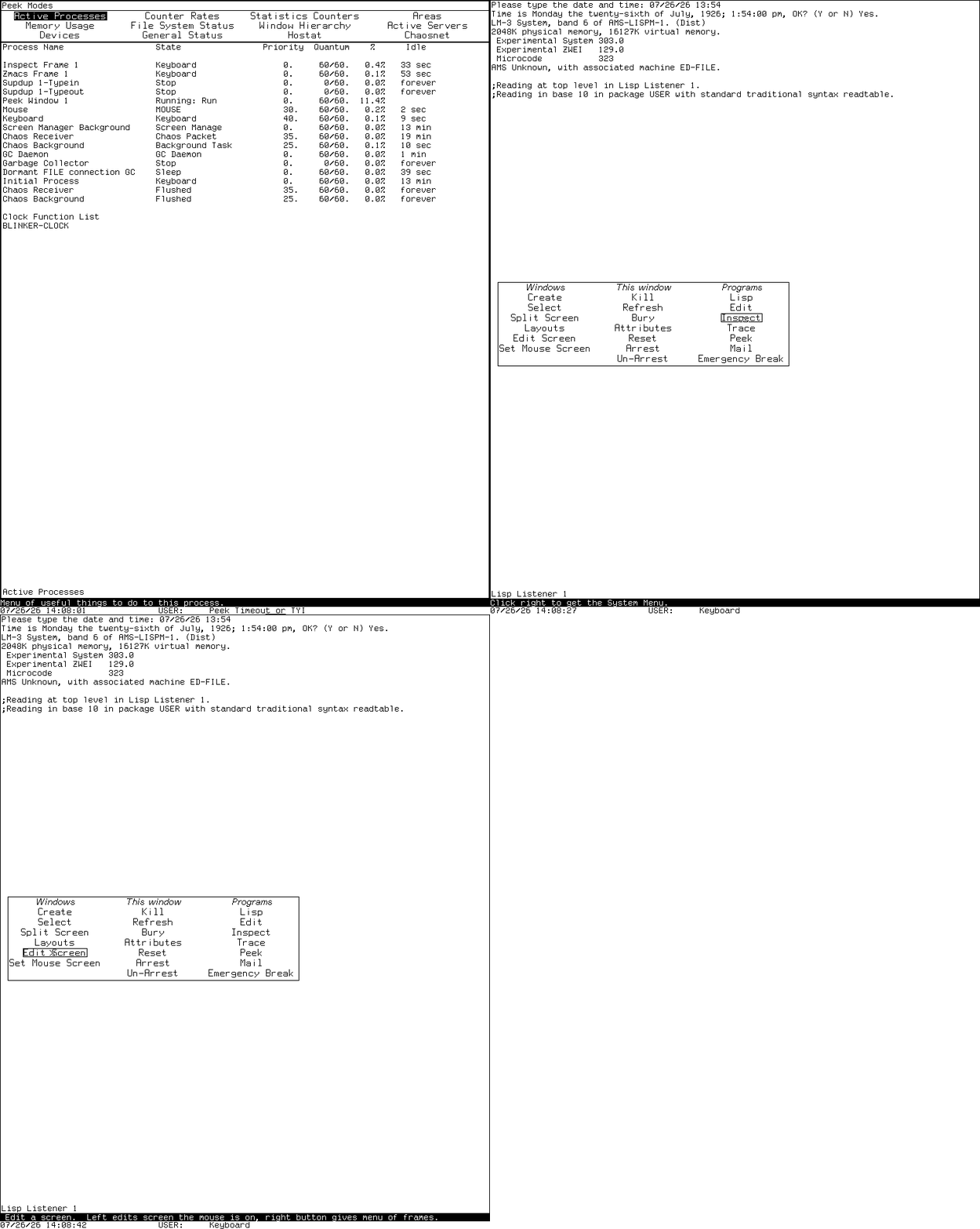
These compact reminders come from coherent interactions introduced in the linear story. The menu clip is continuous; the others retain ordered action-boundary captures and do not claim omitted timing.
Open the System menu: Right over the client
Change Zmacs mode: Meta-X Text Mode or Meta-X Lisp Mode

Ask Zmacs for contextual Help: Help twice

Enter Screen Editor: System menu, then Edit Screen
Everyday environment: D01-D16
| Area | What you would do | First tour stop | Preserved boundary |
|---|---|---|---|
| D01 Listeners | Evaluate Lisp, inspect values, and work with editable input. | Select Lisp; enter (+ 40 2), then a form returning several values. Dossier |
Hands-on and reviewed. |
| D02 selection and windows | Find existing programs, create windows, and manage the exposed screen. | Right-click for the System menu; compare Create, Select, and program entries. Dossier | Hands-on; avoid destructive cells during the first tour. |
| D03 Screen Editor | Change the live TV window layout. | Choose Edit Screen, point at an operation, read the who line, then Abort without mutation. Dossier | Menu verified; staged mutation deserves a disposable session. |
| D04 Emergency Break | Reach a degraded evaluator when the ordinary environment is unusable. | Read the dossier before entering it; the tour capture evaluates (+ 40 2). |
Hands-on recovery path; not an everyday Listener. |
| D05 EINE/ZWEI/Zmacs | Edit Lisp and text with modes, buffers, commands, and structural operations. | System E; ask for Help; run Meta-X Text Mode and Meta-X Lisp Mode. Dossier |
Zmacs hands-on; EINE lacks a compatible runnable band. |
| D06 Dired/BDired/Edit Buffers | Navigate files, compare directories, and stage buffer actions. | In Zmacs, open Edit Buffers and learn its mark-then-execute model. Dossier | Empty/synthetic buffer view verified; populated file operations need disposable guest files. |
| D07 Help | Ask the current program, editor mode, or System registry what it can do. | Press Help twice in Zmacs; try System Help; compare their scopes. Dossier |
Hands-on contextual Help; no Genera-style Document Examiner application on CADR. |
| D08 ZMail | Compose and, in later LM-3 software, read mail. | Read the CADR ZMail dossier, then inspect the registered Mail path without configuring delivery. | Reader absent from the tested band; composition/source profiles remain distinct. |
| D09 Converse/messages | Send interactive messages and notices to other machines. | Read the cross-system dossier and learn QSend/SHOUT/NOTIFY roles. | Maintained Converse cannot load in the tested band; no isolated peer transaction claimed. |
| D10 SUPDUP/Telnet | Open a remote terminal session. | Create a terminal window and inspect the disconnected prompt; exit without a peer. Dossier | Disconnected shells verified; no connected negotiation oracle. |
| D11 Inspector | Browse a live Lisp object through mouse-sensitive rows. | Select Inspect; inspect a short list and follow one safe component. Dossier | Hands-on with synthetic data. |
| D12 Error Handler | Understand a condition, stack, frames, and available recovery choices. | Signal only the dossier's synthetic error in a disposable session, then Abort. Dossier | Ordinary and windowed states reviewed; do not experiment on irreplaceable state. |
| D13 Trace/Stepper | Observe calls, arguments, returns, and call relationships. | Trace a researcher-defined function, call it once, then untrace it. Dossier | Safe trace path verified; breakpoint mutation intentionally unexercised. |
| D14 Peek | Observe processes, memory, windows, files, and network state. | Open Peek, choose Processes, and read the mode-specific Help. Dossier | Process view reviewed; mutation controls remain source-grounded only. |
| D15 Metering | Measure counters, page behavior, or maintained LM-3 events. | Read the metering dossier before choosing a profile. | System 46, LMETER/PTRAC, and maintained System 303 are different facilities; runtime meter remains pending. |
| D16 Flavors | Examine classes, components, instance variables, and methods. | Use Meta-X Describe Flavor on TV:LISP-LISTENER. Dossier |
Hands-on Flavors; do not import Genera CLOS/Flavor Examiner behavior backward. |
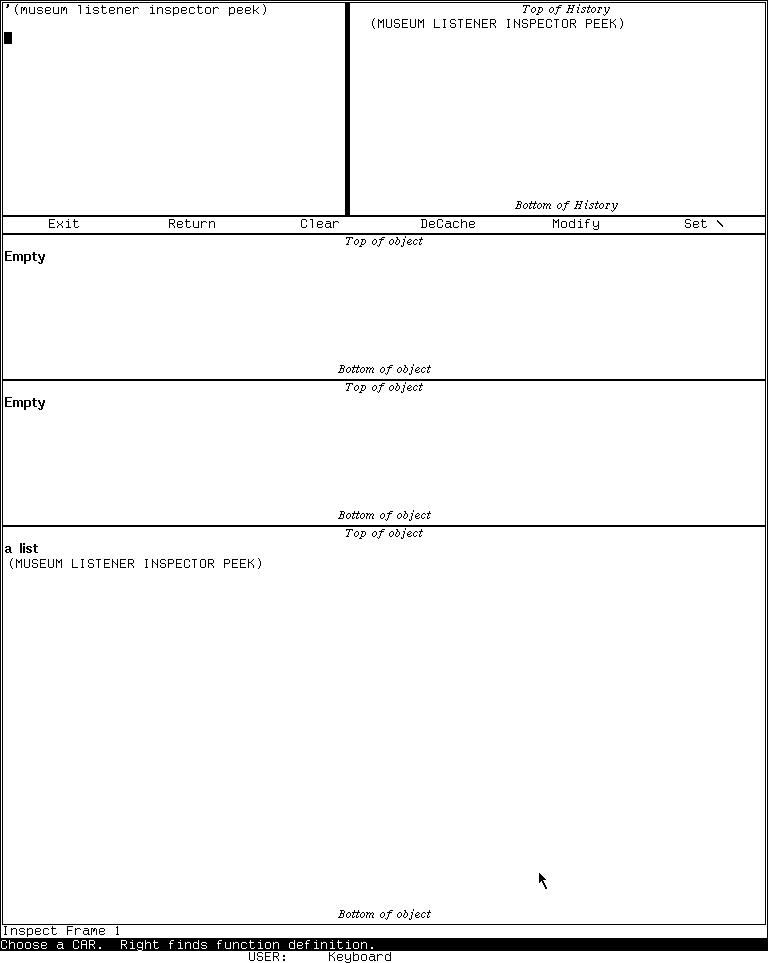
Runtime observation: the Inspector's mouse-sensitive list view in the preserved System 303 band. It illustrates the D11 tour stop, not arbitrary-object safety or every Inspector release.
Files, operations, and implementation: D17-D27
| Area | What you would use it for | First tour stop | Preserved boundary |
|---|---|---|---|
| D17 file systems | Work with pathnames, local stores, QFILE, LMFILE, and file servers. | Learn pathname syntax in the Listener, then tour Dired with disposable files. Dossier | Local and network backends differ; external service is not configured. |
| D18 disk repair | Inspect labels, packs, checkout state, salvage, and repair. | Read the disk dossier; identify read-only versus mutating commands. | Do not hands-on-tour destructive commands against the preservation disk. |
| D19 tape | Archive, restore, inspect, and administer later LMI tape formats/devices. | Study TFrame's seven modes in the tape dossier. | No System 46 subsystem; maintained System 303 hardware/remote-device runtime is blocked. |
| D20 site/login data | Define hosts, users, sites, and login behavior. | Compare the site tables and Site Editor model in the dossier. | Site mutation is administrative and not exercised. |
| D21 services dashboards | Observe operator processes and background facilities. | Use Peek Processes as the safe dashboard, then read the services dossier. | Later mailer/printer/domain frames are primarily Genera; CADR service mutation is deferred. |
| D22 runtime/compiler | Read, evaluate, compile, disassemble, schedule, and collect Lisp. | Compile a tiny researcher-defined function and disassemble it. Dossier | Hands-on compiler path reviewed. |
| D23 QFASL/UNFASL | Understand compiled objects, relocation, loading, and recoverable structure. | Read the format dossier; do not treat UNFASL as original-source recovery. | Infrastructure, not a standalone GUI. |
| D24 system construction | Build systems, patches, bands, and distributions. | Inspect declarations and loaded-version queries in the dossier. | Band writing and distribution mutation are not first-tour operations. |
| D25 source comparison | Compare Lisp sources and merge differences. | Start with SRCCOM's non-mutating comparison model in the dossier. | Genera Compare/Merge must not be inferred for CADR. |
| D26 text production | Format output, query users, grind Lisp, dribble sessions, spellcheck, and prepare documents. | Dribble a disposable Listener transcript, then stop it; inspect Zmacs formatting commands. Dossier | Ispell is optional; printers and historical document pipelines are not configured. |
| D27 mathematics | Use matrix, rational, complex, elementary, and infix facilities. | Evaluate a small non-mutating matrix operation from the audited API. Dossier | Hands-on arithmetic is possible; keep the documented preserved anomaly in mind. |
Interface, graphics, and output: D28-D36
| Area | What you would use it for | First tour stop | Preserved boundary |
|---|---|---|---|
| D28 Dynamic Windows | Later typed presentations and program frameworks. | Learn CADR's TV/mouse-sensitive typeout model instead. Comparison | Dynamic Windows is Genera, not the CADR UI substrate. |
| D29 CLIM 2 | Portable application frames and presentation interfaces. | Read the cross-catalog CLIM audit. | No CADR CLIM application claimed. |
| D30 FED | Design and edit raster fonts. | Study public font source, then open FED only in a disposable band if available. Dossier | Source assets are public; runtime generation/profile differences remain explicit. |
| D31 raster paint | Edit bitmap pictures and raster patterns. | Inspect the screen/raster editor controls and public ink patterns. Dossier | Some recovered pictures have unresolved embedded-content rights and stay local. |
| D32 Graphic Editor | Construct structured drawings. | Read the drawing dossier. | Genera application; do not invent a CADR equivalent from shared drawing primitives. |
| D33 color | Define color maps and edit colors. | Study the CADR color model and monochrome runtime boundary. Dossier | Tested display is monochrome; Genera Color Editor is separate. |
| D34 image primitives/assets | Draw lines, text, raster ops, icons, patterns, and pictures. | Run a harmless QIX demonstration, then compare the asset census. | Public-source QIX verified; unresolved decoded pictures remain untracked. |
| D35 hardcopy | Produce Press, printer, and plot output. | Read the hardcopy dossier and identify device assumptions. | No configured output device; do not equate menu presence with successful printing. |
| D36 Concordia | Structured authoring and book design. | Read the Concordia dossier. | Genera product; CADR/LM-3 boundary is explicit and no CADR hands-on path is claimed. |
Languages, networking, and machine engineering: D37-D52
| Area | What you would use it for | First tour stop | Preserved boundary |
|---|---|---|---|
| D37 C/FORTRAN/Pascal | Develop non-Lisp languages inside Genera. | Read the language-environments dossier. | Symbolics products, not CADR applications. |
| D38 Compiler Tools | Build grammars, lexers, parsers, and syntax-aware editors. | Read the Compiler Tools dossier. | Genera optional system; no CADR tour claim. |
| D39 Conversion Tools | Perform structured source migrations. | Read the Conversion Tools dossier. | Genera optional system; no CADR tour claim. |
| D40 Joshua | Build rule, inference, truth-maintenance, and expert systems. | Read the Joshua dossier. | Optional Genera product; public AMORD lineage is not a CADR Joshua runtime. |
| D41 Statice | Persist and browse objects in a database. | Read the Statice dossier. | Genera product and server stack; no CADR application claim. |
| D42 Macsyma | Perform symbolic mathematics, plotting, and expression editing. | Read the Macsyma dossier. | Lineage includes Lisp machines, but the preserved runnable band does not establish this product. |
| D43 NS design | Design schematics, gates, PCBs, and VLSI. | Read the NS family dossier. | Genera product/media evidence; no CADR hands-on tour. |
| D44 CLOE | Develop and deliver Lisp applications for Intel/DOS/Windows targets. | Read the CLOE dossier. | Absent from preserved media/world; not a CADR facility. |
| D45 transports | Understand Chaosnet and higher-level network paths. | Inspect the safe network registry and Peek network view. Dossier | Architecture can be toured; no external route or peer transaction is claimed. |
| D46 network services | Use name, time, file, mail, and site utilities. | Display the runtime service registry without starting services. Dossier | Registry presence is not configured service operation. |
| D47 RPC/host integration | Connect Lisp-machine software to UNIX and host environments. | Trace the CADR UNIX-interface boundary in the dossier. | Infrastructure and later Genera extensions, not one portable app. |
| D48 CLX/X | Use remote X screens and X-server facilities. | Read the CLX dossier. | Primarily Genera/CLX; CADR display is the TV framebuffer in this tour. |
| D49 CL-HTTP | Serve and browse the Web from Lisp. | Read the CL-HTTP dossier. | Contributed Genera systems are unloaded; no CADR application claimed. |
| D50 microassembler | Assemble CADR microcode and manage symbols/artifacts. | Study the microassembler dossier before touching machine state. | Source/build tool; not a beginner GUI. |
| D51 diagnostics | Checkout hardware, exercise devices, and debug the CADR. | Read the diagnostics dossier. | Physical hardware paths are unavailable or unsafe to simulate casually. |
| D52 Ivory/FEP/VLM | Understand later Symbolics execution and front-end layers. | Compare CADR's emulator/microcode boundary with the dossier. | Genera-specific layers are not CADR applications. |
Demonstrations and examples: D53-D60
| Area | What you would do | First tour stop | Preserved boundary |
|---|---|---|---|
| D53 MUNCH | Generate the XOR-based Munching Squares display. | Read the MUNCH writeup, then use the audited stop control. | Source-grounded; use a disposable runtime session. |
| D54 LEXIPHAGE | Watch a word-oriented display process consume and transform text. | Read the LEXIPHAGE writeup before loading it. | Source/runtime boundary is recorded in the dossier. |
| D55 Spacewar | Play the two-ship gravity-and-torpedo game. | Learn both players' controls, then enter the verified playfield. Dossier | Live playfield reviewed; keyboard mapping is part of the exercise. |
| D56 Doctor | Converse with the ELIZA-style rule program. | Start Doctor, enter a harmless sentence, and learn its explicit exit phrase. Dossier | Synthetic conversation reviewed; historical rule/source defects are documented. |
| D57 CADR HACKS | Explore graphics, sound, novelty programs, and QIX. | Begin with QIX because its live start/stop path is verified. Dossier | Each demo has its own dependencies and controls; do not bulk-run the suite. |
| D58 Genera HACKS | Explore the later Genera demonstration suite. | Read the Genera suite dossier. | Not the CADR suite and not runnable in the CADR band. |
| D59 CLIM demos | Learn CLIM concepts through demonstration frames. | Read the CLIM demonstrations dossier. | Genera optional system; no CADR CLIM tour. |
| D60 examples | Study small product and programming examples. | Use the examples dossier to select a source example with known prerequisites. | “Example” does not imply loaded, safe, or standalone. |
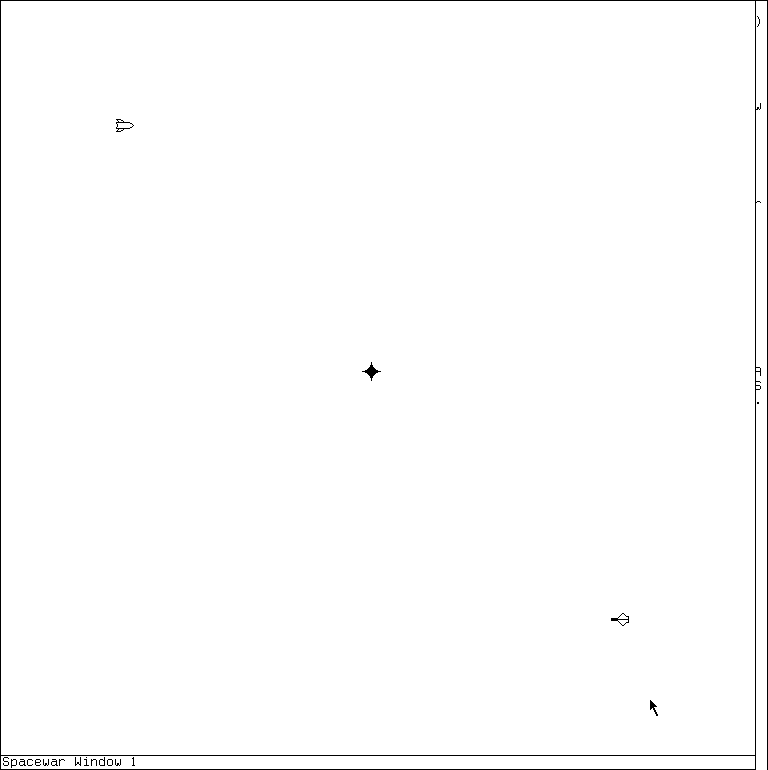
Runtime observation: a representative D55 application state. It is included to teach what the game surface looks like beside the source-grounded control explanation, not as a decorative gallery image.
Completeness and evidence
Every D01-D60 area appears above. The canonical application dossier coverage matrix remains authoritative for exact release entries, full bindings, source/manual/runtime discrepancies, and open oracles. This atlas is the safe navigation layer, not a replacement specification.