CADR and Genera interface style guide
Conclusion
This is not a general retro-interface guide. Its only visual references are the selected MIT CADR/LM-3 and Symbolics Genera profiles. A conforming design must be traceable to their source, preserved artifacts, or observed runtime behavior; the historical motivation does not authorize arcade, terminal, CRT, cyberpunk, or contemporary “retro” conventions.
The characteristic appearance comes from a tightly coupled system:
- crisp one-bit raster typography;
- black-and-white drawing with Boolean operations and periodic stipples;
- dense, content-sized windows with one-pixel rules;
- mode lines, labels, scroll margins, and a permanently visible who line;
- transient menus whose current item is outlined or reversibly highlighted;
- context-sensitive mouse documentation;
- three-button and modifier-rich interaction; and
- applications that present meaningful objects and commands rather than hiding everything behind generic push buttons.
MIT CADR/LM-3 and Symbolics Genera must nevertheless be treated as different profiles. The selected CADR baseline is the sparse TV window system seen in the public System 46 source and the preserved System 303 runtime. The selected Genera baseline is the more typographically varied TV plus Dynamic Windows environment in Genera 8.5. Genera descends from the same broad tradition, but adds framed program surfaces, semantic character styles, presentation-sensitive interaction, richer formatted output, more named stipples, and a stronger visual distinction among title, display, menu, and interactor panes.
For a website, preserve those relationships while implementing them with accessible HTML controls, keyboard focus, text alternatives, and responsive layout. Those facilities are modern implementation machinery, not a source of additional visual style.
Evidence profile and design status
This guide distinguishes three kinds of statement:
| Label | Meaning |
|---|---|
| Observed | Visible in a reviewed runtime capture from the identified System 303 or Genera 8.5 environment. |
| Source-grounded | Established by the selected public CADR/LM-3 source or licensed Genera source analysis recorded in the linked museum article. |
| Implementation mapping | A way to reproduce an established CADR or Genera relationship in HTML, CSS, Canvas, or another modern toolkit. It is not attributed to the original system and must not introduce a new visual convention. |
The profiles are:
| Profile | Evidence boundary | Good target description |
|---|---|---|
CADR-303-MONO |
Experimental System 303.0 runtime, cross-checked against public System 46 and LM-3 sources | A late CADR/LM-3 monochrome TV interface |
GENERA-85-MONO |
Open Genera 2.0 / Genera 8.5 world and selected source | A monochrome-first Genera TV and Dynamic Windows interface |
CADR-COLOR-4 |
Public CADR four-bit color-screen source | An optional 576 by 454 indexed-color laboratory profile, not the ordinary monochrome desktop |
GENERA-COLOR |
Genera color protocols and Color Editor source analysis | A device-dependent color extension; do not infer its appearance from the monochrome Open Genera runtime |
Do not silently average the two monochrome profiles. A design that combines Genera's drop shadow with CADR's portrait composition is a labeled hybrid, not a reconstruction of either system. A generic modern terminal font is not visually conforming to either profile merely because it is monospaced.
The controlled visual comparison
CADR/LM-3 System 303
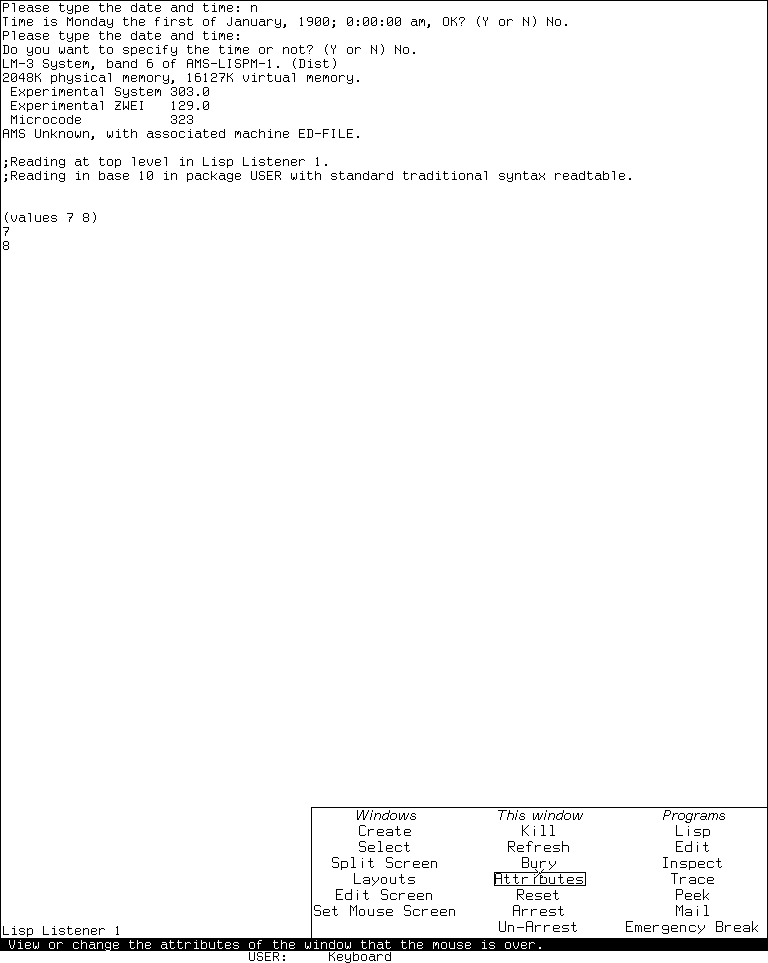
Runtime observation, Experimental System 303.0, 2026-07-18. The image supports the comparison of sparse popup geometry, column headings, outlined current item, surrounding Listener, bottom mode line, and pointer-documentation/status region. MIT and other identified rightsholders retain any interest in the screen; this scholarly use is reviewed under the repository's case-specific fair-use policy, and no affiliation or endorsement is implied.
The visible hierarchy is created almost entirely by position, rules, whitespace, font changes, and the current-item outline. There is no desktop wallpaper, toolbar, icon dock, rounded card, or shaded widget chrome. The menu occupies only the area its items need and leaves the underlying application legible.
Symbolics Genera 8.5
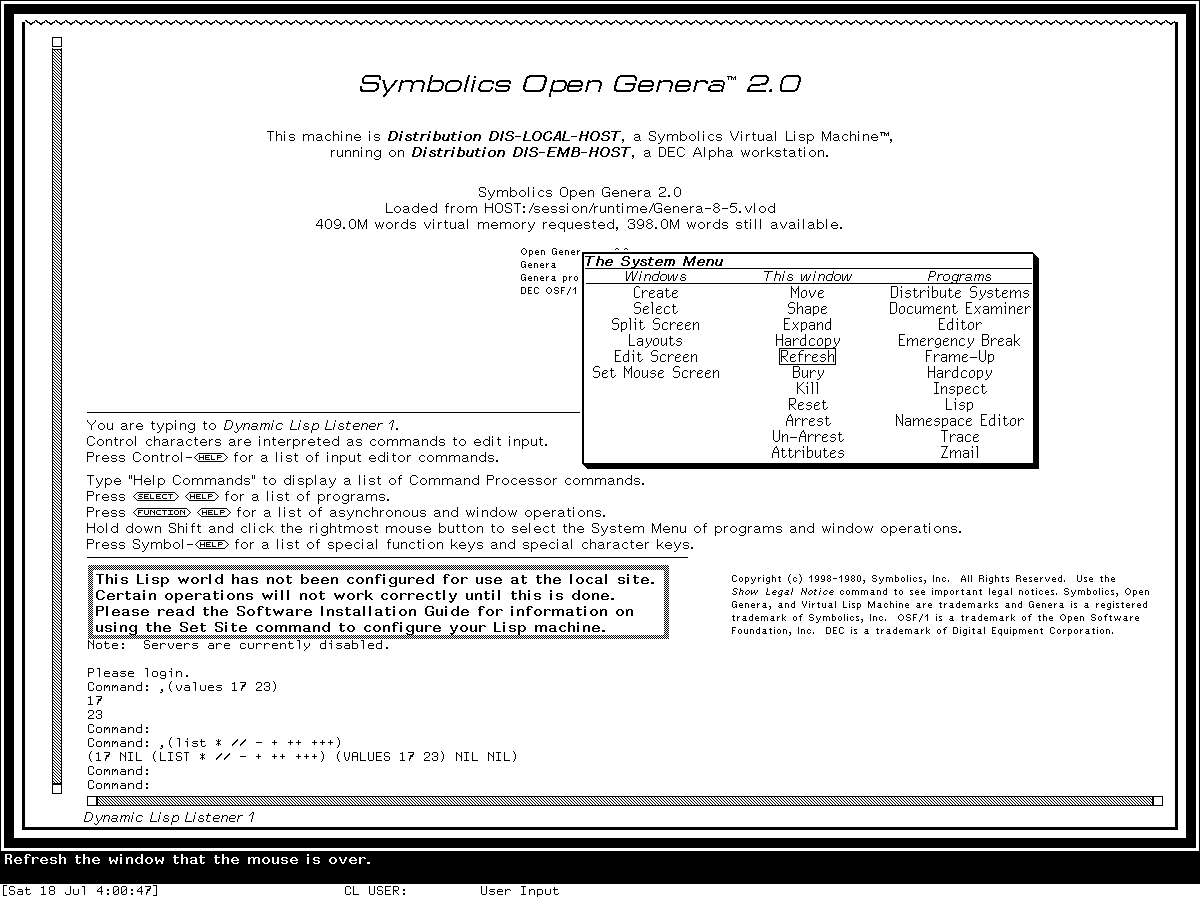
Runtime observation, Genera 8.5, 2026-07-18. The image supports comparison of the menu title, column organization, typography, current-item box, border and shadow, framed screen, scrollbar, bottom label, and pointer-documentation/status relationship. Symbolics retains any copyright interest; this limited scholarly use is reviewed under the repository's case-specific fair-use policy, and no affiliation or endorsement is implied.
Genera remains visually economical, but the hierarchy is stronger. The popup has a title, differentiated headings, a heavier lower-right edge, and more proportional letterforms. The enclosing Listener has a decorated frame, scrollbar, and label. These are not grounds for adding modern bevels or arbitrary ornament: the decoration still communicates window extent, pane role, exposure, selection, or operation.
Genera Dynamic Windows form language
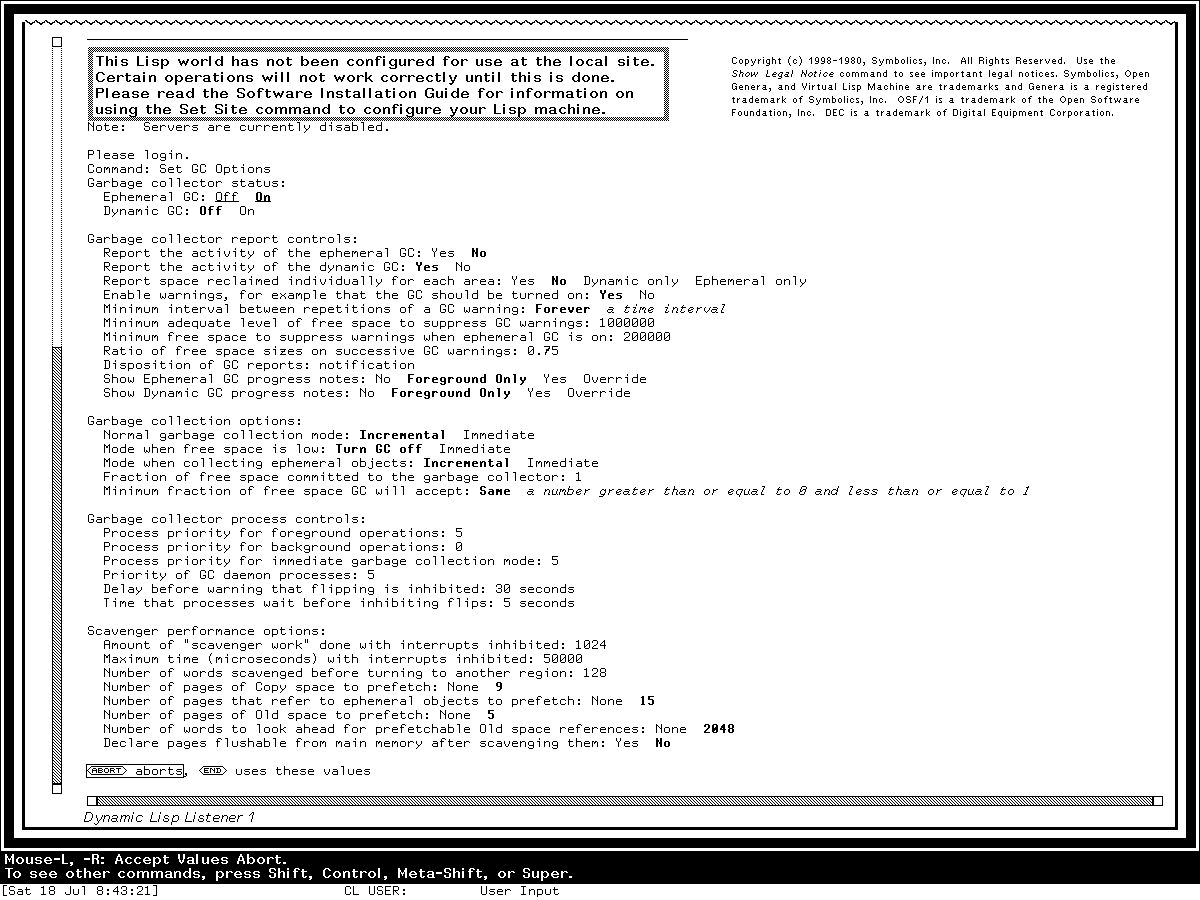
Runtime observation, Genera 8.5, 2026-07-18. This capture is used only to analyze the typographic and spatial language of an Accepting Values form. Its volatile garbage-collector values are not release defaults or configuration advice. Symbolics retains any copyright interest; this limited scholarly use is reviewed under the repository's case-specific fair-use policy.
This form is especially important evidence against reducing Genera to a terminal. It is spatial, mouse-sensitive, typed, and redisplay-aware, yet most controls remain text. Bold and italic raster styles, indentation, blank rows, semantic grouping, inline alternatives, and bottom-line documentation do the work that contemporary toolkits often assign to filled cards, colored badges, switches, and tooltips.
CADR/LM-3 visual profile
Typography
The public font artifacts and source establish a role-based bitmap vocabulary:
| Role | Historical font evidence | Implementation mapping |
|---|---|---|
| ordinary screen text | CPTFON source becomes runtime CPTFONT; nominal 8-pixel advance, 12-pixel cell |
Use a compact fixed bitmap face at an integer 8-by-12 grid. |
| ordinary screen menus and questionnaire buttons | MEDFNT; nominal 9-pixel advance and 13-pixel cell |
Use a slightly larger fixed face without adding padding-heavy button chrome. |
| distinguished System Menu actions | compiled MEDFNB; nominal 10-pixel advance and 13-pixel cell |
Use a real bold raster variant for exceptional actions, not synthetic CSS emboldening if exactness matters. |
| very compact labels | 5X5; 6-pixel advance and 5-pixel glyph cell |
Reserve for genuinely tiny functional annotations. |
| special menu choices | HL12I |
Italic is a semantic distinction, not general decoration. |
| margin scroll messages | TR10I |
A small serif italic can distinguish transient navigation text. |
For a browser, the most faithful implementation uses a font converted from the tracked public CADR font sources under their recorded license. A normal outline monospace fallback can reproduce structure but not exact raster rhythm.
Suggested logical roles:
[data-lm-profile="cadr"] {
  --lm-font-body: "CADR CPTFONT", ui-monospace, monospace;
  --lm-font-menu: "CADR MEDFNT", var(--lm-font-body);
  --lm-font-menu-strong: "CADR MEDFNB", var(--lm-font-menu);
  --lm-body-size: 12px;
  --lm-body-leading: 12px;
  --lm-cell-x: 8px;
  --lm-cell-y: 12px;
}
The quoted family names are project-local CSS aliases, not standardized installed font names. Map them to the files actually supplied by the site.
Window geometry and chrome
The CADR TV window is a sheet with explicit outside and inside geometry. Borders, labels, scroll margins, and other decorations consume margins around the client area. That architecture should remain visible in an implementation.
Use:
- a one-pixel outer rule for ordinary windows;
- optional top or bottom labels measured as part of the window, not floating above it;
- square corners;
- no ambient shadow on an ordinary CADR popup;
- narrow scroll regions in the window margin;
- a mode line or label that spans the application width; and
- a separate who-line region below the main application screen.
Do not reproduce a contemporary title bar with close/minimize/maximize buttons. Window operations live in global or contextual menus and keyboard commands.
Mode line and who line
The System 303 capture separates three bottom functions:
- the application label/mode line at the bottom of its window;
- a mouse-documentation line; and
- a status line showing user, keyboard/process context, and other state.
Do not compress these into a floating toast. Use stable horizontal bands. Reverse video is appropriate only where it matches the chosen release and band. In the reviewed System 303 capture, both who-line rows use ordinary black-on-white video. In the reviewed Genera 8.5 captures, the pointer-documentation row is white on black and the status row immediately beneath it returns to black on white. Do not apply the Genera documentation row's reverse video to the complete who-line region.
Scrollbars and cursors
CADR scroll controls are window-margin behavior, not generic browser scrollbars. They may expose position and navigation through a thin edge region. Use a narrow track, raster car/marker, and context-sensitive pointer documentation. Avoid rounded thumbs, translucent overlays, disappearing scrollbars, and inertial overscroll.
Do not render the margin as a passive position meter. The inspected TV lineage defines button-sensitive relative and absolute gestures; the inspected Genera Dynamic Windows margin divides the control into start box, middle shaft, car, and end box, with relative jumps, proportional positioning, motion tracking, and optional auto-repeat. A web adaptation should make at least these operations available without a wheel:
- one-line movement from directional end controls;
- relative page movement by selecting the shaft outside the car;
- proportional movement by dragging the car; and
- Arrow, Page Up/Down, Home, and End operation when the shaft has keyboard focus.
This keyboard and primary-button mapping is an accessibility adaptation, not a claim that the historical three-button gesture table used modern scrollbar conventions. Retain the thin hard-edged margin, proportional car geometry, immediate repaint, and pointer documentation while exposing the adaptation clearly.
For the selected Genera Documentation Examiner profile, place the vertical viewer scrollbar in its left margin and the horizontal scrollbar in its bottom margin. The reviewed Listener, Terminal, Converse, and Notifications displays likewise put their vertical scrolling margin on the left of the pane it controls. Do not move the bar to the browser-conventional right edge merely because the implementation uses HTML.
The selected Dynamic Windows source gives a default 14-pixel margin: two pixels of outside whitespace, a 10-pixel elevator strip, and two more pixels of whitespace. The two end targets are empty 10-by-10 one-pixel outlined boxes, not arrow icons. Inside the central strip, the source draws two one-pixel cables at its outer edges with 50%-GRAY; the space between them remains white. The car has a one-pixel outline, a 33%-GRAY interior, and a minimum length of eight pixels along its axis. Use the exact minimal stipple cells with no interpolated scaling:
50%-GRAY cable    33%-GRAY car
.#                #..
#.                .#.
                  ..#
The cells are periodic masks: phase and drawing ALU still matter in a historical raster implementation. For a monochrome web reproduction, repeat the cable pattern along only the two cable lines, keep its cell anchored to device pixels through zoom, and retain the car's one-pixel black outline. Filling the complete shaft with a checkerboard or placing modern triangles in the end boxes changes the observed visual grammar.
Text cursors and blinkers are rectangular raster objects. A block or thin rectangle that follows the current character cell is more authentic than a glowing caret. Blinking should respect reduced-motion preferences.
Grays, stipples, and color
The ordinary monochrome profile uses one-bit repeating masks. The five named CADR patterns are:
50%-GRAY   25%-GRAY   75%-GRAY   33%-GRAY   HES-GRAY
.#         #...       .###       #..        #...
#.         ..#.       ##.#       .#.        ....
           .#..       #.##       ..#        ..#.
           ...#       ###.                  ....
Treat # as a mask bit, not inherently as black. The foreground, destination, and Boolean raster operation determine the visible result.
If using the optional CADR-COLOR-4 profile, expose a sixteen-entry mutable indexed palette. Do not declare a permanent “CADR palette”: source-defined routines replace the color map, and the same pixel index can display a different RGB value later.
CADR component recipe
A compact CADR-style page usually needs:
screen
├─ application window
│  ├─ content/terminal area
│  ├─ optional narrow scroll margin
│  └─ bottom label or mode line
├─ temporary menu or typeout overlay
└─ who-line screen
   ├─ pointer documentation
   └─ user/process/file/status fields
Start with this hierarchy before adding application-specific panels.
Genera 8.5 visual profile
Typography and character styles
Genera's native character style is a semantic (family, face, size) triple. It is resolved through a device-specific font map. This supports more visual hierarchy than a single terminal face without becoming a modern CSS property bundle.
Useful screen roles from the selected profile:
| Role | Genera style or raster family | Implementation mapping |
|---|---|---|
| default fixed text | FIX.ROMAN.NORMAL, resident CPTFONT, 8-by-12 fixed cell |
Commands, Listener output, code, compact status. |
| small fixed text | FIX.*.SMALL, TVFONT family |
Dense labels and secondary status. |
| program/menu text | JESS family, commonly normal or large |
Human-facing titles and menu roles. |
| sans-serif hierarchy | SWISS with roman, bold, italic, and condensed forms |
Headings, labels, compact explanatory text. |
| serif/body hierarchy | DUTCH family |
Document-like body or print-oriented roles. |
| emphatic display | italic EUREX at very large or huge sizes |
Rare titles and display text, not every heading. |
Faces include roman, bold, italic, bold-italic, uppercase, bold-extended, condensed, and extra-condensed. Use actual raster variants where available. Synthetic browser weight or oblique transforms blur and distort the designed pixel forms.
Suggested logical CSS roles:
[data-lm-profile="genera"] {
  --lm-font-fixed: "Local Genera CPTFONT", ui-monospace, monospace;
  --lm-font-ui: "Local Genera JESS13", var(--lm-font-fixed);
  --lm-font-sans: "Local Genera HL12", sans-serif;
  --lm-font-serif: "Local Genera TR12", serif;
  --lm-font-display: "Local Genera EUREX21I", var(--lm-font-serif);
  --lm-fixed-size: 12px;
  --lm-ui-size: 13px;
  --lm-cell-x: 8px;
  --lm-cell-y: 12px;
}
These aliases are examples; use the actual family names exported by the selected font package. The public Genera Fonts reproduction provides the reviewed 89-font Genera 8.5 resident profile as Unicode BDF and OTB fonts. It preserves the one-bit glyphs, advances, bearings, baselines, and line metrics rather than substituting a generic pixel font. Its publication notice relies on the U.S. “typeface as typeface” rule and deliberately separates the historical font-shape payload from the BSD-licensed project tooling.
Choose an actual resident size instead of enlarging a smaller bitmap to fill a different historical role. In the selected resident profile, CPTFONT is a 12-pixel cell, JESS13 a 13-pixel font, HL12 a 14-pixel cell, HL14 a 15-pixel cell, and SWISS20 a 20-pixel cell. Thus a 20-pixel sans-serif display heading should use SWISS20, not scale HL12 to 20 CSS pixels. Use the matching bold or italic raster object rather than browser synthesis. This rule preserves resident design sizes; it does not imply that every Genera application used these five fonts in these exact web roles.
The reproduction repository is the public distribution path. This repository still keeps its direct licensed-world extraction products under ignored build/fonts/genera/; do not copy those local intermediates into docs/ or a web application.
Program frames and panes
A Genera Dynamic Windows application commonly separates:
- title or status pane;
- display pane;
- command menu pane;
- interactor or Listener pane;
- Accept Values pane; and
- typeout or temporary output region.
Use one-pixel dividers and content-specific character styles. The panes are parts of one program state, not independent dashboard cards. Avoid separate rounded containers, unrelated shadows, and large gutters around every pane.
The enclosing TV window may add:
- a thin outer border;
- one or more functional decoration rules;
- a narrow scroll margin;
- a bottom label;
- gray-patterned scroll cables, car, or deexposed area; and
- a lower-right drop shadow for a temporary menu.
Do not apply every decoration to every surface. The live System Menu has a shadow; the underlying Listener is a framed application surface, not another floating card.
The /\/\/\ edge seen on some Dynamic Windows panes is a ragged border, and it has a specific meaning: retained content continues beyond that viewport edge. Top and bottom report vertical continuation; left and right report horizontal continuation. The side renderer exists and is enabled by default, but it is less often visible because ordinary text panes commonly remain at horizontal origin zero and do not overflow their right edge. A source-visible Notifications configuration turns the side pair off explicitly.
Do not place the pattern on all four edges as decoration. Start with straight rules, then make only the edge whose overflow predicate is true ragged. Use the source profile's ten-pixel repeat at native or integer-scaled pixels; do not let browser zoom resample a bitmap border independently of the pane. Preserve partial-repeat phase at the right for horizontal edges and at the bottom for vertical edges. The ragged renderer replaces the ordinary straight rule on that edge. In a layered web implementation, first cover or omit the straight rule beneath the active ragged strip, including the rule's boundary pixel, then draw the zigzag. A transparent zigzag laid over the rule, or a mask that stops at the inside of the containing block, incorrectly shows both borders at once. Restore the straight rule when the continuation predicate becomes false. The complete predicates, drawing contract, application inventory, and reviewed horizontal example are in Ragged window borders in Symbolics Genera.
Accepting Values and semantic forms
A Genera Accepting Values form should read like the observed structured technical document:
- group heading followed by indented rows;
- prompt and current value on one line when space permits;
- alternatives written inline;
- selected/default alternatives distinguished by real bold;
- validation constraints in italic;
- action presentations such as
AbortandEndprinted in the content flow; - keyboard navigation among queries and choices;
- pointer-sensitive highlighting and documentation; and
- redisplay only of affected regions.
Recommended semantic HTML:
<form class="lm-av" aria-describedby="lm-pointer-doc">
  <fieldset class="lm-av__group">
    <legend>Garbage collector status:</legend>

    <div class="lm-av__query">
      <span id="ephemeral-label">Ephemeral GC:</span>
      <span role="radiogroup" aria-labelledby="ephemeral-label">
        <button type="button" role="radio" aria-checked="false">Off</button>
        <button type="button" role="radio" aria-checked="true">On</button>
      </span>
    </div>
  </fieldset>

  <div class="lm-av__actions">
    <button type="button">Abort</button>
    <button type="submit">End</button>
    <span>uses these values</span>
  </div>
</form>
Style the buttons as printed presentations rather than filled rectangles:
.lm-av button {
  appearance: none;
  color: inherit;
  background: transparent;
  border: 0;
  border-radius: 0;
  padding: 0;
  font: inherit;
}

.lm-av [aria-checked="true"] {
  font-weight: 700;
}

.lm-av button:focus-visible,
.lm-av button:hover {
  outline: 1px solid currentColor;
  outline-offset: 0;
}
The HTML roles preserve accessibility even though the visual treatment rejects modern pill-shaped controls.
Presentations and object-sensitive output
Genera output can retain the semantic identity of displayed objects. A value in a report is not merely colored text: pointer gestures can select it, insert it as input, translate it to a command, or open a context-dependent operation menu.
For a web implementation:
- render semantic values as focusable elements only when they have an action;
- keep ordinary output ordinary text;
- show the current presentation with a reversible outline, underline, or style change;
- update the stable pointer-documentation line with the effective action;
- use a context menu built from the object's type and active command context; and
- ensure keyboard users can reach the same operations.
Avoid making every noun blue and underlined like an ordinary hyperlink. The original language depends on context, transient highlighting, and documentation rather than one permanent “clickable” color.
Genera stipples and color
Genera defines twelve active TV grays and twenty-five active named texture masks, including hatches, rain, tracks, dashes, bricks, tiles, hearts, diamonds, parquet, and weaves. Use them sparingly for:
- drop shadows;
- scroll cables and cars;
- disabled or deexposed regions;
- diagram fill;
- selection feedback; and
- application-specific patterned areas.
The exact cells are cataloged in Gray patterns, textures, and stipples in Symbolics Genera. Do not replace all flat white regions with decorative textures merely because the library contains them.
On a color device, a gray-level request may become a direct achromatic color rather than a stipple. Native colors, raster ALUs, stipples, Dynamic Windows patterns, CLIM inks, and character styles are adjacent but distinct systems. A faithful design should likewise avoid one overloaded “theme color” variable that erases their roles.
Genera component recipe
screen
├─ framed TV/program window
│  ├─ optional title/status pane
│  ├─ display pane
│  ├─ optional command menu or Accept Values pane
│  ├─ interactor/typeout pane
│  ├─ narrow scroll margin
│  └─ bottom window label
├─ temporary titled menu with hard stippled shadow
└─ bottom status area
   ├─ one or two pointer-documentation lines
   └─ user/package/input state
Not every application needs every pane. Preserve the role separation, then remove unused surfaces.
Comparative design tokens
This table summarizes source-grounded and observed relationships. It does not supply unmeasured historical constants.
| Token | CADR profile | Genera profile |
|---|---|---|
| base surface | white | white |
| base ink | black | black |
| body type | fixed CPTFONT-class bitmap |
fixed CPTFONT plus semantic proportional families |
| ordinary cell | 8 by 12 pixels for the selected CPT font | 8 by 12 pixels for FIX normal in the selected world |
| menu type | MEDFNT-class fixed raster |
JESS/SWISS-style proportional raster |
| primary rules | one pixel | one pixel, sometimes nested by frame role |
| corner radius | zero | zero |
| reviewed System Menu shadow | none in the observed CADR menu | hard lower-right stippled shadow in the observed Genera menu |
| current menu item | one-pixel outline | one-pixel outline |
| inactive/gray treatment | named one-bit stipple | denser gray library plus named texture registry |
| status/help | two-row who-line region | bottom pointer-documentation and status region |
| form controls | menus, choice boxes, textual variable-value forms | inline typed presentations and Accepting Values |
| hierarchy | position, fixed-font variants, rules | position, semantic family/face/size, rules, panes |
| color | optional mutable 16-index screen | device-dependent indexed/direct color; monochrome remains complete |
A small profile-switchable CSS foundation
The following is intentionally structural. It does not embed or redistribute font or pattern assets.
.lm-screen {
  --paper: #fff;
  --ink: #000;
  --rule: 1px;
  position: relative;
  overflow: hidden;
  color: var(--ink);
  background: var(--paper);
  border-radius: 0;
  font-synthesis: none;
  font-variant-ligatures: none;
  text-rendering: geometricPrecision;
}

.lm-window {
  position: absolute;
  display: grid;
  grid-template-rows: 1fr auto;
  border: var(--rule) solid var(--ink);
  background: var(--paper);
}

.lm-window__content {
  min-width: 0;
  min-height: 0;
  overflow: auto;
  scrollbar-width: none;
}

.lm-window__label,
.lm-mode-line {
  min-height: 1lh;
  border-top: var(--rule) solid var(--ink);
  white-space: nowrap;
}

.lm-who-line {
  display: grid;
  grid-template-rows: 1lh 1lh;
  color: var(--ink);
  background: var(--paper);
}

.lm-who-line > * {
  overflow: hidden;
  white-space: nowrap;
}

[data-lm-profile="genera"] .lm-who-line__documentation {
  color: var(--paper);
  background: var(--ink);
}

[data-lm-profile="cadr"] {
  font-family: var(--lm-font-body);
  font-size: var(--lm-body-size);
  line-height: var(--lm-body-leading);
}

[data-lm-profile="genera"] {
  font-family: var(--lm-font-fixed);
  font-size: var(--lm-fixed-size);
  line-height: 1;
}

@media (prefers-reduced-motion: reduce) {
  .lm-blinker {
    animation: none;
  }
}
Do not rely on text-rendering to make an outline font pixel-identical. Exact raster typography requires a tested bitmap-font path or a Canvas renderer that places glyphs and advances at integer coordinates.
Interaction style
Keyboard
Lisp-machine software assumes a rich keyboard with Control, Meta, Super, Hyper, Shift, and named function keys. For a modern web interface:
- expose commands through a searchable command surface as well as shortcuts;
- display Lisp-machine notation such as
C-M-J,S-Right, orSelect Q; - keep multi-stage prefix state visible;
- preserve Abort, Help, End, and Refresh as semantic commands;
- do not rely on browser-reserved chords without a remapping layer; and
- provide a keymap reference generated from the actual active command tree.
The dedicated CADR and Genera modifier studies, with their Hyper companions, should guide application-specific choices.
More processing and typeout
Long output should stop at a page boundary or use an explicit typeout/scroll region. Do not silently turn every report into an infinite document. Show **MORE** or an equivalent profile-specific continuation state and accept keyboard and pointer continuation.
Audible and visible rejection
Invalid keys, disabled choices, and impossible operations often beep or preserve the current state rather than silently doing nothing. A modern implementation can use:
- a short optional sound;
- a one-frame reversible flash;
- a stable status-line explanation; and
aria-liveerror text.
Never use screen shake or a long blocking animation.
Documentary keybinding animations
An instructional site may animate a verified key or pointer transition even though decorative animation is outside both historical profiles. Keep that documentary layer visually subordinate:
- use complete native-resolution runtime frames at their original pixel size or an integer multiple;
- pause long enough to inspect the before and after states instead of simulating smooth modern motion;
- name the exact chord in adjacent selectable text rather than painting a modern keycap overlay over the historical screen;
- distinguish continuous recordings from ordered action-boundary clips;
- use frames from one coherent interaction; never animate unrelated endpoints and call the result a demonstration;
- never invent pointer trajectories, redisplay timing, or intermediate screens; and
- honor reduced-motion preferences by exposing the same states as ordinary stills or text.
Do not fractionally scale GIF frames. Optimized GIF subrectangles may encode only changed pixels after the first frame, but their logical canvas must retain the exact runtime dimensions. The publication and rights rules remain those of the screenshot review, not those of decorative web animation.
Responsive layout and accessibility
Historical fidelity and accessibility are compatible when visual treatment is kept separate from semantics.
Required modern concessions:
- preserve a logical reading order independent of absolute visual placement;
- use real headings, lists, tables, forms, radio groups, and buttons;
- expose every pointer operation to keyboard and touch;
- show focus with the same hard outline used for pointer highlighting;
- mirror pointer documentation for focus;
- allow zoom without clipping essential commands;
- reflow multi-column menus into fewer columns when necessary;
- provide a high-legibility font fallback;
- offer a no-blink mode;
- do not encode state only in a 50% stipple whose pixels disappear under scaling;
- keep contrast at black/white levels or otherwise meet current contrast guidance; and
- preserve text selection and copy unless the application is explicitly a raster canvas.
When exact bitmap text becomes unreadable at the user's zoom or pixel density, provide a user-selectable legibility mode. That mode is an accessibility adaptation, not the CADR or Genera visual-conformance mode, and should be labeled accordingly.
Conformance levels
Level 1: structural conformance
Preserve:
- pane hierarchy;
- one-pixel rules;
- monochrome palette;
- square geometry;
- mode/who-line structure;
- semantic menus and presentations;
- dense spacing; and
- pointer/focus documentation.
This level does not claim typographic or pixel-level visual conformance. A substituted font must be disclosed rather than presented as CADR or Genera typography.
Level 2: visual conformance
Add:
- the public CADR Fonts or Genera Fonts reproduction matching the selected release profile;
- integer-grid glyph placement;
- exact source-grounded stipple cells;
- historical cursor and scroll-margin shapes;
- profile-specific menu typography and shadows; and
- exact bitmap icons whose rights permit distribution.
Do not substitute a direct local extraction from the licensed world for the bounded, reviewed Genera Fonts publication corpus.
Level 3: behavioral conformance
Add:
- three-button and modifier-aware gesture dispatch;
- command/prefix trees;
- momentary menus;
- semantic presentation records;
- object-sensitive operation menus;
- input correction and completion;
- More/typeout behavior;
- stable pointer documentation;
- pane redisplay; and
- Abort/failure semantics.
At this level, use the subsystem reimplementation specifications rather than this style guide as the normative behavioral source.
Common failure modes
Avoid these shortcuts:
| Shortcut | Why it fails |
|---|---|
| green-on-black terminal plus scanlines | Simulates a television cliché, not the observed black-on-white window systems |
| one arcade pixel font everywhere | Erases CADR font roles and Genera's semantic FIX/JESS/SWISS/DUTCH/EUREX hierarchy |
| rounded cards and pill buttons | Imports contemporary mobile/dashboard grammar absent from these profiles |
| blurred drop shadows | Genera uses hard raster decoration and stippled shadows; CADR's observed System Menu has no analogous ambient shadow |
| permanent top menubar | The documented systems rely heavily on momentary global/context menus, command entry, keys, and object gestures |
| colored links for every object | Genera presentations are contextual semantic records, not merely hyperlinks |
| huge padding | Destroys the character-cell rhythm and information density |
| fake random glitches | Confuses emulator or hardware failure with interface design |
| desktop icons and wallpaper | Neither is part of the selected visual baselines |
| calling Dynamic Windows “CLIM” | Genera Dynamic Windows, TV, ZWEI, and CLIM are related but distinct substrates |
| mixing CADR and Genera without a profile label | Produces an ahistorical composite and makes precise criticism impossible |
Review checklist
Profile
Typography
Geometry
Interaction
Restraint
Assets, licensing, and attribution
The public CADR Fonts reproduction packages both the authored-source and resident-runtime System 46 profiles as Unicode BDF and OTB fonts. The distinction matters: select cadr-unicode-source-* when an exact surviving authored artifact is the target, and cadr-unicode-runtime-* when the System 46 resident display object is the target. Its recovered payload and direct derivatives retain the pinned upstream BSD-3-Clause notice. Consult MIT CADR font sources and recovery for the museum evidence.
The public Genera Fonts reproduction packages the 89 one-bit fonts resident in one pinned Genera 8.5 base world as Unicode BDF and OTB fonts. Its notice publishes the historical glyph shapes and display metrics on the U.S. “typeface as typeface” basis; it does not present them as BSD-licensed or claim a Symbolics license. The corpus excludes the VLOD, supplied BFD/BDF files, Genera code, manuals, help, and unrelated world data. Use Extracting resident fonts from a Genera world for the local evidence boundary.
The three screenshots in this article are evidence for historical comparison, not design assets, wallpapers, templates, or permission to crop interface fragments into a new product. Their exact approved use, provenance, hashes, rightsholder notices, and project-license exclusions are in the CADR and Genera screenshot catalogs and the publication rights review.
The current U.S. Copyright Office regulation lists “typeface as typeface” among material not subject to copyright. Circular 33 likewise says typeface and mere variations of typographic ornamentation or lettering are not copyrightable, while noting that original separable pictorial or graphic decoration can present a different case. A computer program that generates a typeface can also be a separate copyrightable work. The two public font repositories therefore document the provenance and publication basis of their bounded font payloads separately from the licenses on their tooling. This is U.S.-specific and not legal advice; software, contract restrictions, trademarks, separable artwork, and non-U.S. law remain separate questions.
Names and marks such as Symbolics and Genera may raise trademark questions separate from copyright. Identify the historical reference without implying vendor sponsorship or presenting the implementation as an official surviving product.
Final audit disposition
The 2026-07-26 final audit reread the guide against its pinned CADR and Genera source companions, the resident-font catalogs, and the reviewed System Menu, Document Examiner, Listener, and Accepting Values captures. It corrected four implementation-significant errors or omissions:
- a Genera margin shaft has two one-pixel patterned cables with white between, rather than a completely stippled track;
- its end targets are empty outlined boxes rather than modern arrow glyphs;
- display headings should select resident
SWISS20orHL14objects instead of enlargingHL12; and - ragged borders are state-dependent continuation indicators on all four possible viewport edges that replace the corresponding straight rule, not decorative horizontal trim or a transparent overlay on a second border.
The who-line polarity, scrollbar placement, hard System Menu shadow, named font roles, intrinsic raster-image rule, device-pixel stipple rule, and distinction between CADR TV, Genera TV/Dynamic Windows, and CLIM remain supported within the explicit profiles above. No profile-wide dimension is inferred from a single application where the guide lacks comparative measurements. The following open questions therefore remain limitations rather than silently guessed constants.
Open questions
- Measure a representative set of CADR and Genera windows to produce release-specific decoration token tables without treating application-specific values as global defaults.
- Reach the Genera Stipple Editor and Set Screen Options in the isolated world to observe pattern-menu order and live phase.
- Capture a public System 46 runtime separately from the System 303 restoration baseline to make visual release differences explicit.
- Extend the completed Chromium checks to other browser engines and Canvas paths for exact raster-font metrics, baseline, nonspacing glyphs, and integer scaling.
- Add tested WOFF2 packaging guidance to the public CADR and Genera font reproductions without changing their profile or publication boundaries.
- Document touch mappings for three-button presentation interaction through user testing rather than analogy.
Sources and museum companions
- MIT CADR and LM-3 TV window-system specification for sheet geometry, borders, labels, menus, scroll margins, cursors, who line, and raster behavior.
- Symbolics Genera Dynamic Windows specification for panes, formatted output, presentations, pointer documentation, command processing, Accepting Values, redisplay, and TV integration.
- Program selection and System Menu specification and the separate CADR and Genera runtime studies.
- MIT CADR font usage audit and Genera resident font catalog.
- Genera inks, faces, and character styles.
- CADR color inks and raster patterns and Genera gray patterns, textures, and stipples.
- Color systems and the Genera Color Editor.
- Symbolics, Programming the User Interface, Genera 8 public manual, linked from the Genera subsystem studies above.
- MIT and Symbolics primary source artifact identities, public commit/check-in links, licensed-media hashes, and runtime records are retained in the cited museum pages.
- CADR Fonts, pinned at commit
97722fa9fc687a3f72e4583acf64dd1721840ec7, for the reproducible System 46 source/runtime BDF and OTB profiles. - Genera Fonts, pinned at commit
892fa057622389b43cdd8f725dc5a2384ab656f8, for the reproducible Genera 8.5 resident BDF and OTB profile and its bounded publication notice. - U.S. Copyright Office, 37 C.F.R. section 202.1(e) and Circular 33, for the U.S.-specific typeface statement summarized above.
Last verified: 2026-07-26.