Activities, Select keys, and the System Menu in Symbolics Genera
Genera's Activities system is the common selection layer behind Select key gestures, the Select Activity command, and many System Menu program entries. An activity is not necessarily one process or one window class. It is a named way to find, reuse, choose, or create an interactive facility. The System Menu complements that registry with window management, screen layouts, split-screen construction, and an extensible set of program launchers.
The inspected 8.5 world had 19 registered activity names and 12 Select bindings. Its live System Menu showed 28 operations in three columns. Those sets overlap but are intentionally not identical: for example, the menu label Inspect corresponds to the Inspector activity, while Emergency Break is a special System Menu action rather than an ordinary activity.
Evidence and rights boundary
The source and extracted Help artifacts below came from licensed Open Genera media and remain untracked. This page retains portable identities and original analysis, not the proprietary source or decoded Help text.
| Portable artifact | Bytes | SHA-256 | Use in this study |
|---|---|---|---|
sys.sct/window/activities.lisp.~35~ |
22,385 | 8965c6ae99c41efbab9cf10896d0bca253f99dd7a85ad76c30b3e86b7df91089 |
activity classes, registries, selection, Select keys, and precreation |
sys.sct/window/sysmen.lisp.~250~ |
52,798 | 2f54fdb15335fc7f9f9f5c47a03f1ad2a5803d86787267949825f23853363f4c |
System Menu columns and window operations |
sys.sct/window/help-frame.lisp.~22~ |
17,047 | 93f9421715235bb3d1fee377cdee353724b43aee3603a45aafe6c8a8f6397db6 |
Select-key help and selection surface |
sys.sct/dynamic-windows/dynamic-window-combinations.lisp.~25~ |
17,542 | 87c40a87d4fb50ab3d45e19e31f265878e506b1cb5248badc924985c161c7b52 |
Dynamic Windows combinations selected as activities |
sys.sct/dynamic-windows/program-framework-panes.lisp.~32~ |
18,999 | 4ebc7fac734b83b7f9c2be4e81fb47b6443157460c0fcdbbb864dd242eeb27ea |
program panes and selection integration |
sys.sct/dynamic-windows/define-program-framework.lisp.~332~ |
132,692 | e4fde854b9a36492bf4d23eec0a812bd36c7d42e7d32c649c7aaa5786cd30128 |
program-framework construction and automatic registration |
sys.sct/doc/installed-440/user/select-select-help.sab.~14~ |
27,570 | 5926571afb220b08a7dbf7583a37695dfbc77044b0d41a42fee66308f7b3cd19 |
31 installed Select Key Selector records |
sys.sct/doc/installed-440/user/user2.sab.~49~ |
68,970 | e50534c65ea80151dc6aae37f5c02b733c7142789ac06b67c7f415f14756c566 |
22 installed introductory interaction records |
sys.sct/doc/installed-440/user/user3.sab.~59~ |
183,472 | 2f6434c42ff256d1e3dd7090dc360fae641328d6c4659f734811c0d953bbe319 |
26 installed window-system records |
sys.sct/doc/installed-440/user/user6.sab.~38~ |
376,824 | 5d45af80aeed3ff128dbe514b7f7773e46a261829f02a8fddbdaeed04226d4d2 |
19 installed System Menu, Select Activity, and workbook records |
The public manuals describe Genera 8; the local world identifies as 8.5. Exact live registries and menus below therefore come from the 8.5 runtime rather than being silently copied from an earlier reference table.
What an activity represents
The source describes an activity in operational terms: something connected to a Select key, the System Menu, or Select Activity. That intentionally broad contract supports several implementations:
| Activity class | Selection model |
|---|---|
| Basic activity | Supplies a description, source pathname, and generic selection/precreation protocol; define-activity installs one or more external names for the resulting object. |
| Compatible activity | Names a window flavor and an expression used when a new instance must be created. |
| Program activity | Selects a Dynamic Windows program-framework application. |
| Program-choice activity | Chooses the actual program at selection time, using a predicate such as screen or runtime capability. |
User interfaces pass an activity-name string and resolve it through the registry when selected. They do not have to retain the original activity object. That indirection allows a later definition to replace an activity without leaving every menu cell pointing at the old object.
The activity table is a case-insensitive string table with an initial size of 32. Redefinition checks the source file associated with an existing name; patch, site, and explicit clobber paths can replace an installation while accidental unrelated redefinition is diagnosed. This is a live extension mechanism, not merely a compiled constant.
How selection finds or creates a window
Selecting an activity does not always create a new window. The inspected find-frame-for-activity logic searches in this order:
- give the current activity and its superiors an opportunity to satisfy the selection;
- consider previously selected windows for that activity;
- inspect exposed inferiors across the console's screens;
- if allowed and still necessary, create a new instance.
Options govern whether an already selected instance is acceptable and whether a new instance is forced. If the only suitable instance is already selected and the caller did not allow that result, the system can signal the condition with a beep rather than needlessly making a duplicate. Selection is therefore a policy-mediated search, not a direct constructor call.
Precreate Activities accepts either activity names or Select characters and may start creation in a process. It trades time and memory during initialization for faster first selection later. The distinction between precreation and selection is visible in the API even though both ultimately prepare an activity's window.
Complete live activity registry
A direct evaluation of CLI::*ACTIVITY-TABLE* in a fresh isolated 8.5 world returned these 19 registered names:
| Activity | Activity | Activity |
|---|---|---|
| Converse | Distribute Systems | Document Examiner |
| Editor | File Server | Flavor Examiner |
| Frame-Up | Inspector | Keyboard Control |
| Lisp | Namespace Editor | |
| Notifications | Peek | Restore Distribution |
| Select Key Selector | Terminal | Zmacs |
| Zmail |
This is a runtime registry census, not a claim that every activity's external service was configured. The world explicitly reported an unconfigured site and disabled servers.
Complete live Select-key bindings
The Select table is case-insensitive and normalizes letter characters to uppercase. Its initial source allocation is 20 entries. A “firewall” can enable all registered Select characters or only a chosen subset for a context. The older TV:*SELECT-KEYS* mechanism is marked obsolete in the inspected implementation and is not the table used for these results.
The fresh runtime evaluation returned exactly 12 bindings:
| Gesture | Activity | Gesture | Activity |
|---|---|---|---|
Select = |
Select Key Selector | Select C |
Converse |
Select D |
Document Examiner | Select E |
Editor |
Select I |
Inspector | Select L |
Lisp |
Select M |
Zmail | Select N |
Notifications |
Select P |
Peek | Select Q |
Frame-Up |
Select T |
Terminal | Select X |
Flavor Examiner |
The Select Activity Command Processor command offers completed activity names and accepts a target screen, so an activity need not have a single-character binding to be selectable. The Select Key Selector is itself an activity, reached by Select =, and reports the installed bindings.
The source, installed Help, public handbook, and live registry do not form one timeless list. In particular, the public User's Guide assigns Select F to File System Maintenance, but this live table does not contain F. The handbook also names FEP-Tape and File System Maintenance activities that are absent from the live 8.5 activity table, while the live table includes File Server and Namespace Editor even though the installed selector-help database has no activity record for either. Those are version/install-state differences preserved as evidence, not reconciled by guessing.
Windows-column operations
| Item | Source-established behavior |
|---|---|
| Create | Offers the installed default window types, obtains a rectangle with the mouse, constructs the selected kind, and selects it. |
| Select | Builds a menu from selectable windows found across the console's screens and selects the chosen existing window. |
| Split Screen | Interactively assembles multiple windows and assigns them a tiled layout before committing the result. |
| Layouts | Selects a simple Lisp-only layout, saves the current arrangement under a name, or restores a named in-memory layout. |
| Edit Screen | Enters screen-layout editing operations for the selected screen. |
| Set Mouse Screen | Changes which screen receives the mouse; its right-button path always presents a choice menu. |
The default Create menu in the directly evaluated world had ten exact entries:
| Create-menu entry | Role |
|---|---|
| Terminal | create a Terminal window |
| Lisp | create another Lisp Listener in a separate process |
| Peek | create Peek |
| Inspect | create an Inspector |
| Edit | create an editor window |
| Frame-Up | create Frame-Up |
| Distribute Systems | create the distribution program |
| Document Examiner | create Document Examiner |
| Namespace Editor | create Namespace Editor |
| Any | prompt for an arbitrary window flavor rather than naming one application |
The final row is a generic construction escape hatch. Counting it as a tenth application would confuse a menu operation with the window it may create.
This-window operations
These operations act on a chosen window, normally the one associated with the mouse. Several have right-button variants that first ask which window to affect.
| Item | Source-established behavior or boundary |
|---|---|
| Move | Relocate a window; the alternate path can choose the victim explicitly. |
| Shape | Change a window's outline; the alternate path can choose the victim. |
| Expand | Expand a window; the alternate path can choose the victim. |
| Hardcopy | Left and Middle use the ordinary automatic-target wrapper; Right always opens the alias-versus-concrete target chooser. Both eventually enter the installed hardcopy facility; presence does not prove a printer is configured. |
| Refresh | Request redisplay of the window. |
| Bury | Move the window behind others without destroying it. |
| Kill | Terminate/remove the selected window, with confirmation where the target requires it. |
| Reset | Reset the window or its process interaction state rather than creating a replacement. |
| Arrest | Stop the window's process from running. |
| Un-Arrest | Resume an arrested window process. |
| Attributes | Display or edit attributes of the selected window. |
The menu therefore exposes process control and window-stack control beside geometry. Bury, Arrest, and Kill are not synonyms: one changes exposure order, one suspends execution, and one removes the target.
The Hardcopy button triple is a live-world observation, not an inference from two similarly named source wrappers. A read-only registry query printed Left/Middle as TV:SYSTEM-MENU-HARDCOPY-WINDOW and Right as TV:SYSTEM-MENU-HARDCOPY-WINDOW-MENU; it did not invoke either wrapper or submit output. The exact binding and target-routing contract is specified in the D02 reimplementation specification.
Programs-column operations
Most entries select or create their corresponding installed programs. Their presence establishes discoverability in this world, not configuration of every dependency.
| Item | Selection target or special behavior |
|---|---|
| Distribute Systems | installed distribution-management program |
| Document Examiner | installed hypertext documentation browser |
| Editor | installed editor activity |
| Emergency Break | enters a low-level break through the cold-load stream; the source presents it as an exceptional, caution-required escape path |
| Frame-Up | installed frame/window inspection program |
| Hardcopy | installed hardcopy program |
| Inspect | Inspector facility |
| Lisp | Dynamic Lisp Listener |
| Namespace Editor | installed namespace-management program |
| Trace | tracing/diagnostic program |
| Zmail | mail application |
The broader Genera software-area catalog keeps these runtime entries distinct from command areas, release systems, optional media, and program-framework definitions.
Split Screen in detail
The inspected source presents Split Screen as an interactive layout builder rather than a fixed “divide this window in two” command. Its supplemental choices are:
| Choice | Role in the builder |
|---|---|
| Existing Lisp | reuse a Lisp Listener |
| Existing Window | reuse another existing window |
| Plain Window | add a basic window |
| Trace & Debug | add the paired trace/debug arrangement |
| Trace | add a trace window |
| Debug | add a debugger window |
| Frame | enclose all chosen windows in a frame and expose frame-name and Select-key options |
| Mouse Corners | obtain layout geometry from pointer-selected corners |
| Undo | remove the most recent builder action |
| Do It | commit the assembled layout |
| Abort | leave without committing it |
Installed window types are added alongside these builder-specific choices. A chosen window can also be wrapped or annotated with a frame, name, or Select key.
For fewer than four requested windows, the automatic layout uses one column and N rows. At four or more, it uses two columns and ceiling(N/2) rows. Windows fill rows from left to right; when the count is odd, the final bottom window extends to the right edge and spans both columns. This small algorithm is a source-visible behavior that a generic description such as “tiles the windows” misses.
Source comments preserve unfinished or troublesome edges: possible disk thrashing, editing saved layouts, a mouse-oriented layout display, and an intermittent choose-variable-values problem. They are not promoted here into observed failures; they show what the implementation's authors still considered problematic at this source revision.
One historical implementation detail is especially easy to miss: source comments say Split Screen was added, somewhat arbitrarily, when Inspect was installed and was used as a development tool. Its presence in the finished System Menu does not mean it originated as a universal primitive of the base menu.
Layouts and persistence boundary
Layouts offers Just Lisp, Save This, and saved names. The saved representation records live window objects together with their edges. It is therefore a snapshot of an arrangement of existing objects, not a portable declarative recipe containing only application names and dimensions.
Source inspection did not establish a separate serialized layout-file format. A saved layout might survive as part of a saved Lisp world, but that possibility was not tested and should not be conflated with a user-facing persistent layout file. Runtime save/restore of a named layout remains a TODO for a future isolated session.
Runtime observation in Genera 8.5
A fresh isolated session named core-dossiers-20260718, generation 1, opened the System Menu and later exercised the Listener, Inspector, and Peek.
| Item | Recorded value |
|---|---|
| Session | core-dossiers-20260718, generation 1; 2026-07-18 03:59:21–04:08:08 EDT |
| Licensed release archive | 206,213,430 bytes; SHA-256 89fb3e76b91d612834f565834dea950b603acf8f9dbacacdd0b1c3c284a2d36e |
| Base and private world | Genera-8-5.vlod; 54,804,480 bytes; SHA-256 a8ee5e86cc7e322f7385af3e0cd579d7650d4dcfc3ce328acbf8b25515dd0672 at start and stop |
| Debugger and VLM | debugger SHA-256 2db918cfe8f35f52c7ff4b7695b0ecd3bb85e41a3327ea5a94874edf05edb54a; VLM SHA-256 9f5e18d5770f973879716182b6856ef5a8ee9d3b2bb907476ea0cf35986aa4c7 |
| Harness | execution-time SHA-256 bc9276ac766913bc15018dd334a2a2704ae5a926e1fcbc30ccfcff08af8cb48a |
| Toolchain | manifest.scm SHA-256 3adae999bbe420182f22adc2499fcc82449a46eaf580a362de9c0e718fa6b37d; Guix channel 230aa373f315f247852ee07dff34146e9b480aec |
| X compatibility preload | source SHA-256 4db1dee8e71d5ddc5cfd8289ecc3607738370ac97f856853786cfe713e94e392; executable SHA-256 acd71dbcb948f05b7fd2730b2b4706c08f16f46d792bd9aa6aa64370e855e4b1 |
| Network/configuration helpers | ifconfig interposer SHA-256 f45f45461622975996ab41138f64bb84a4b17c51fba0dbb649208914898c26b7; configuration SHA-256 5ce6509f5adf2cf2d054d34eb4ba777ce462285b8cd9b01bc071bf819139e086 |
| Time responder | executable SHA-256 cc3a2274149c5593b52e6608d732d4048518c766134df5e0f018746ad5cf98bb; validated RFC 868 evidence SHA-256 20362e5593d8b810a63e268dbc9b6644d71baf90999e5aeb8ff9a7a1d008c65c |
| Selected window | Genera on DIS-LOCAL-HOST, XID 4194310, x=72, y=55, 1200×900 |
The VLM ran in separate user, mount, network, PID, IPC, and hostname namespaces. It had no external route or guest-visible host file service, and Xvfb did not advertise MIT-SHM. The exact X compatibility substitutions and local RFC 868 exchange were observed and validated; the responder exited zero. Bubblewrap exposed only the read-only Guix store, exact read-only helpers and X socket, and writable private runtime needed for the run. This is process reach reduction, not a claim of complete kernel isolation.
At 04:00:48 EDT, holding Shift and the right mouse button over the client displayed the three-column System Menu enumerated above. The pointer action was recorded as an intent before XTEST delivery and a linked successful outcome afterward. The menu was then dismissed before Select I and Select P opened the Inspector and Peek; Select L later returned to the Listener.
Local capture evidence and published screenshot
The representative 1200×900 raw capture is 0004-system-menu.png. At capture time the action-log prefix contained 10 records with SHA-256 0f09c1ed08ca140069792249c6a9235cc857277382605bc2152bf1e2c491012c. The PNG has SHA-256 e1a8a968d891e68e9f4315ee7d943d4b0b1fb70b103226402ba64d23f91a5d66; its normalized pixels have SHA-256 3a233d323b245d7d7da5587b014bd47ac12f29fa239972871c9f22e6b32358af. The image- and use-specific review approved this single sparse menu state for the curated Genera screenshot catalog.
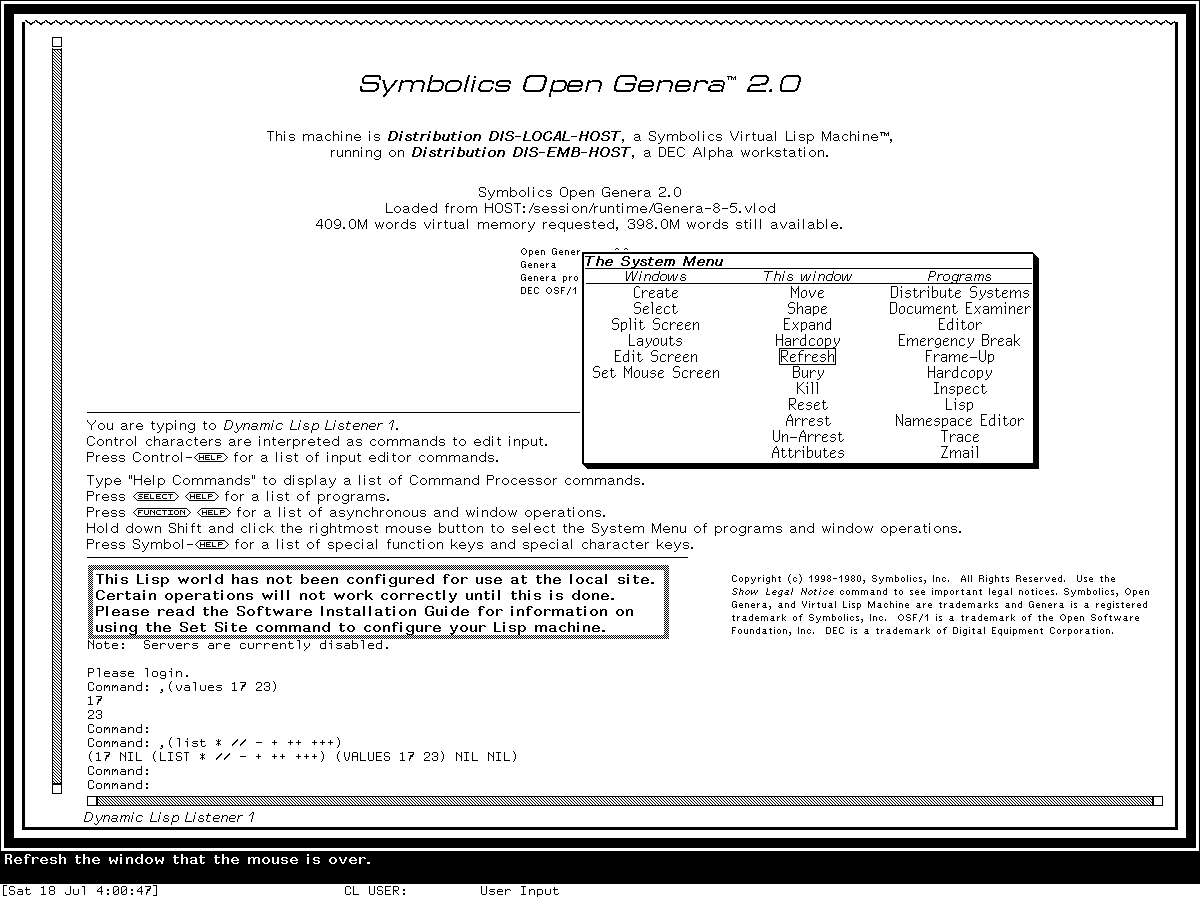
Runtime observation: the System Menu in Genera 8.5 while Shift and the right mouse button were held over the Listener, captured 2026-07-18. Underlying software and display material remain the property of their respective rightsholders; reproduced here for criticism, scholarship, and historical documentation under 17 U.S.C. section 107. No affiliation or endorsement is implied.
The 25,569-byte final run record has SHA-256 03f497f39e3afc2d34916f6ab817a6664cde14a32224031bf52f90443ea94810. The 31,489-byte action log contains 33 linked intent/outcome pairs (66 records) and has SHA-256 02df861d873714eb7f75e4fe450d65ec4c965cc407717f0725e1e49e34bb3565.
The shutdown prompt was observed, yes was sent and accepted, and cleanup progress appeared. The known cold-load channel mutex stall then required bounded host cleanup. The final record says forced-stopped, forced_stop=true, forced_after_confirmed_shutdown_stall=true, state_may_be_incomplete=true, orderly_vlm_host_shutdown=false, and unsaved_lisp_state_discarded=true. The harness neither invoked Save World nor created a host process checkpoint; save_world_performed and guest_checkpoint_created remain unknown. The private world stayed byte-identical to the base, and no process remained. See the Genera computer-use harness article for the full provenance model.
Read-only Hardcopy binding probe
An additional isolated session, d01-hardcopy-item-probe-g85-20260719, generation 1, looked up and printed only the live Hardcopy item. The action log SHA-256 is 398e844474cef70a92f774ae466ed6afa7ae29b5685b21283218a9cb33a52de9; the final ignored evaluator capture has PNG SHA-256 9c2034e9e91de5f8e3ffe7f3122a9a5e6806446b73ac3f2f9674193b75cf8838 and decoded pixel SHA-256 c22456f9ddf8a88b6a2d3f185f6341642b724fcbc4064b1fda8f2f714b5923e7. It is local evidence, not a publication asset. Base and private world bytes remained at SHA-256 a8ee5e86cc7e322f7385af3e0cd579d7650d4dcfc3ce328acbf8b25515dd0672. The harness requested neither Save World nor a process checkpoint; the guest Save World and checkpoint fields remain unknown. The shutdown prompt, confirmation, and cleanup progress were observed before bounded forced cleanup of the known stall. Run-record SHA-256: 71eaa7541ee4a1d19d72ec55b93f597c6f73daa71155d4247aa95874c2dd2c49.
| Probe field | Portable evidence |
|---|---|
| Interval/final record | 2026-07-19 04:18:42–04:24:22 EDT; forced-stopped; run SHA-256 above |
| Licensed world | Genera-8-5.vlod, 54,804,480 bytes; base/private SHA-256 a8ee5e86cc7e322f7385af3e0cd579d7650d4dcfc3ce328acbf8b25515dd0672 at start and stop; unchanged |
| VLM/debugger | execution VLM SHA-256 9f5e18d5770f973879716182b6856ef5a8ee9d3b2bb907476ea0cf35986aa4c7; debugger SHA-256 2db918cfe8f35f52c7ff4b7695b0ecd3bb85e41a3327ea5a94874edf05edb54a |
| Harness/config | harness execution SHA-256 bc9276ac766913bc15018dd334a2a2704ae5a926e1fcbc30ccfcff08af8cb48a; config SHA-256 5ce6509f5adf2cf2d054d34eb4ba777ce462285b8cd9b01bc071bf819139e086 |
| Compatibility inputs | X preload SHA-256 acd71dbcb948f05b7fd2730b2b4706c08f16f46d792bd9aa6aa64370e855e4b1; ifconfig preload SHA-256 f45f45461622975996ab41138f64bb84a4b17c51fba0dbb649208914898c26b7 |
| Time/toolchain | RFC 868 responder SHA-256 cc3a2274149c5593b52e6608d732d4048518c766134df5e0f018746ad5cf98bb, evidence SHA-256 ba0d5e7f2093a96e28d1fbb1b7334d4393c18d273e1ca5f6fbc5eb1eea7bd28a, exit zero; Guix manifest SHA-256 3adae999bbe420182f22adc2499fcc82449a46eaf580a362de9c0e718fa6b37d, channel 230aa373f315f247852ee07dff34146e9b480aec |
| Isolation/display | Bubblewrap user/mount/network/PID/IPC/hostname isolation; no default/external route or guest-visible host file service; MIT-SHM absent; private 1440×1100×24 Xvfb |
| Selected client | Genera on DIS-LOCAL-HOST, XID 4194310, x=72, y=55, 1200×900 |
| Ordered input | 16 records forming eight linked intent/outcome pairs; a first combined input failed in the reader before evaluation; after aborting and clearing it, the exact read-only lookup was submitted once and evaluated; action-log SHA-256 above; Hardcopy was never invoked |
| Persistence/shutdown | Harness Save World invocation false; harness-created process checkpoint false; guest Save World/checkpoint unknown; prompt, confirmation, and cleanup progress observed; forced_stop, forced_after_confirmed_shutdown_stall, state_may_be_incomplete, and unsaved_lisp_state_discarded true; orderly VLM host shutdown false |
Scope limits and open questions
- The exact activity and menu lists describe one inspected 8.5 world. Loading or unloading systems, applying patches, or changing site code can alter them through the documented registration interfaces.
- The current runtime session opened the System Menu and used three Select gestures; it did not execute every potentially destructive or service-dependent menu item.
- Named-layout save and restore, screen editing, and Split Screen's odd-window automatic layout should be exercised in a future isolated session. Until then, their descriptions remain source- and manual-grounded rather than runtime claims.
- The isolated world was deliberately not configured as a Symbolics site. Menu presence does not establish working mail, namespace, hardcopy, distribution, or network services.
Sources
- Symbolics, Genera User's Guide, Genera 8, activities, Select keys, windows, and System Menu sections; verified 2026-07-18.
- Symbolics, Genera Workbook, Genera 8, Select Activity and System Menu exercises; verified 2026-07-18.
- Symbolics, Programming the User Interface, Genera 8, window-system and interaction architecture; verified 2026-07-18.
- Licensed local Genera 8.5 source and extracted Document Examiner help, identities recorded above; inspected 2026-07-18.
- Fresh
core-dossiers-20260718Genera Xvfb session, generation 1, input, image, and shutdown evidence recorded above; observed 2026-07-18. - Fresh
d01-hardcopy-item-probe-g85-20260719Genera Xvfb session, generation 1, read-only registry, image, unchanged-world, and shutdown evidence recorded above; observed 2026-07-19.