System Menu and program selection on the MIT Lisp Machine
The System Menu and the System key are related entry points, not two ways of displaying one fixed application list. The pointer menu exposes window creation, selection, layout, per-window operations, and common programs. The keyboard selector consults a separate registry keyed by characters and cycles through recently selected windows. Both registries can change at run time.
This distinction matters in the runnable System 303 band: its System Menu shows seven Programs entries, including Mail and Emergency Break, while System Help reports only five currently valid selector entries.
Evidence sets
The public MIT CADR System 46 source is pinned at Git revision 8e978d7. The maintained LM-3 System tree is pinned separately at Fossil check-in 4df393c, tag system-303.
| Evidence | File | Bytes | SHA-256 |
|---|---|---|---|
| System 46 | src/lmwin/sysmen.105 |
28,436 | c203bc08b5550edefb1928349179fc54c483655d273077294211eb778daff6f1 |
| System 46 | src/lmwin/basstr.163 |
37,385 | 19e0771ff876d5325f18b97a2ccbf392f7d5950d3a89751d633d27d7cbe01e72 |
| System 46 | src/lmwind/operat.27 |
85,337 | a5ab658210dc09891b0886b58af705368e33a41f013073c8b9a637d99ab0f02d |
| LM-3 System 303 | l/sys/window/sysmen.lisp |
43,408 | b53b7c3d5a59040f3180d5be0d2072b2a334bb386fa5e19dd6abbd945148b40c |
| LM-3 System 303 | l/sys/window/basstr.lisp |
81,846 | 8ba3a16e726ed043e6585c7a68b7096bb2dcc5d6f05476afd89f84a48dff2645 |
The maintained LM-3 files preserve and extend older MIT window-system code. They are not silently treated as the missing continuation of every System 46 file, and a live System 303 registry is not projected backward onto System 46.
Three different selection mechanisms
Pointer selection
A visible selectable window can be selected by clicking left in it. Selection exposes the window if needed, directs keyboard input to it, and moves it to the front of the recent-selection data structure.
The System Menu's Select item instead constructs a menu from the windows that report a selection name, across all screens in System 303. Choosing one performs mouse-style selection. This is the route for a completely obscured or deexposed window whose name remains selectable.
System-key program selection
System followed by a registered character asks for a program by kind. A normal character finds the most recently selected matching window. If the current window has that kind, it is demoted so repeated use cycles through other instances.
System 303 separates selection and creation:
Systemplus a character selects an existing matching window; if none exists and that entry permits creation, it creates one;Control-Systemplus the character explicitly requests the entry's creation path;System Ruboutcancels an accidentally begun selector;System HelporSystem ?prints the live registry.
The registry entry can identify a flavor, a specific window, or an expression that returns one. Its creation field can forbid creation, instantiate the same or another flavor, or evaluate a form. This is why the selector is better understood as a program-launch registry than a hard-coded keymap.
Recent-window rotation with Terminal S
The window system also retains a NIL-padded array of previously selected windows. Terminal S operates on recency rather than application type:
| Input | Behavior in the inspected sources |
|---|---|
Terminal S |
default to argument 2; exchange/cycle the two most recent windows |
Terminal n S |
select the nth recent window and rotate the top n entries |
Terminal 1 S |
move through all selectable windows while preserving a cyclic order |
Terminal -n S |
rotate the same group in the reverse direction |
Terminal 0 S |
select a window waiting for attention, such as pending typeout or an error |
Terminal O |
select the least recently selected window that is currently exposed; repetition cycles exposed windows |
Terminal B |
System 303: bury the selected window |
Before rotating, the implementation removes entries that no longer return a selection name. It also transfers already typed input to the old selected window before changing selection, preventing typeahead intended for that window from following the selector.
These recent-window commands and System-key cycling share the same selection history, but they apply different filters.
Split Screen and saved layouts
Both source lines expose more than a simple “tile windows” command. The Split Screen menu can include:
- any normal Create-menu flavor;
- an existing Listener or arbitrary existing selectable window;
- plain output, trace, error, or combined trace/error windows;
- an optional frame with a name and System key;
- pointer-selected corners instead of the whole screen;
- Undo, Do It, and Abort while constructing the proposal.
System 303's layout algorithm stacks fewer than four windows vertically. For four or more it uses two columns and ceiling(n/2) rows; when n is odd, the last bottom window spans the full width. This concrete geometry rule is in the implementation, not the short menu label.
A saved layout stores live window references and their status and edges; it is not a serialized restartable desktop. Restoring it reshapes and exposes those same objects, restores their ordering, selects the first saved window, and asks the screen manager to reconcile the display. Saving can also register a new System selector key for that layout.
The source preserves known limitations: Split Screen may thrash the disk, saved layouts cannot be edited through this interface, the proposal diagram is not itself mouse-editable, and the frame value chooser sometimes fails to appear or use a requested frame. SYSTEM-MENU-LAYOUTS is also preceded by a comment that it needs substantially more error checking. These are explicit implementation notes, not inferred defects.
System-key inventories and a source/manual disagreement
System 46
The static core registry in basstr.163 contains:
| Key | Program | Creation policy |
|---|---|---|
E |
Editor | allowed |
I |
Inspector | specialized (TV:INSPECT) form |
L |
Lisp Listener | allowed |
P |
Peek | allowed |
R |
window error handler | select existing only |
S |
Supdup | allowed |
T |
Telnet | allowed |
The contemporary operations manual also lists M for the mail-reading system. That is evidence for a fuller configured environment, but M is absent from the exact static core list in the pinned file. The discrepancy is retained rather than “corrected” in either direction: loaded subsystems could add or replace facilities, and System Help was the contemporary way to ask the live machine what was available.
LM-3 System 303
System 303 replaces the fixed list with ADD-SYSTEM-KEY and REMOVE-SYSTEM-KEY. Entries are sorted, previous definitions can remain behind an overriding one, and Help suppresses duplicate characters and atomic flavor names that are not currently valid flavors.
A fresh System 303-0 band reported exactly five live entries:
| Selector | Help label |
|---|---|
Top-L |
LISP(Edit) |
E |
Editor |
I |
Inspector |
L |
Lisp |
P |
Peek |
This is a statement about that band at that boot. The source tree contains registration calls for optional facilities such as ZMail, the font editor, Converse, Spacewar, tape tools, and site editors, but a source-level call does not prove that its subsystem was loaded into this runtime.
Runtime observation: System 303-0
The fresh Xvfb session shared with the Listener study recorded:
| Item | Recorded value |
|---|---|
| Session | core-env-20260718, generation 1; 2026-07-18 03:55:07–04:06:40 EDT; non-resumed |
| Load band and disk | System 303-0; base/private-start disk SHA-256 bb16e46ad81decfe1efe691d36b6aa4ce3fd4ffb82474365de3520989d397cb5 |
| Public revisions | L d1250f90044f09b6c92014a9aef65f9574e1bcbf8a7163004e53cc6dbed0f2d6; System 4df393c68d7f083ce42d5c377039d26043cc18a9031ace28258dc97f4137eb91; usim 330d8248ec2e12af071e287920e681600f75df9ffd854aada5f8a64c9adad64d; usite 8f717978b458b40adf1e238aaf177f5bc54ef46881268e03b787ba57b0d30a0e; Chaos db2953fde68d726a605d1d1699bab6c926ef252bd4991f692bae6ee5a634764e |
| Private copy/tree state | copied 03:55:03 EDT; System tree 21f5215de973aa6ccbddb817f2d64edd95ee1014c3028a9b0711ea7c741b807e, Chaos 34ab197641aae909e9a224edc307020fddec263e732207a74573d51dac0daa87, usite adbb720339db225e6635977a869cf3f3d50b507e614b37a976f4a6548d212a81; copy and start matched, all changed flags false |
| Emulator and artifacts | usim start/exec 707a77d23e28ea1c45ae0eb0145dc181fa7ba649b9defc30044d4f847ac2c5be; promh.mcr 2c667f99f014a7130a55b255d31df02588d9396beace78abfe9325269e4ff3e6, promh.sym e9e3dd6a541511dd9541ae96b99dae19cb185d8b79fa09959f21fa52224f233d, ucadr.sym 9071decf16fa8f11d7970c4662db0d6e95600fe43ec86ac41c77b37dbd7caa2a |
| Toolchain | manifest 3adae999bbe420182f22adc2499fcc82449a46eaf580a362de9c0e718fa6b37d; Guix channel 230aa373f315f247852ee07dff34146e9b480aec; Python 3.11.14, Xorg 21.1.21, ImageMagick 6.9.13-5, xdotool 3.20211022.1 |
| Host window | LOCAL-CADR [running], XID 2097202, 768×963 at x=0, y=0 |
After the boot date/time responses and a Listener evaluation, the relevant ordered actions were: click right at framebuffer coordinate (400, 500), capture the three-column menu, dismiss it, type System Help, capture the five live entries, type Space to flush the Help window, then continue to Inspector and Peek. No System Menu operation was selected.
| Raw capture | Observed state | PNG SHA-256 | Decoded-pixel SHA-256 |
|---|---|---|---|
0006-system-menu.png |
exact three-column menu and who-line documentation for Attributes | 2abdb00ff42c3d032744785b2964d144b62e468ea92815becb5f479d78519d82 |
8f1c1079bc16273526ce55958a563547d74fb873f852643b057b4d22fa99c77d |
0007-system-help.png |
five live selector entries plus Control-System creation and Rubout cancellation instructions | befd14fb940bc86cb2208ae73c14c6e5c09604864f92f2939d2f3f68c16df172 |
d79127556ccfeb924a5f3431f46c85fcaa32af75602d43f89c29550defdf9f05 |
The image-specific review selected only the sparse System Menu capture for the curated CADR screenshot catalog. The fuller System Help capture remains ignored because the menu image is sufficient for the layout claim and avoids publishing an additional explanatory-text screen.
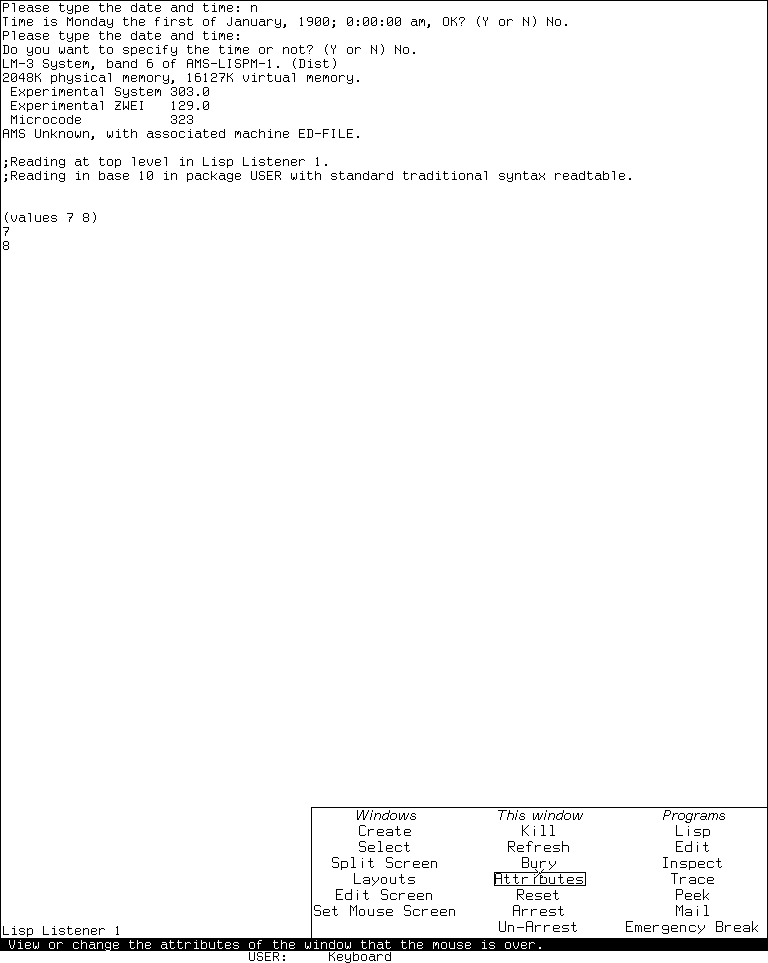
Runtime observation: the LM-3 System 303 System Menu after a right click in the Listener, captured 2026-07-18. Underlying software and display material remain the property of their respective rightsholders; reproduced here for criticism, scholarship, and historical documentation under 17 U.S.C. section 107. No affiliation or endorsement is implied.
The 6,781-byte run record has SHA-256 2d877843f58a8a261bafe68afca846919963dec5584a39bbb5275fcbe6615e22. Shutdown was clean: emulator and Xvfb status zero, forced_stop=false, state_may_be_incomplete=false, and the base disk unchanged.
Open questions
- The System 46 menu and static selector were not exercised in a runnable System 46 band. Pointer geometry and any load-band patches remain source/manual evidence.
- The observed System 303 run did not open every subsidiary menu or perform destructive window operations. Their inventories and confirmation behavior are established by the pinned implementation, not by destructive testing.
- The exact load-time reason that the observed selector lacks optional entries such as
Mwas not traced to a saved-world build log. The live absence is confirmed; its historical build decision remains unknown.
Sources
- MIT CADR System 46,
sysmen.105,basstr.163, and operations manual source, revision8e978d7; verified 2026-07-18. - LM-3 System 303,
sysmen.lispandbasstr.lisp, check-in4df393c; verified 2026-07-18.