The MIT Lisp Machine Lisp Listener
The Lisp Listener is the machine's ordinary graphical Lisp interaction window, but it is not merely a terminal wrapped around a global REPL. Each normal Listener owns a process, a line-oriented input editor, display state, and, in the LM-3 System 303 source, a package association synchronized with the top-level's dynamic *PACKAGE*. Multiple Listeners can therefore be idle or busy independently and retain different interaction contexts.
This page distinguishes the public MIT CADR System 46 snapshot from the maintained LM-3 System 303 restoration tree. The runnable observation is of the latter only.
Evidence sets
MIT CADR System 46
The public System 46 tree is pinned at Git revision 8e978d7. The relevant local files are:
| File | Role | Bytes | SHA-256 |
|---|---|---|---|
src/lispm/ltop.231 |
top-level and break loops | 17,152 | 5e217afe3b7bd31645a3a793c1c4b4a33cf211cc4c3b5770210bed228a3f8f15 |
src/lmwin/baswin.428 |
Listener window flavor and process | 56,577 | 2ee1f487e6d14bec5bfc52a1e64b04963b8b1120a4d291be329995de92339dd4 |
src/lmwin/stream.14 |
stream and rubout-handler input editing | 41,227 | 3a41c4752da5b84f2ed88b1b8e3c215c54ceda75f4db28d3bb461fdc2e30b499 |
src/lmwind/operat.27 |
contemporary window-system manual source | 85,337 | a5ab658210dc09891b0886b58af705368e33a41f013073c8b9a637d99ab0f02d |
LM-3 System 303
The maintained LM-3 System repository is pinned at Fossil check-in 4df393c, tag system-303. Its corresponding files are:
| File | Role | Bytes | SHA-256 |
|---|---|---|---|
l/sys/sys/ltop.lisp |
top-level, histories, package synchronization, and break loop | 42,225 | 57dd2591cfeb84ee00f1d9cb51c17b5c30f22e36026074117e3420f4e3dc943e |
l/sys/sys/sysdcl.lisp |
system composition, including the standard RH input editor |
25,396 | 2999f1824666171d729dae611a09204ac0bd42373f30d7d22c733f904c27a6dd |
l/sys/io/read.lisp |
READ-FOR-TOP-LEVEL and End activation |
104,944 | 0fa6eea755dcb077bc519d36654597cdf5ee8f6e3a61a1f38f821db15392a02f |
l/sys/window/baswin.lisp |
Listener variants and process lifecycle | 82,708 | 3b86ca413528046887da8371433d656ecd9d5f9130d6eadd764fc54f137b42f1 |
l/sys/window/stream.lisp |
stream protocol and fallback rubout handler | 26,023 | 3159e4aa22a77a71a2d603cb5fe9ec78c1674af0615dd9ad83d238195613cef8 |
l/sys/window/rh.lisp |
standard full rubout-handler input editor | 68,866 | 6e71970e7b481441554ed64af2ac9ca04439a9af6d532a61a24d02cce8a4e0f8 |
The LM-3 repository is a maintained restoration tree. A source comment or behavior at this check-in is evidence for this exact tree and its System 303 band, not proof that the same line was present in every historical release.
Purpose and entry points
The System 46 operations manual calls the Listener the first full-screen window after a cold boot and the usual place to run simple user programs. Its core operation is a conventional read-eval-print loop: read one Lisp form, evaluate it, and print every value.
Ways to obtain or select a normal Listener include:
- cold boot, which creates the initial full-screen Listener;
System L, which selects an existing Listener and normally creates one if none exists;Control-System Lin System 303, which explicitly requests a new one;- Lisp in the System 303 System Menu's Programs column;
- Create, then Lisp, in the System Menu;
- code that constructs
TV:LISP-LISTENERor asksTV:IDLE-LISP-LISTENERfor an idle full-sized Listener.
System L is a selector, not an evaluator command. Repeating it cycles through the most recently selected windows recognized as Listeners. The related System Menu and selector article documents that registry and cycling algorithm.
The window and the Lisp top level are separate layers
SI:LISP-TOP-LEVEL1 implements the read-eval-print semantics. The window system supplies a stream and process that run it. This split permits the same top-level function to operate over different streams, while the LISP-LISTENER flavor supplies the visible, selectable embodiment.
In System 303, the flavor hierarchy makes several boundaries explicit:
LISTENER-MIXIN-INTERNALowns the top-level process but is deliberately invisible toSystem L;LISTENER-MIXINadds recognition bySystem L;LISP-INTERACTORis a Lisp interaction window built on the internal mixin, but its source documentation explicitly says it is not a normalLISP-LISTENER-P;LISP-LISTENERcombines notification handling, the public Listener mixin, and a saved-bits window;IDLE-LISP-LISTENERreuses an idle Listener of the requested full-screen size or constructs one when necessary.
The process preset gives the top level a regular PDL size of 40,000 and a special PDL size of 4,000 in both inspected lines. LISP-LISTENER-P reports :BUSY while LISP-TOP-LEVEL-INSIDE-EVAL is true in that process's stack group and :IDLE otherwise.
System 303 also delays starting many window processes until the window will actually become visible. The source explains that this reduces boot paging and prevents partially initialized editor windows from running too early. A nearby comment calls this process/window selection machinery a “horrible crock” that ought to be replaced by a program system. That is implementation evidence of a known architectural boundary, not a museum characterization of the whole system.
Per-Listener package and reader state
The System 303 top level synchronizes its dynamic *PACKAGE* with a package slot on the terminal stream. If Lisp code changes *PACKAGE*, the window is updated; if another operation changes the window's package, the next top-level iteration adopts it. The first iteration initializes whichever side has not yet been set.
The loop also binds the readtable, print base, and read base for its own execution. When the readtable changes, it reports the current input base, package, and readtable. The observed System 303 Listener printed:
;Reading at top level in Lisp Listener 1.
;Reading in base 10 in package USER with standard traditional syntax readtable.
This per-window package synchronization is absent from the inspected System 46 LISP-TOP-LEVEL1; it should not be retroactively attributed to that snapshot.
Interaction histories and multiple values
Both implementations preserve recent forms and values as dynamically bound Listener variables, but System 303 extends the model.
| Variable | System 46 | System 303 |
|---|---|---|
- |
form just read | form just read |
+, ++, +++ |
three recent forms | three recent forms |
*, **, *** |
first value of each of three recent evaluations | first value of each of three recent evaluations |
// |
list of all values from the current evaluation | list of all values from the current evaluation |
////, ////// |
not maintained by the inspected loop | all-value lists from the two preceding evaluations |
*VALUES* |
not maintained by the inspected loop | newest-first history whose elements are complete value lists |
System 303 pushes an entry on *VALUES* even when evaluation aborts; the entry is NIL in that case. Its top level prints each value on a separate line. A fresh runtime evaluation of (values 7 8) visibly printed 7 and 8 on successive lines, confirming the multiple-value path in the loaded band.
The break loop reuses these histories rather than creating an unrelated REPL state. In System 303, Resume continues, Abort quits the break, and a form of the shape (RETURN value) returns that value from the break context.
Buffered Listener input editor
The Listener does not use ZWEI for its ordinary input. It uses the window stream's rubout handler, a buffered editor that rescans the form after edits. Ordinary characters insert themselves. Because Lisp forms are self-delimiting, a Return that supplies terminating whitespace normally lets READ finish; End is also declared as an explicit activation character in System 303's READ-FOR-TOP-LEVEL.
“Does not use ZWEI” needs one qualification. The System 303 input editor is its own rubout-handler implementation and does not create a ZWEI buffer, but it shares ZWEI's input-history, kill-history, syntax tables, argument-list printer, and documentation machinery when those facilities are loaded.
System 46 input commands
| Key | Effect in stream.14 |
|---|---|
Rubout |
delete the last buffered character and rescan |
Clear |
discard all buffered input |
Form |
clear the screen, reprint any prompt, and re-echo the buffer |
VT |
start a new line, reprint any prompt, and re-echo the buffer |
| other Control or Meta character | beep; with a full-rubout caller option, return to that caller |
Form, VT, and Clear are old-keyboard names. The operations manual maps their roles to Clear-Screen, Delete/new-line behavior, and Clear-Input on the new keyboard.
System 303 fallback handler
window/stream.lisp retains a compact fallback editor:
| Key | Effect in window/stream.lisp |
|---|---|
Rubout |
delete one character backward |
Meta-Rubout |
delete backward over one word |
Clear-Input |
delete the entire buffered input |
Clear-Screen |
clear the window, reprint the prompt, and re-echo the buffer |
Delete |
print a newline, reprint the prompt, and re-echo the buffer |
End |
activate READ-FOR-TOP-LEVEL even when ordinary self-delimitation has not completed |
| other Control or Meta character | beep unless the caller explicitly declares it an editing command, pass-through character, or activation |
That table is not the effective full System 303 command inventory. The file itself says it is overridden by SYS:WINDOW;RH, sysdcl.lisp includes RH in the standard Window system, and rh.lisp ends by calling RH-ON. The loaded handler can be switched back to this fallback with (TV:RH-OFF) and restored with (TV:RH-ON).
In particular, the standard editor does not retain the fallback's Delete reprint binding. Its explicit refresh commands are Clear-Screen and Control-L; the generic keyboard-help source also labels Delete unused.
System 303 standard editor: prefixes and movement
The standard alternate handler supports numeric arguments. Modified decimal digits accumulate a decimal argument, Control-U starts at four and multiplies an existing argument by four, and a modified minus toggles the negative flag. The handler passes the resulting signed argument to commands; for ordinary characters, a positive argument inserts that many copies and a negative one inserts none.
| Key | Effect in window/rh.lisp |
|---|---|
Control-F, Control-B |
move forward or backward by characters |
Control-A, Control-E |
move to the beginning or end of the current input line |
Control-P, Control-N |
move to the previous or next input line, preserving the approximate column |
Meta-<, Meta-> |
move to the beginning or end of the entire buffered input |
Meta-F, Meta-B |
move forward or backward by words |
Control-Meta-F, Control-Meta-B |
move forward or backward by complete Lisp forms |
The active form commands replace older parenthesis-only implementations that remain inside a source block comment. The Lisp-aware scanner handles quoting, strings, lists, package colons, and slash escapes more broadly than a simple search for matching parentheses.
Mark, deletion, exchange, and insertion
| Key | Effect in window/rh.lisp |
|---|---|
Control-<, Control-> |
set the mark at the beginning or end of the buffer |
Control-Space, Control-@ |
set the mark at the current input position |
Control-W |
kill the region between point and mark into ZWEI's kill history |
Meta-W |
copy the region into kill history without deleting it |
Rubout, Control-D |
delete characters backward or forward |
Clear-Input |
delete the entire buffered input; with the caller's full-rubout option, return to that caller when already empty or after clearing |
Control-K |
kill to end of line, or kill the newline when already at line end |
Meta-Rubout, Meta-D |
delete a word backward or forward |
Control-Meta-Rubout, Control-Meta-K |
delete a Lisp form backward or forward |
Meta-T |
exchange words; direction and repetition follow the numeric argument, while zero uses the marked word |
Control-Meta-T |
exchange the neighboring Lisp forms around point |
Control-T |
transpose the two characters around point, with special handling at line end |
Control-O |
insert one or the numeric number of newlines while leaving point before them |
Control-Q |
quote and insert the following character, repeated by the numeric argument |
Clear-Screen, Control-L |
clear the window and reprint the prompt and full buffered input |
Word commands use ZWEI's active word-syntax table when available and fall back to alphabetic-character classification otherwise. Region kills and word or form deletions feed the shared ZWEI kill history. These are concrete forms of code reuse without making the Listener a ZWEI editor window.
Input history, kill history, and completion
Each stream lazily acquires its own input history. A completed nontrivial input is saved only when it differs from the newest entry; the source deliberately avoids recording one-character inputs. Kill history is shared through ZWEI.
| Key | Effect in window/rh.lisp |
|---|---|
Control-Meta-Y, Control-C |
yank an entry from this stream's input history; numeric zero lists it |
Control-Y |
yank from kill history; numeric zero lists it |
Meta-Y, Meta-C |
after a history yank, rotate to another entry and replace the previous yank |
Status |
display the first screenful of input history |
Control-Status |
display the first screenful of kill history |
Meta-Status |
display the remaining or numerically selected portion of input history |
Control-Meta-Status |
display the remaining or numerically selected portion of kill history |
Control-! |
complete the buffer prefix through point from input history; a numeric argument skips matching entries |
Meta-! |
after completion, rotate forward or backward among entries with the same prefix |
The input history is associated with the stream, while the Lisp value and form variables *, **, +, and their relatives are dynamic bindings in the top-level process. They are complementary histories, not the same data structure.
Help and context-sensitive Lisp information
| Key | Effect in window/rh.lisp |
|---|---|
Help |
explain the input context and point to input, System-key, and Terminal-key help |
Meta-Help |
list special-keyboard symbol translations |
Control-Help |
generate a complete list from the live rubout-handler command alist plus caller-specific editing commands |
Control-Meta-Help |
display internal buffer pointers, status, options, and terminal stream |
Control-Shift-A |
locate the function around point and display its argument list |
Control-Shift-D |
display that argument list and the function documentation, if present |
With numeric argument 2, the last two commands contain a source-visible special case that attempts to resolve a method handler from certain SEND or function-call expressions. This behavior is more context-sensitive than the manual's generic description of line editing.
On a parse error, the System 303 handler prints >>ERROR, reports the error, and forces the user to edit or rub out before the read is retried. It retains the prompt and buffered input across that rescan.
Two source-visible limitations are not described in the short Listener manual:
- the stream method
:REPLACE-INPUTunconditionally signals an error saying that it has not been written; :START-TYPEOUTand:FINISH-TYPEOUTare present as no-op compatibility methods in this source.
These limitations apply to the exact stream protocol implementation, including when the full rubout handler supplies editing behavior; they do not describe ZWEI editor streams.
Mouse and global keyboard behavior
The Listener itself gives the mouse no application-specific object gestures. The System 46 manual describes its pointer as the ordinary north-by-northwest arrow and says a single right click summons the System Menu. The System 303 runtime who-line repeated the same instruction: Click right to get the System Menu.
Global keyboard interception still applies. Abort returns a computation to the Listener command level, Break enters a break loop, Help invokes global keyboard documentation, and System and Terminal introduce window-system commands. These are window-system facilities that operate while the Listener is selected; they are not additional rubout-handler bindings.
Runtime observation: System 303-0
The Xvfb computer-use harness made a fresh, non-resumed boot and preserved the following boundary:
| Item | Recorded value |
|---|---|
| Session | core-env-20260718, generation 1; 2026-07-18 03:55:07–04:06:40 EDT; boot ID 3ee4cfb0-9636-4c5c-8661-a1b04ab7aa07 |
| Load band | System 303-0; banner Experimental System 303.0, ZWEI 129.0, microcode 323 |
| Disk | base and private-start SHA-256 bb16e46ad81decfe1efe691d36b6aa4ce3fd4ffb82474365de3520989d397cb5; base unchanged after stop |
| Public revisions | L d1250f90044f09b6c92014a9aef65f9574e1bcbf8a7163004e53cc6dbed0f2d6; System 4df393c68d7f083ce42d5c377039d26043cc18a9031ace28258dc97f4137eb91; usim 330d8248ec2e12af071e287920e681600f75df9ffd854aada5f8a64c9adad64d; usite 8f717978b458b40adf1e238aaf177f5bc54ef46881268e03b787ba57b0d30a0e; Chaos db2953fde68d726a605d1d1699bab6c926ef252bd4991f692bae6ee5a634764e |
| Private source copy | copied 2026-07-18 03:55:03 EDT at the same System, usite, and Chaos revisions |
| Private trees | System 21f5215de973aa6ccbddb817f2d64edd95ee1014c3028a9b0711ea7c741b807e; Chaos 34ab197641aae909e9a224edc307020fddec263e732207a74573d51dac0daa87; usite adbb720339db225e6635977a869cf3f3d50b507e614b37a976f4a6548d212a81; all copy/start hashes matched and all changed-since-copy flags were false |
| Emulator | start and execution SHA-256 707a77d23e28ea1c45ae0eb0145dc181fa7ba649b9defc30044d4f847ac2c5be |
| Machine artifacts | promh.mcr 2c667f99f014a7130a55b255d31df02588d9396beace78abfe9325269e4ff3e6; promh.sym e9e3dd6a541511dd9541ae96b99dae19cb185d8b79fa09959f21fa52224f233d; ucadr.sym 9071decf16fa8f11d7970c4662db0d6e95600fe43ec86ac41c77b37dbd7caa2a |
| Toolchain | manifest SHA-256 3adae999bbe420182f22adc2499fcc82449a46eaf580a362de9c0e718fa6b37d; Guix channel 230aa373f315f247852ee07dff34146e9b480aec; Python 3.11.14, Xorg 21.1.21, ImageMagick 6.9.13-5, xdotool 3.20211022.1 |
| Selected host window | LOCAL-CADR [running], XID 2097202, x=0, y=0, 768×963 |
The ordered relevant input was: answer the boot date/time questions with N (one early second N was sent before the second prompt and had no visible effect, so the answer was sent again), evaluate (values 7 8), open the System Menu with right click, request System Help, select System I, inspect '(museum listener inspector peek), select System P, choose Active Processes, open the first process's action menu, dismiss it without choosing an action, and stop the emulator.
The Listener multiple-value capture is 768×963 with PNG SHA-256 139d66a2ddc3230e46781610a079a0e0134bf440becaa665f9c2042d514d551c and decoded-pixel SHA-256 428ce18e58cbda778a5e33e216f946ada4f8ef1a401961024b085e7f95b90b04. The image-specific publication review approved this one sparse state and mapped it to the curated CADR screenshot catalog.
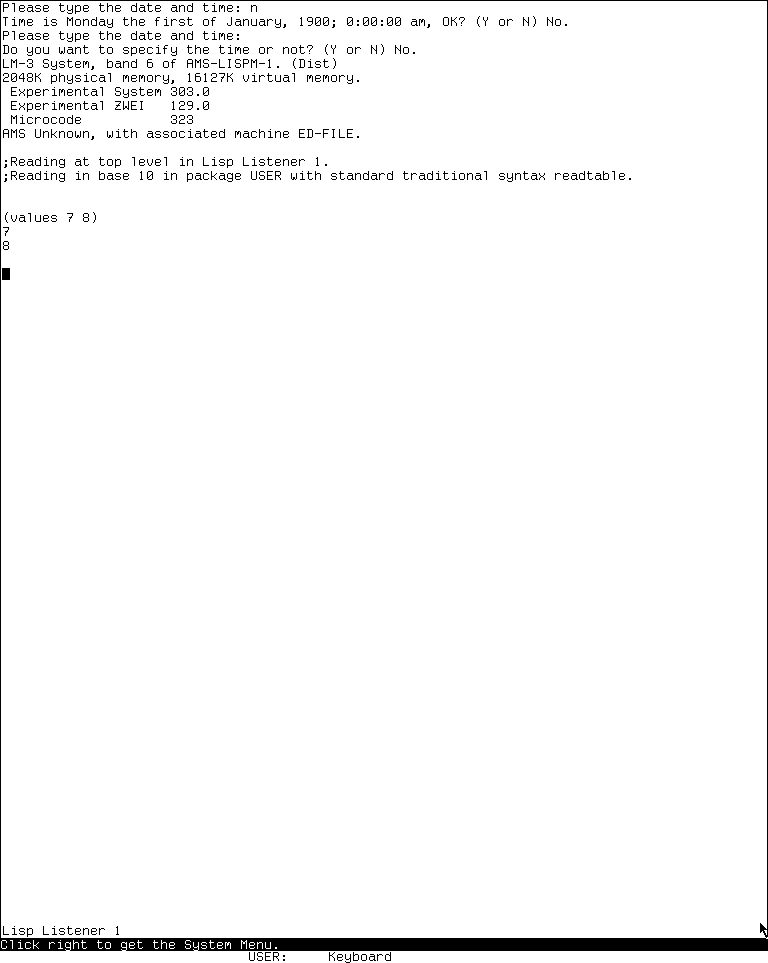
Runtime observation: the Lisp Listener in LM-3 System 303 after evaluating
(values 7 8), captured 2026-07-18. Underlying software and display material remain the property of their respective rightsholders; reproduced here for criticism, scholarship, and historical documentation under 17 U.S.C. section 107. No affiliation or endorsement is implied.
The 6,781-byte run record has SHA-256 2d877843f58a8a261bafe68afca846919963dec5584a39bbb5275fcbe6615e22. Shutdown was clean: forced_stop and state_may_be_incomplete are false, the emulator and Xvfb exited zero, and the base disk was unchanged. See the computer-use harness article for the evidence schema.
What the manual alone does not establish
- The operations manual's short Listener chapter accurately identifies a REPL, but it does not describe the per-window process, idle/busy query, package synchronization, value histories, or the standard input editor's movement, kill, history, completion, and context-help command sets.
- A Listener-shaped interaction pane is not necessarily selectable by
System L; System 303 deliberately distinguishes internal listener mixins andLISP-INTERACTORfrom public Listeners. System Lselecting a Listener does not imply that it creates a new one on every invocation. Normal selection cycles existing windows; explicit creation is a separate path in System 303.- The observed System 303 package and history behavior must not be projected backward onto System 46 where the corresponding code differs.
Open questions
- No System 46 load band was run for this article. Its visible prompt shape, exact old-keyboard echo behavior, and any patches applied beyond the pinned source remain source-grounded rather than runtime-confirmed.
- The System 303 run exercised ordinary evaluation, multiple values, and program selection, but did not deliberately trigger a parse error or nested break loop, nor did it exercise each full rubout-handler movement, history, completion, and context-help command. Those paths are established by source and should be sampled in a future non-destructive runtime session.
Sources
- MIT CADR System 46,
ltop.231,baswin.428,stream.14, and operations manual source, revision8e978d7; verified 2026-07-18. - LM-3 System 303,
ltop.lisp,sysdcl.lisp,baswin.lisp,stream.lisp,rh.lisp, andread.lisp, check-in4df393c; verified 2026-07-18.