The MIT Lisp Machine Inspector
The Inspector is an interactive browser and live editor for Lisp objects. It does not flatten an object into inert text: each displayed field retains enough identity for the user to follow references, inspect function definitions, and, where the implementation marks the field settable, replace data in the running system. Its three-pane history makes navigation visible while the separate history pane preserves older objects.
That power makes the Inspector both a documentation tool and a potentially destructive debugger. Modify changes the actual object, array, binding, or memory location being inspected; it does not edit a private copy.
This page treats the public MIT CADR System 46 source and the maintained LM-3 System 303 source as separate evidence sets. Runtime observations apply only to the System 303-0 load band described below.
Evidence sets
MIT CADR System 46
The public System 46 tree is pinned at Git revision 8e978d7.
| File | Role | Bytes | SHA-256 |
|---|---|---|---|
src/lmwin/inspct.80 |
Inspector frame, object printers, navigation, and modification | 37,465 | 137fe25adf7df785548e098da2053ce7bac709e021a5abc7039e9aac218bb600 |
src/lmwind/operat.27 |
contemporary operations-manual source | 85,337 | a5ab658210dc09891b0886b58af705368e33a41f013073c8b9a637d99ab0f02d |
LM-3 System 303
The maintained LM-3 System repository is pinned separately at Fossil check-in 4df393c, tag system-303.
| File | Role | Bytes | SHA-256 |
|---|---|---|---|
l/sys/window/inspct.lisp |
current Inspector frame, object dispatch, commands, and mutation paths | 60,805 | b38e92064d6827528064bca27fe0e36d1ab1d61e54431fe69e3efcf9bf5f083a |
l/sys/window/basstr.lisp |
System-key registration and generic selection behavior | 81,846 | 8ba3a16e726ed043e6585c7a68b7096bb2dcc5d6f05476afd89f84a48dff2645 |
The LM-3 repository is a maintained restoration. Features found only in its System 303 source are not attributed to the older System 46 snapshot without independent evidence.
Purpose and entry points
The System 46 manual describes the Inspector as a program for displaying and modifying Lisp data structures. The source supports three principal entry paths:
System Iselects or creates an Inspector;- Inspect in the System Menu selects or creates one;
(INSPECT object)enters an Inspector from Lisp.
The process model differs by source line. In System 46, System I is registered as a specialized call to (TV:INSPECT), and INSPECT allocates a resource frame and runs its top level in the caller's process. In System 303, System I and the System Menu select or create an INSPECT-FRAME with its own process, while the function call (INSPECT object) deliberately allocates a processless resource frame and runs its command loop in the caller's process. The latter arrangement lets evaluated forms see the caller's dynamic special bindings; a standalone System 303 application does not inherit an arbitrary Listener's dynamic environment in that way.
Other programs can embed Inspector panes rather than launching the complete application. The source explicitly anticipates use inside debugging and error handling interfaces.
Keyboard command inventory
System 46
| Key or input | Effect in inspct.80 |
|---|---|
Control-Z |
exit the Inspector |
Break |
enter a Lisp break loop |
Quote |
read, evaluate, and print a form without inspecting its result |
Rubout |
ignored by the outer command loop |
| ordinary form | read and evaluate it, then inspect the result |
The ordinary line editor still handles corrections while it is reading a form. “Rubout ignored” describes the outer Inspector command dispatch, not a claim that typed Lisp can never be corrected.
System 303
| Key or input | Effect in inspct.lisp |
|---|---|
Control-Z or Abort |
signal an abort from the current inspection |
Control-V |
scroll the bottom Inspector pane down by roughly one screen |
Meta-V |
scroll the bottom Inspector pane up by roughly one screen |
Break |
enter a Lisp break loop |
Clear-Screen |
clear the display cache and fully redisplay |
End |
return the current * object from the processless Inspector loop |
Help |
display the Inspector's in-program help and wait for acknowledgment |
Delete |
clear history, cache, and all three object panes |
Control-\\ |
prompt for a value and set the Inspector-local \\ variable to it |
Rubout |
ignored by the outer command loop |
Quote |
read, evaluate, and print a form without inspecting its result |
| ordinary form | read and evaluate it, then inspect the result |
System 46 explicitly maintains * as the last inspected object. System 303 adds ** and ***, so the three variables mirror the visible three-object stack. End and Exit return * in System 303; Return instead asks for an explicit value. These exits are useful when INSPECT is being used as an expression-level chooser rather than merely as a standalone application.
Pointer interaction inventory
Selectable displayed values support these core gestures:
| Gesture | Result |
|---|---|
| left click | inspect the value, pushing the display history |
| middle click | inspect the value while preserving the source pane for comparison |
| right click | follow the value as a function definition where meaningful |
| Hyper-left click | System 303: modify that field directly if it has a setter |
The function-following gesture is type-aware. System 303 can follow a symbol's function, an instance's function, a closure or entity, or another valid function spec. It does not simply treat every printed token as a function name.
Within the history pane, left click reinspects an entry; middle click removes that entry and decaches it. The frame also inherits the generic right-button System Menu gesture from the window system.
What the Inspector understands
The object dispatcher chooses a specialized presentation from the object's runtime type. This is not CLOS pretty-printing layered over a generic list: the Inspector knows how to expose implementation structures and live locations.
System 46 object classes
The pinned System 46 dispatcher has specialized paths for:
- stack frames;
- named structures;
- instances and their instance variables;
- arrays and array leaders;
- lists;
- symbols;
- select-method objects;
- closures and entities;
- FEFs, the machine's compiled-function representation.
Its array browser exposes leaders and elements of one-dimensional arrays. Multi-dimensional arrays fall back to printing the object rather than enumerating all indexed elements. Its FEF view includes disassembly.
Additions and extensions in System 303
System 303 preserves those categories and adds or broadens:
- arbitrary-rank arrays, enumerated with row-major indices converted back to subscripts;
- locatives, whose referenced contents are displayed directly;
- a catch-all presentation for otherwise unknown objects;
- richer compiled and interpreted lexical-closure displays;
- incremental item generation for large structures.
Named structures are tested before more general categories, preserving their type-specific descriptions even when their representation overlaps another Lisp type.
Fields that can be modified
The Inspector does not make every printed item editable. The setter inventory is part of its data model and differs between the source lines.
System 46
The inspected code provides setters for:
- a symbol's value, function, and property list;
- list cars and corresponding list locations;
- instance variables;
- closure variables;
- named-structure slots;
- one-dimensional array elements and array leaders;
- select-method mappings.
FEFs are displayed and disassembled, but the inspected System 46 code does not establish a general settable FEF-constant interface. Multi-dimensional array elements likewise lack the later generic indexed path.
System 303
The maintained source provides setters for:
- named-structure slots;
- instance variables;
- ordinary closure slots and lexical-closure slots;
- unshadowed interpreted-closure variables;
- select-method tails and keyword functions;
- symbol values, functions, and property lists;
- locative contents;
- list cars and list locations;
- array leaders and elements of arbitrary-rank arrays;
- FEF constants.
Special or shadowed interpreted variables are intentionally not marked settable by that display path. A prospective FEF function setter is present only as commented-out code; this page does not count it as a feature.
These operations can violate application and runtime invariants. The Inspector has no transactional undo layer, and the source does not turn Modify into a copy-on-write operation.
Findings not apparent from the short manual description
(INSPECT object)in System 303 runs a processless frame in the caller's process specifically so evaluated forms can see dynamic special bindings; the older System 46INSPECTcall also runs its resource frame in the caller.- The visible object text is cached and can become stale even though mutation acts on live objects.
- System 303's arbitrary-rank array view computes real multidimensional subscripts rather than displaying only a flat row-major number.
- Mouse sensitivity is capability-based: Modify narrows selection to display items carrying real setters.
- The right-button value gesture follows function identity and is distinct from ordinary structural navigation.
- System 303 exposes locatives and implementation-level closure state that are not ordinary application records.
- FEF constants are mutable in the maintained System 303 implementation, but a different FEF function setter is merely commented out. Source presence alone is not treated as an implemented command.
Runtime observation: System 303-0
A fresh Xvfb computer-use session selected the Inspector with System I, then evaluated and inspected '(museum listener inspector peek). The initial frame visibly had the interaction, history, six-item menu, and three Inspector panes described by the source. The top two object panes read Empty; after the form was entered, the history pane showed the expression and the bottom pane showed the resulting object under the label a list.
| Item | Recorded value |
|---|---|
| Session | core-env-20260718, generation 1; 2026-07-18 03:55:07–04:06:40 EDT; boot ID 3ee4cfb0-9636-4c5c-8661-a1b04ab7aa07; non-resumed |
| Load band | System 303-0; banner Experimental System 303.0, ZWEI 129.0, microcode 323 |
| Disk | base/private-start SHA-256 bb16e46ad81decfe1efe691d36b6aa4ce3fd4ffb82474365de3520989d397cb5; base unchanged after stop |
| Public revisions | L d1250f90044f09b6c92014a9aef65f9574e1bcbf8a7163004e53cc6dbed0f2d6; System 4df393c68d7f083ce42d5c377039d26043cc18a9031ace28258dc97f4137eb91; usim 330d8248ec2e12af071e287920e681600f75df9ffd854aada5f8a64c9adad64d; usite 8f717978b458b40adf1e238aaf177f5bc54ef46881268e03b787ba57b0d30a0e; Chaos db2953fde68d726a605d1d1699bab6c926ef252bd4991f692bae6ee5a634764e |
| Private copy | copied 2026-07-18 03:55:03 EDT at those revisions; System tree 21f5215de973aa6ccbddb817f2d64edd95ee1014c3028a9b0711ea7c741b807e, Chaos 34ab197641aae909e9a224edc307020fddec263e732207a74573d51dac0daa87, usite adbb720339db225e6635977a869cf3f3d50b507e614b37a976f4a6548d212a81; copy/start hashes matched and changed flags were false |
| Emulator | start and execution SHA-256 707a77d23e28ea1c45ae0eb0145dc181fa7ba649b9defc30044d4f847ac2c5be |
| Machine artifacts | promh.mcr 2c667f99f014a7130a55b255d31df02588d9396beace78abfe9325269e4ff3e6; promh.sym e9e3dd6a541511dd9541ae96b99dae19cb185d8b79fa09959f21fa52224f233d; ucadr.sym 9071decf16fa8f11d7970c4662db0d6e95600fe43ec86ac41c77b37dbd7caa2a |
| Toolchain | manifest 3adae999bbe420182f22adc2499fcc82449a46eaf580a362de9c0e718fa6b37d; Guix channel 230aa373f315f247852ee07dff34146e9b480aec; Python 3.11.14, Xorg 21.1.21, ImageMagick 6.9.13-5, xdotool 3.20211022.1 |
| Host window | LOCAL-CADR [running], XID 2097202, x=0, y=0, 768×963 |
The relevant ordered input was System I, followed by the expression '(museum listener inspector peek). No modification gesture or other destructive Inspector operation was attempted.
Two raw 768×963 captures remain in the ignored session:
| Raw capture | State | PNG SHA-256 | Decoded-pixel SHA-256 |
|---|---|---|---|
0008-inspector-initial.png |
initial Inspector frame | c524f90d50659ca59fb59b8788e3e1f30e980d2265ded8a5657526aa604b9e08 |
19c519454d3a1ca16ead54034043bc97e81ab8432a05bc2d691f5f6b4c0b8cb7 |
0009-inspector-list.png |
inspected list | a8c104631118a10749f4b0a6b6059dfe902c190e4c20075d8f94fcb683c137b3 |
178b6ccd02a999bebaa6e5171d33f6980d6196f210078286dcb6483ec7398044 |
The image-by-image review selected only the synthetic-list state for the curated CADR screenshot catalog. The blank initial frame remains ignored because it adds little evidence beyond the populated layout below.
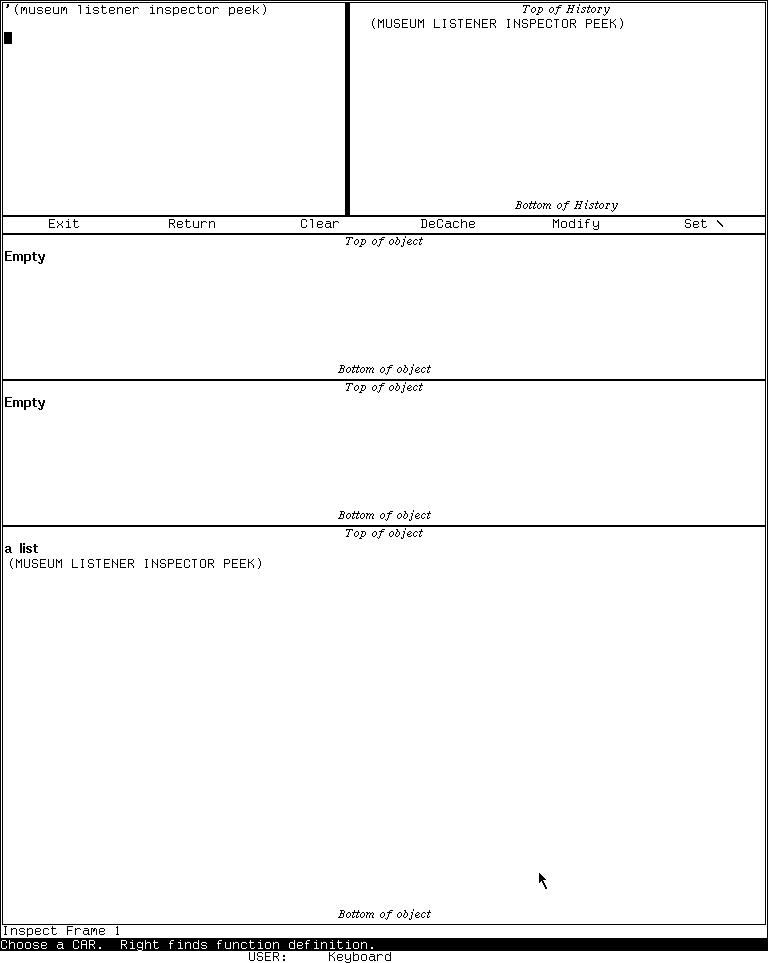
Runtime observation: the LM-3 System 303 Inspector displaying
'(museum listener inspector peek), captured 2026-07-18. Underlying software and display material remain the property of their respective rightsholders; reproduced here for criticism, scholarship, and historical documentation under 17 U.S.C. section 107. No affiliation or endorsement is implied.
The 6,781-byte run record has SHA-256 2d877843f58a8a261bafe68afca846919963dec5584a39bbb5275fcbe6615e22. Shutdown was clean: forced_stop and state_may_be_incomplete are false, the emulator and Xvfb both exited zero, and the base disk was unchanged. The computer-use harness article explains the evidence schema and repeat procedure.
Limits and open questions
- No live mutation was performed. The setter inventory is established from source, while the visible modal selection and resulting memory change remain to be exercised on a deliberately disposable test object.
- The runtime pass did not open the Inspector's Help screen or exercise every scrolling and history gesture. Those bindings are source-established, not claimed as individually runtime-confirmed.
- No runnable System 46 band was used. Its behavior here is source- and manual-grounded only.
- The exact first release that introduced locatives, arbitrary-rank array browsing,
**/***, or Hyper-left modification has not been established. - The populated-list capture received a separate per-image publication review; the unused initial-frame capture remains ignored and unreviewed for publication.
Sources
Source links and pinned revisions last verified 2026-07-18.
- MIT CADR System 46,
INSPCT.80, Inspector implementation. - MIT CADR System 46,
OPERAT.27, window-system operations manual source. - LM-3 System 303,
window/inspct.lisp, maintained Inspector implementation. - LM-3 System 303,
window/basstr.lisp, System-key and selection infrastructure. - Local System 303-0 Xvfb observation, session
core-env-20260718, generation 1, 2026-07-18; raw evidence identified above.