Screen Editor and Frame-Up on the MIT Lisp Machine and Genera
Bottom line
The Screen Editor and Frame-Up both manipulate rectangular layouts, but they do different jobs. The Screen Editor changes a live hierarchy of windows: it can move, reshape, expose, bury, create, destroy, expand, and edit the attributes of windows already participating in a screen or frame. Frame-Up is a program-interface designer: it edits a model of a future Dynamic Windows program frame and emits a DEFINE-PROGRAM-FRAMEWORK form.
The Screen Editor did not disappear between the CADR and Genera. The inspected System 46 release has a 13-command version, LM-3 System 303 has a 15-command version, and the licensed Genera 8.5 source contains a closely descended 15-command version. Genera adds Frame-Up alongside that inherited live-window tool; Frame-Up is not its replacement.
Two fresh observations establish the distinction. System 303 displayed the complete 15-item Screen Editor operation menu without changing any window geometry. In the Genera 8.5 world, Frame-Up started with one :DISPLAY pane, accepted Split Pane PANE-1 Horizontally, displayed the resulting two-pane model, and returned to the previous Listener when Done was selected.
Evidence and release boundaries
This article keeps four evidence classes separate:
- Public source fact: MIT System 46 comes from the released source tree at revision
8e978d7d1704096a63edd4386a3b8326a2e584af. - Maintained-source and runtime observation: LM-3 System 303 source is pinned to Fossil check-in
4df393c68d7f083ce42d5c377039d26043cc18a9031ace28258dc97f4137eb91, and a separately identified publicSystem 303-0band was run in the museum harness. No byte-for-byte source-to-band build chain is claimed. - Public manual fact: the Genera descriptions were cross-checked against the public Genera Workbook, Genera User's Guide, and Programming the User Interface material.
- Licensed-artifact observation: implementation details for Genera 8.5 were derived locally from purchased media and are paraphrased here. No proprietary source or recovered payload is tracked.
The exact inspected source artifacts were:
| System and file | Bytes | SHA-256 | Role |
|---|---|---|---|
System 46 lmwin/scred.62 |
49,289 | 63bdc78c6984cbb6e68b207fea7f2167955bae17350680d6fe2381fec1e8ecb8 |
Public Screen Editor implementation |
System 46 lmwind/operat.27 |
85,337 | a5ab658210dc09891b0886b58af705368e33a41f013073c8b9a637d99ab0f02d |
Public operator-manual source |
System 303 window/scred.lisp |
69,028 | 8f76df709ca1b913925370463248d00c13d059c97a2bdb6d5154db3797749cf9 |
Maintained public Screen Editor implementation |
System 303 window/choice.lisp |
84,440 | 866900e06a7f55855d84df71dbbb77c07040a4db586cba39e665c93f945f6dbd |
Public variable-value form and row-input implementation |
System 303 window/rh.lisp |
68,866 | 6e71970e7b481441554ed64af2ac9ca04439a9af6d532a61a24d02cce8a4e0f8 |
Public alternate rubout-handler map/state machine |
System 303 window/stream.lisp |
26,023 | 3159e4aa22a77a71a2d603cb5fe9ec78c1674af0615dd9ad83d238195613cef8 |
Public stream/RH and keyboard-only pop-up input dispatch |
System 303 window/mouse.lisp |
57,256 | facf7f3dd979a758bd70b0644120ccceb0f243188acd180dcbf0a70a836ec6b2 |
Public button/modifier/click-count encoding |
System 303 window/sysmen.lisp |
43,408 | b53b7c3d5a59040f3180d5be0d2072b2a334bb386fa5e19dd6abbd945148b40 |
Public pop-up diagnostic implementation |
System 303 window/tvdefs.lisp |
44,999 | ae8a8a342d10e4bdc89dc119f9afca9606a7797757601fdd593f8477bfc738ed |
Public WINDOW-CALL selection lifecycle |
System 303 window/baswin.lisp |
82,708 | 3b86ca413528046887da8371433d656ecd9d5f9130d6eadd764fc54f137b42f1 |
Public pop-up stream composition |
System 303 window/sheet.lisp |
110,976 | 3547b359a4947d4eb7f256fefa5034c88e5afcb329bd435d7353cdf034d58902 |
Public exposed-sheet traversal used by smart snapping |
System 303 wind/operat.text |
105,069 | 3129801c6193035feb527c24ec65942a9b5b6b57cbaf9dcddc4372214ad47a97 |
Maintained public operator-manual witness; source/runtime disagreements remain explicit |
Genera 8.5 window/scred.lisp |
94,187 | d0756bb5102789ad748a08bb1087166c9e13f071ec233adbeca1730107d1e542 |
Licensed Screen Editor implementation; metadata only |
Genera 8.5 dynamic-windows/layout-designer.lisp |
50,166 | 3fe3957872d881daf28bc9cb60079fbb32bfdca28dbefb098722cea5befb46a4 |
Licensed Frame-Up implementation; metadata only |
Genera 8.5 dynamic-windows/program-framework-panes.lisp |
18,999 | 4ebc7fac734b83b7f9c2be4e81fb47b6443157460c0fcdbbb864dd242eeb27ea |
Licensed pane-type registry; metadata only |
Screen Editor: entry and interaction model
In all three inspected generations, Edit Screen is a System Menu operation. The ordinary action edits the inferiors of the current screen. The alternate right-button path can select a visible frame or screen beneath the pointer, allowing the same machinery to rearrange the panes inside a program frame rather than only top-level windows.
The interaction is deliberately pointer-driven rather than key-driven:
- Select an operation from the temporary Screen Editor menu.
- When prompted in the who line, point at the requested window, edge, corner, or destination.
- Follow that operation stage's button rules. The first window picker accepts any chord containing Left, but later Right can accept, smart-snap, or start movement, and some Middle or Right paths cancel only in particular releases.
- Choose Exit to leave the editor.
If the temporary operation chooser returns NIL because it was externally deexposed or dismissed, the editor simply re-exposes it. That path invokes no command and does not snapshot, rotate Undo history, or apply window state.
There is no independent Screen Editor keybinding table in the inspected releases. Its complete application-owned command surface is the operation menu plus the mouse gestures described below. All seven nonzero button masks and their modifier combinations have been accounted for. Only Genera Reshape gives live Shift state an application meaning in the main geometric trackers; the nested System 303 attribute form and Genera Accepting Values instead use their own exact encoded modifier and multiple-click trees. The exhaustive staged input trees are normative in the reimplementation specification.
The modal menu and trackers never read keyboard characters. Global Terminal/Escape, System, Select, Function, and asynchronous keys retain their TV dispatcher meanings; every other character continues to the dynamically current selected window's input buffer. Thus a global selector can change keyboard focus while Screen Editor keeps waiting for a mouse action, but it does not create a hidden Screen Editor keybinding.
Complete command comparison
| Operation | System 46 | System 303 | Genera 8.5 | Effect and controls |
|---|---|---|---|---|
| Bury | yes | yes | yes | A Left-containing target click moves a live window beneath the other active inferiors; a target click without Left cancels. |
| Expose | yes | yes | yes | Point at a visible part of a window and move it to the exposed front of the ordering. |
| Expose (menu) | yes | yes | yes | Choose by name from the deexposed active inferiors, including windows that cannot be pointed at. Later code reports an empty list instead of silently doing nothing. |
| Create | yes | yes | yes | Invoke the same extensible window-type creation menu used by the System Menu, then specify the new geometry. |
| Create (expand) | no | yes | yes | Create a window and immediately expand it into free space. |
| Kill | yes | yes | yes | Destroy a selected window. System 303 and Genera explicitly ask for confirmation. It cannot be undone. |
| Exit | yes | yes | yes | Leave Screen Editor and reselect the prior window when its exposed ancestry still permits it. |
| Undo | yes | yes | yes | Restore the saved geometry, exposure state, and ordering from before the previous successful command, subject to the limitations below. |
| Move window | yes | yes | yes | Preserve width and height while moving the selected window to a pointer-selected position. |
| Reshape | yes | yes | yes | Select a window and set a new shape. System 46 and System 303 use the older size-selection interaction; Genera delegates to its newer window reshaper. |
| Move multiple | yes | yes | yes | Toggle coincident edges and corners with Left. C303/Genera Right starts the current set and can also place it; Middle cancels. C46 instead treats Right as cancel. |
| Move single | yes | yes | yes | Use the following-arrow cursor to select one exposed edge or corner. C303/Genera Right cancels selection but can commit the later placement; C46 Right cancels both stages. |
| Expand window | yes | yes | yes | Grow one window into adjacent space not occupied by another exposed window. |
| Expand all | yes | yes | yes | Grow every exposed window outward to fill free space without taking away any window's previous territory. |
| Attributes | no | yes | yes | Edit the selected window's non-geometric attributes. The implementation model changes substantially between System 303 and Genera. |
System 46 contains 13 entries. System 303 adds Create (expand) and Attributes, moves Exit to the last position, supplies item-specific mouse documentation for all 15 items, and styles Exit as standout. Genera retains the same 15 operations but places Exit and Undo before the geometry group and gives the pop-up a Screen Edit Operation label.
Move Multiple and Move Single
These two commands expose behavior that a short menu label cannot convey.
Move Multiple treats window boundaries as connected geometry. A Left click on an edge or corner toggles it in the move set; selecting one member of a group of coincident features includes the others so adjacent windows can remain joined. A second click removes an unwanted member. Releasing Left at 60 ticks or earlier is a short toggle; remaining held when elapsed time becomes greater than 60 toggles and starts the move. In System 303 and Genera, Right alone starts the current set without toggling and either Left or Right can fix the group; Middle cancels. System 46 requires Left to start and finish and treats Middle or Right as cancel. An outside click is not universally ignored: the C46 Multiple path and the C46/C303 Single paths feed the source's :OUT descriptor to an invalid feature operation and can signal, whereas Genera releases outside clicks and continues.
Move Single uses a large arrow cursor. At an edge it points perpendicular to the edge; at a corner it rotates to keep pointing at that corner. Once selected, the feature follows the pointer until placed. In System 303 and Genera the initial Right cancels, while a final Right commits because only Middle is rejected at placement; System 46 rejects Right at both stages. Maintained System 303 and Genera validate proposed edges centrally, beeping and reporting an illegal result while continuing with later records. System 46 sends proposed edges directly, leaving acceptance or a condition to the target window's edge-setting behavior.
Pointer sampling is also release-visible. C46 Move Window waits for button release and then reads the release position; System 303 records mask and position at button-down and returns while it is held. In the older two-corner Reshape, the first corner uses the release-time position. For the second, C46 waits for a nonzero mask without retaining its identity, while System 303 retains the mask; both perform blinker cleanup and then read the still-live coordinates without awaiting release. The sampled lower-right x and y are incremented for half-open edges. Move Window and older Reshape can validate once in their tracking helper and again, or directly set, during central application, so a stateful target can accept the first stage and reject or signal at the second.
System 303's Right smart corner is an order-sensitive snap, not a nearest-edge search. It walks the entire exposed sheet hierarchy in depth-first postorder, including nested descendants and finally the edited sheet, tests low then high edges on each axis for each sheet, lets later qualifying edges overwrite earlier ones, and finally clamps x and y inclusively to the edited sheet's low and high inside-coordinate bounds.
What Undo really stores
The Screen Editor does not record an inverse function for every command. It snapshots each editable inferior as:
(window exposed-state left top right bottom)Commands return a transformed list, and the central loop applies the geometric and exposure side effects. This makes ordinary geometry changes reversible with one saved prior list. System 303 and Genera reread the live screen immediately before a command so changes made by other processes or by screen management are incorporated. Only a command that returns the literal abort sentinel preserves the prior Undo history. Reshape cancellation, Move Multiple/Single cancellation, System 303 Attributes Abort, and other successful unchanged results can consume the preceding Undo opportunity. System 46 has no sentinel, so even a canceled initial selection normally replaces history with the unchanged state.
System 46 snapshots only at entry and after application, but “stale snapshot” is not its whole command contract. Hit-testing, Bury/Expose, Move Multiple/Single, and Expand All use stored rows; Move Window and Reshape reread live target geometry, Expand Window rereads live superior/siblings/geometry, and object menus or destructive commands query live objects. Concurrent changes can therefore be stale, fresh, or mixed depending on the operation.
The source also records exact limits:
- Kill cannot be undone because the window object has been destroyed.
- Undo has no object-destruction or resurrection operation. Comments/manual wording expect a created object to remain buried, but the apply loop has no explicit action for an object absent from the old snapshot, while later menu documentation says Create and Kill cannot be undone. The exact runtime result remains open.
- Reconstructing the precise order of deexposed inferiors is not always possible. Undoing an exposure can therefore return a window to the wrong place in that hidden ordering.
- For the same reason, two successive Undo operations are not guaranteed to be a no-op, and undoing the bury of an already deexposed window is inexact.
These are implementation comments and behaviors, not retrospective guesses.
Attribute editing changed from a fixed form to delegation
System 303's Attributes command builds a fixed variable-value editor. It first probes border, label, and name capabilities in that order, sends ten unconditional base getters, then sends the supported name-or-label, border, and border-margin getters; font-map retrieval occurs while the form is constructed. It offers:
- current font;
**MORE**processing;- reverse video and vertical line spacing;
- actions for input and output attempted while deexposed;
- an always-visible Other output-action S-expression;
- character-drawing and erasing ALU functions;
- screen-manager priority and save-bits behavior;
- window name or label; and
- border width and border-margin width.
The form has Done and Abort choices. Changing reverse video also updates the default draw and erase ALU operations so their polarity remains coherent. Choice rows respond only to exact unmodified single Left or Right. The TV encoder chooses the highest newly-down button, so a simultaneous chord containing Right takes the Right row path, Left+Middle becomes the no-action Middle path, and sequential presses remain separate events. Modifier-bearing and multiple-click row events do not match; byte-exact MOUSE-3-2—whether Shift+single Right or natural double-Right produced it—is intercepted for the System Menu.
Typed rows use Left for an empty replacement and Right for the printed old value with point at its beginning. They do not use Genera's Input Editor. They enter System 303's native alternate rubout handler, whose complete 36-entry base map includes character/word/S-expression motion and deletion, mark/kill/yank histories, four Help forms, decimal numeric arguments, and the C-Q quote-next prefix. Emptying the buffer starts a second-stage handshake: another Rubout restores the old value; another character is put back and starts a fresh empty retry. Number, S-expression, and string rows then use distinct readers. Reader parse errors remain inside the editor for correction, while an escaping type error uses the form's one-character dismissal/put-back retry loop. The complete key/argument/pointer tree is in the reimplementation specification. The temporary form also saves and selects over the prior window, then unconditionally reselects that saved non-NIL object during cleanup. Thus a selection made through System Menu while Attributes is active can be overridden when the form exits; the source has no dead-saved-window guard.
Genera replaces that hard-coded catalog with a protocol. The Screen Editor asks the selected window for its own attribute queries and applies the returned message/value pairs. This lets different window classes expose different editable attributes without changing the Screen Editor itself. Its Accepting Values form has a separate idle accelerator map (Refresh, Help, End, Abort, Space, C-E, C-D, and C-N/C-P/C-F/C-B), Standard Scrolling and Standard Arguments prefix trees, exact Left/Middle/Shift-Middle pointer handlers, and generic Right operation menus. Entering a field then changes context to the full Input Editor and type-specific completion map; idle unknown keys are accelerator errors, not self-insertion.
Source-only lineage findings
The Genera code is recognizably descended from the MIT implementation: the operation names, edge-alist transaction model, :BURY marker, expansion algorithms, following arrow, and Undo caveats remain. It is not merely a new tool with a reused name.
The later implementation is nevertheless adapted to Genera's multi-console window environment. It obtains the mouse, selected window, and who line from the edited sheet's console; considers an ancestor editable only when it advertises editable inferiors; uses the Genera window reshaper; and delegates attribute selection to the window. This is a concrete example of old Lisp Machine UI machinery surviving while its protocols evolved.
Frame-Up: designing a program frame
Frame-Up is a separate Genera program named internally layout-designer. It is registered as activity and System Menu entry Frame-Up, and its direct Select key is Select Q. The default frame contains:
- a one-line title pane;
- a graphical layout-model display;
- a Command Processor interactor; and
- a two-column menu containing five program/frame commands and five pane commands.
On a direct start, its initial model is program DUMMY-PROGRAM with one pane named PANE-1 of type :DISPLAY. Starting it from Zmacs associates the result with the calling buffer instead.
The source, Workbook, and preserved runtime agree on Select Q. One extracted installed User's Guide record instead says Select T; that record is stale or conflicting for this Genera 8.5 profile and does not override source plus runtime. The metadata-only witness is SYS:DOC;INSTALLED-440;USER;WB1-CHAP16.SAB.13, compiled in System 451.0 and Sage 439.0; its 16-record source binary has SHA-256 7ed8f74a0982e51b509477b3473edd9e6930f5e431af64bf0e2bb35dde07e8f4.
Complete Frame-Up command inventory
Frame-Up itself requests no single-character keyboard accelerators. All ten commands are available by name through its Command Processor and as menu choices. Its title pane displays Layout for program <program>; configuration-name title text exists only as commented source.
| Command | Arguments | Complete behavior at the inspected boundary |
|---|---|---|
| Set Program Options | none; opens an accepting-values form | Sets program name, Select key, command-defining macro, whether the generated command table reads single-character accelerators, and inherited command tables. |
| Select Configuration | one standard configuration | After a beep and destructive confirmation, replaces the current pane tree with either command-menu listener or title display command-menu interactor. |
| Reset Configuration | none | After a beep and destructive confirmation, discards the current tree and restores one :DISPLAY pane. |
| Preview | none | Evaluates the generated framework definition in a redefinition-enabled environment, creates a temporary full program frame, prints pane names into its panes, and waits for a character before returning to Frame-Up. |
| Done | none | Generates and remembers the newest definition for this program name, increments the result tick used by waiting Zmacs commands, and deselects Frame-Up. Direct invocations return to the preceding activity; editor invocations insert or replace code. |
| Set Pane Options | pane | Opens an accepting-values display for the pane name, type, and the options allowed by the selected registered pane type. Middle on any presented layout node invokes the translator; leaves are valid, while a private row/column can fail because it has no registry entry. |
| Set Pane Name | pane, new symbol | Renames a leaf pane. Its presentation translator produces a nonactivated command, allowing the new name to be completed before execution. |
| Split Pane | leaf pane, Horizontally or Vertically |
Creates a second :DISPLAY pane. Horizontal means a horizontal dividing line and a vertical stack; vertical means a vertical dividing line and a horizontal row. Left on a leaf requests horizontal splitting; Shift-Left requests vertical splitting. |
| Swap Panes | two panes | Exchanges two siblings in the same row or column. It rejects the same pane twice, the top pane, or panes with different parents. |
| Delete Pane | pane | Destructively removes a pane. The hidden parent is collapsed only when exactly one child remains; zero or two-or-more survivors stop without promotion. The only pane cannot be deleted. |
No base Frame-Up keybinding is installed for these commands. :MENU-ACCELERATOR T marks their menu role; it is not a character binding. Its local command table inherits from no other command table and explicitly disables accelerator reading. The interactor instead reads a typed command name: ordinary graphics insert text; Space/Line delimit, Complete/Tab/Super-Complete complete, Meta-Complete previews or acquires arguments, Help/C-?/C-/ describe possibilities, and Return/C-Return/End activate a valid command. The complete Input Editor map remains active underneath that per-call parser context, including its numeric arguments and C-Q and scroll register second stages; those arguments edit input and do not repeat Frame-Up commands. Abort and Suspend families retain their stream/process meanings.
Left and Shift-Left over a leaf request horizontal and vertical Split respectively; Middle requests Set Pane Options. Right opens the generic presentation Operation menu. Set Pane Name and Delete Pane have no direct gesture and are menu-only presentation translators; the Split translators are menu candidates as well. The complete menu-button argument-acquisition and presentation tree is recorded in the reimplementation specification.
Pointer matching is exact, not “button present.” The Dynamic Windows encoder has 32 modifier states for each of three buttons. Frame-Up therefore distinguishes 96 raw pointer characters: only unmodified Left/Right reach fixed command-menu handlers; only exact Left, Shift-Left, and Middle reach its direct layout translators; all other states continue to generic presentation handlers or the dead-blip/beep path. Double Left is encoded as Shift-Left, simultaneous Left+Middle becomes Middle, and any simultaneous transition containing Right becomes Right. Active argument acquisition also changes precedence: its innermost pane-selection context can consume Left or Shift-Left before the outer idle Split translator.
Physical Shift-Right and unmodified Right double-click are the same raw character and are consumed by Essential Mouse before Dynamic Windows; Meta-Shift-Right remains the Window Operation Menu gesture. Click routing is also selection-sensitive: when the selected window accepts presentation blips, the clicked window supplies the object and coordinates but the selected window's active context and command table interpret them. Blank Left offers Select This Window only for a different window alias. A leaf's Right Operation menu contains the two Split forms, Set Pane Options, Set Pane Name, and Delete plus applicable generic styled submenus, including Marking and Yanking when its Input Editor context/menu tester applies; an internal node omits Split. Blank Right includes Window Operation and can also include System, Select This Window, and the Input Editor's Marking and Yanking submenu when their testers apply.
Nested interactions keep their own maps. Program and pane option forms use the full Accepting Values accelerator/pointer tree; Select/Reset confirmation is a readline Yes/No FQUERY with Input Editor and completion rather than a one-key Y/N prompt; Preview returns on an ordinary character but routes Refresh, intercepts, and pointer blips through the generic character-reader paths. These context changes are why the specification records a tree rather than a flat key list.
Pane types and editable options
The public Genera manual describes six Frame-Up pane types. The inspected Genera 8.5 source registry defines those six plus :TREE-BROWSER, and Frame-Up enumerates the registry dynamically. Loaded systems can therefore extend the set; the menu is not a fixed six-element constant.
| Pane type | Purpose | Options exposed by the inspected registry |
|---|---|---|
:INTERACTOR |
Compact interactive input/output | typeout window, automatic typeout removal, height in lines |
:LISTENER |
Taller interaction history | typeout window, automatic typeout removal, height in lines |
:COMMAND-MENU |
Program command choices | menu level, row or column number/contents, centering, compressed/equalized columns, width extension |
:TITLE |
Program title | redisplay function or string, redisplay after commands, height, size from output |
:DISPLAY |
Application output | flavor, redisplay function or string, incremental and after-command redisplay, typeout behavior, height, size from output |
:ACCEPT-VALUES |
Editable program-state queries | accepting function, query independence, changed-value/default policy, program-state modification, after-command redisplay, typeout behavior, height, size from output |
:TREE-BROWSER |
Dynamic hierarchical browser | height and output sizing; margins; literal or generated root; open branches; leaf predicate/style; branch description, walking, style, comparison, inferior, and data functions |
The options form special-cases two interacting groups. Redisplay can be None, String, or Function; choosing one removes incompatible properties, and a function can enable incremental redisplay. Command menus can use defaults, a numeric row/column count, or explicit lists of item strings.
The source and manual disagree on one default. The manual describes inherited tables including standard scrolling; the inspected definition initializes Frame-Up's model with colon full command, standard arguments, and input editor compatibility. The source value is the claim made here for this Genera 8.5 artifact.
How the pane model works
Frame-Up stores a tree of layout-pane objects. Leaves are the panes that will appear in generated code. Internal nodes use private :ROW and :COLUMN types and must not escape into the emitted pane catalog.
Splitting a leaf follows two rules:
- If the parent already has the desired orientation, add the new sibling directly after the selected pane.
- Otherwise wrap the old leaf and its new sibling in a new hidden row or column, replacing the old leaf in its former parent.
The selected pane's stored direction participates in laying out inferiors and in promotion after deletion; the Split dispatcher does not read it to select a later split direction. Deletion performs the inverse cleanup by collapsing a hidden parent with one survivor. Swap is intentionally restricted to siblings so the operation never has to reconcile two different constraint contexts.
The built-in configuration named title display command-menu interactor actually constructs children in the order title, command menu, display, interactor. Its label is not a reliable serialization of child order.
What Frame-Up generates
The result is a DEFINE-PROGRAM-FRAMEWORK form containing:
- optional Select key;
- command-defining macro;
- inherited command-table names and accelerator policy;
- state variables;
- leaf pane descriptions with only allowed options; and
- one named configuration with layout and size constraints.
If any node is :ACCEPT-VALUES, generation automatically adds the accept-values-pane command table. A last-resort path emits a one-pane column and an even size when the default unsplit model would otherwise produce no layout description.
Done stores one latest definition per program name in memory. A direct Frame-Up session therefore does not write a file; Insert Program Definition is needed later from Zmacs. An editor-launched session waits for the result tick and inserts the form at point.
Complete Zmacs integration
Four named commands are installed in the standard Zmacs command table. Both M-X (Extended Command) and C-M-X (Any Extended Command) reach all four through name completion; the source assigns none a command-specific direct chord. The extended-command prompt uses Zmacs Mini-IE: its local completion, Help, yank, quote, abort, conditional Return, and explicitly undefined shadows sit above the full Standard Zwei map and C-X prefix tree. Pressing C-M-X inside an active M-X prompt converts it to Any Extended Command without discarding entered text.
| Zmacs command | Behavior |
|---|---|
| Create Program Definition | Prompts for a program name, resets Frame-Up to a new one-pane model in the current package, selects Frame-Up, waits for Done, and inserts the generated form at point. |
| Insert Program Definition | Selects one of the definitions remembered in the current Lisp world and inserts it at point. |
| Edit Program Definition | Reopens only the most recent Frame-Up model for the same program, then replaces the definition interval after Done. It cannot reconstruct an arbitrary hand-edited definition. |
| Edit Program Redisplay Function | Accepts any symbol naming a program, independently of retained Frame-Up results; instantiates it, prompts for a pane whose description has an explicit redisplay function, then invokes the editor on that function. |
The public Frame-Up chapter lists the first three commands; the fourth is a source-visible addition. Edit Program Definition is intentionally conservative: it warns that added options will be lost, edited values will revert, and deleted options will reappear, and asks before proceeding. This behavior follows from the fact that Frame-Up retains its last model rather than parsing arbitrary framework code back into a model.
Source-visible limitations omitted or understated by the manual
- The graphical display is a simulation of constraint-frame layout, not the normal layout engine. Its size functions estimate command-menu width from an average item width and scale character units internally, so it should not be read as a pixel-exact WYSIWYG renderer. All-fixed children are laid out at their computed sizes even beyond the parent, and negative unconstrained extents are not clipped. Preview is the authoritative visual check.
- A source comment identifies unique pane naming as buggy when a standard layout has more than one pane of a given type.
- The state-variable editor is commented out with a note that it does not work well. State variables can still appear in generated forms, but this source does not provide the intended interactive editor for them.
- The source contains a release-7 fallback for an unsplit one-pane configuration, described there as a last-minute fix rather than the preferred layout model.
- Split and Delete assume a coherent private pane tree. Splitting a stale/nonmember node can leave a sibling backlink before signaling, or build a detached linked subtree when orientations differ. Deleting a stale target can still promote an unrelated sole survivor, while zero or multiple survivors stop after destructive list replacement; old backlinks are not cleared.
- Editing an existing definition is model-based and lossy, as described above; it is not a general code-to-layout decompiler.
- Generating a form while an Accept Values pane exists permanently adds that pane's command table to the designer's stored inheritance list; deleting the pane later does not remove the entry.
- Preview evaluates/redefines the actual program name in the current world before displaying a temporary processless frame. Its prompt asks for Space, but any character returns. A later error does not roll back the definition.
- The Zmacs handoff uses one global result tick and later inserts the first retained result. A fast Done can precede the wait snapshot, multiple callers can wake together, and a nonfirst program can receive the wrong first result. Editing also deletes the old interval before inserting replacement text, so insertion failure can leave the definition absent.
Runtime observations
System 303 Screen Editor
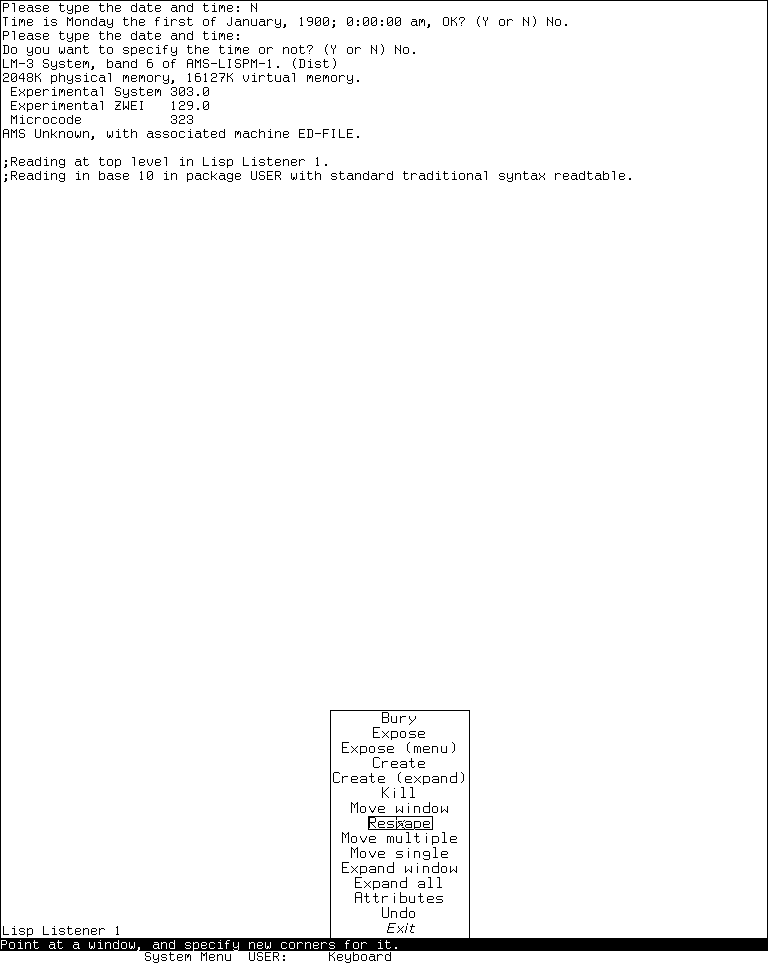
Runtime observation: the 15-item Screen Editor menu in LM-3 System 303, captured 2026-07-18 after selecting Edit Screen from the live System Menu. No geometry or window command was executed. MIT and other underlying software/display interests remain with their respective rightsholders; the image is reproduced for criticism, scholarship, and historical documentation under 17 U.S.C. section 107. No affiliation or endorsement is implied.
The captured ordering exactly matches the pinned System 303 source. The pointer landed on Reshape, and the who line displayed its operation-specific explanation, which also confirms that the maintained menu's documentation metadata is live UI. The menu was then exited without changing geometry.
| Runtime item | Recorded value |
|---|---|
| Session | layout-tools-20260718, generation 1 |
| Interval | 2026-07-18 04:45:30–04:54:25 EDT |
| Guest | Experimental System 303.0, ZWEI 129.0, microcode 323; System 303-0 band |
| Disk | Base and private-start SHA-256 bb16e46ad81decfe1efe691d36b6aa4ce3fd4ffb82474365de3520989d397cb5; base unchanged at stop |
| Source | System check-in 4df393c68d7f083ce42d5c377039d26043cc18a9031ace28258dc97f4137eb91; private tree SHA-256 21f5215de973aa6ccbddb817f2d64edd95ee1014c3028a9b0711ea7c741b807e, unchanged during the run |
| Emulator | Executed SHA-256 707a77d23e28ea1c45ae0eb0145dc181fa7ba649b9defc30044d4f847ac2c5be |
| Curated frame | 768 by 963; 4,688 bytes; PNG SHA-256 87cb86efce54505176e82157a09aab6a0ba693359012afefc02f33e01c525c6e; normalized-pixel SHA-256 12f8b164a5105aa996f480d8f8631c27ae5cdc214961b0afb34ba90c3a6d44b3 |
| Final record | 6,601 bytes; SHA-256 794a35bb1223a152e0f9093d39d577fc7bccd55c002fe27ed53d159749d519dd |
| Shutdown | Clean; forced_stop=false, complete emulator state, emulator and Xvfb status 0, public base disk unchanged |
Genera 8.5 Frame-Up
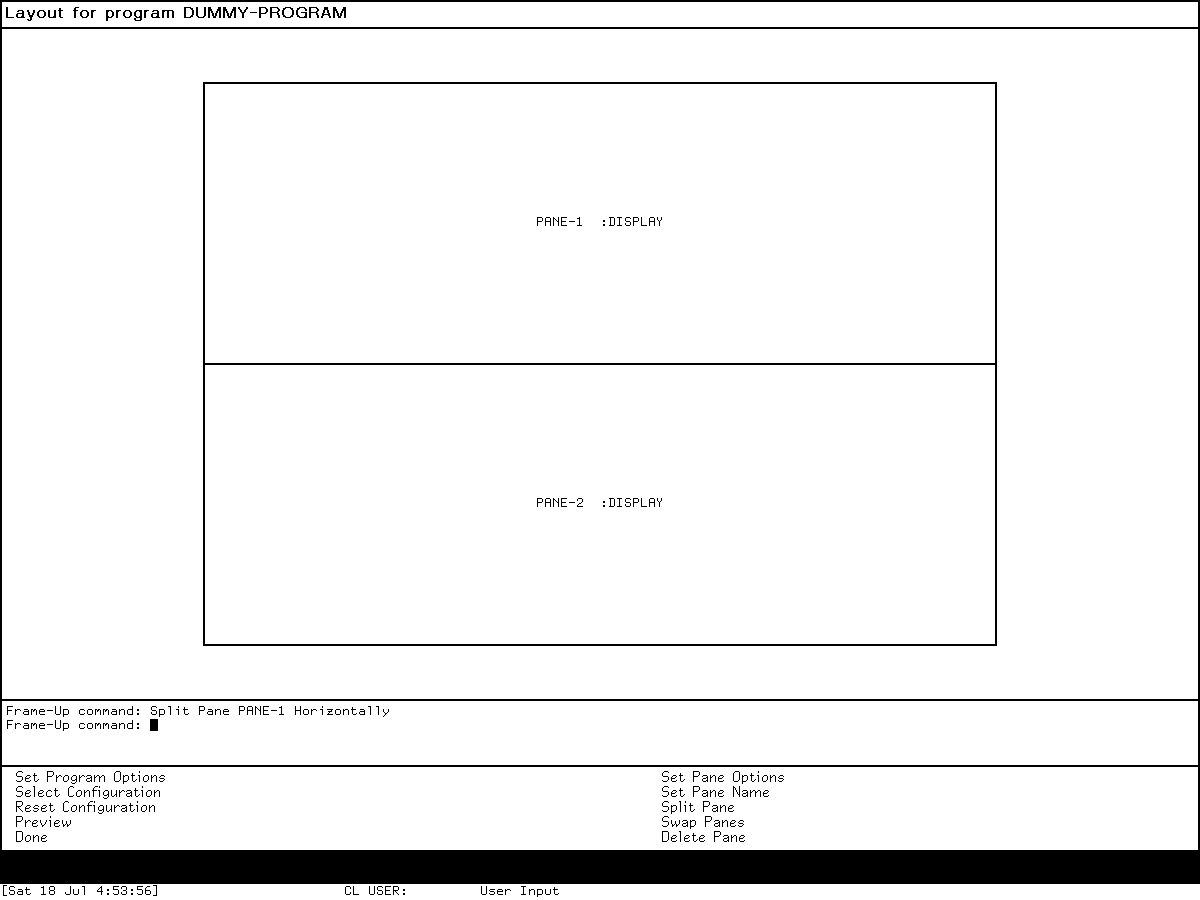
Runtime observation: Frame-Up in the licensed Genera 8.5 world after executing Split Pane PANE-1 Horizontally, captured 2026-07-18. The pane model and command transcript substantiate the source/manual analysis. Symbolics and other underlying software/display interests remain with their respective rightsholders; reproduced for criticism, scholarship, and historical documentation under 17 U.S.C. section 107. No affiliation or endorsement is implied.
Select Q opened Frame-Up directly with the documented dummy program and one display pane. Choosing Split Pane, pointing at the PANE-1 presentation, and completing Horizontally produced two equal panes stacked above and below a horizontal divider. The interactor retained the exact command. Choosing Done returned to the prior Dynamic Lisp Listener. This direct invocation changed only unsaved Lisp state; it did not insert source into a buffer or save the world.
The action prefix also preserves two unsuccessful exploratory inputs: a Left click in pane whitespace caused no visible layout change, and a Right click opened Genera's generic Operation menu rather than a Frame-Up pane menu. The operation menu was dismissed without a choice. No broader gesture inference is made from those attempts.
| Runtime item | Recorded value |
|---|---|
| Session | layout-tools-20260718, generation 1 |
| Interval | 2026-07-18 04:45:37–04:54:45 EDT |
| Licensed input | opengenera2.tar.bz2, 206,213,430 bytes, SHA-256 89fb3e76b91d612834f565834dea950b603acf8f9dbacacdd0b1c3c284a2d36e |
| World | Genera-8-5.vlod, 54,804,480 bytes, SHA-256 a8ee5e86cc7e322f7385af3e0cd579d7650d4dcfc3ce328acbf8b25515dd0672 at start and stop |
| VLM and debugger | VLM SHA-256 9f5e18d5770f973879716182b6856ef5a8ee9d3b2bb907476ea0cf35986aa4c7; debugger SHA-256 2db918cfe8f35f52c7ff4b7695b0ecd3bb85e41a3327ea5a94874edf05edb54a |
| Isolation | Private Xvfb and separate user, mount, network, PID, IPC, and hostname namespaces; no external route or guest-visible host file service |
| Curated frame | 1200 by 900; 2,940 bytes; PNG SHA-256 74925b70d33db0041b024d9fd68c2132d10f071839fc9cd688d09c0385966bb0; normalized-pixel SHA-256 c74dcb59fac25239f723eb3be43327c39866f6a1533fe2838a8b2f94bb51b90a |
| Capture action prefix | 26 records; SHA-256 ff67d57b9d36482395c5d5afc288bf7fd6aa86d9919593171882d927e3fbd2c9 |
| Complete action log | 28 records; 13,301 bytes; SHA-256 0e8cc59f1dda23f0f34484911ade97928b986c55dcbdd54f4d79507e85a42e24 |
| Final record | 25,545 bytes; SHA-256 90171c2f3881211b699160ccf43a11010fef820111ca549635496ce252536956 |
| Shutdown | The known confirmed-shutdown stall required bounded host termination; forced_stop=true, unsaved Lisp state discarded, no Save World or checkpoint, base world unchanged |
Genera 8.5 Screen Editor
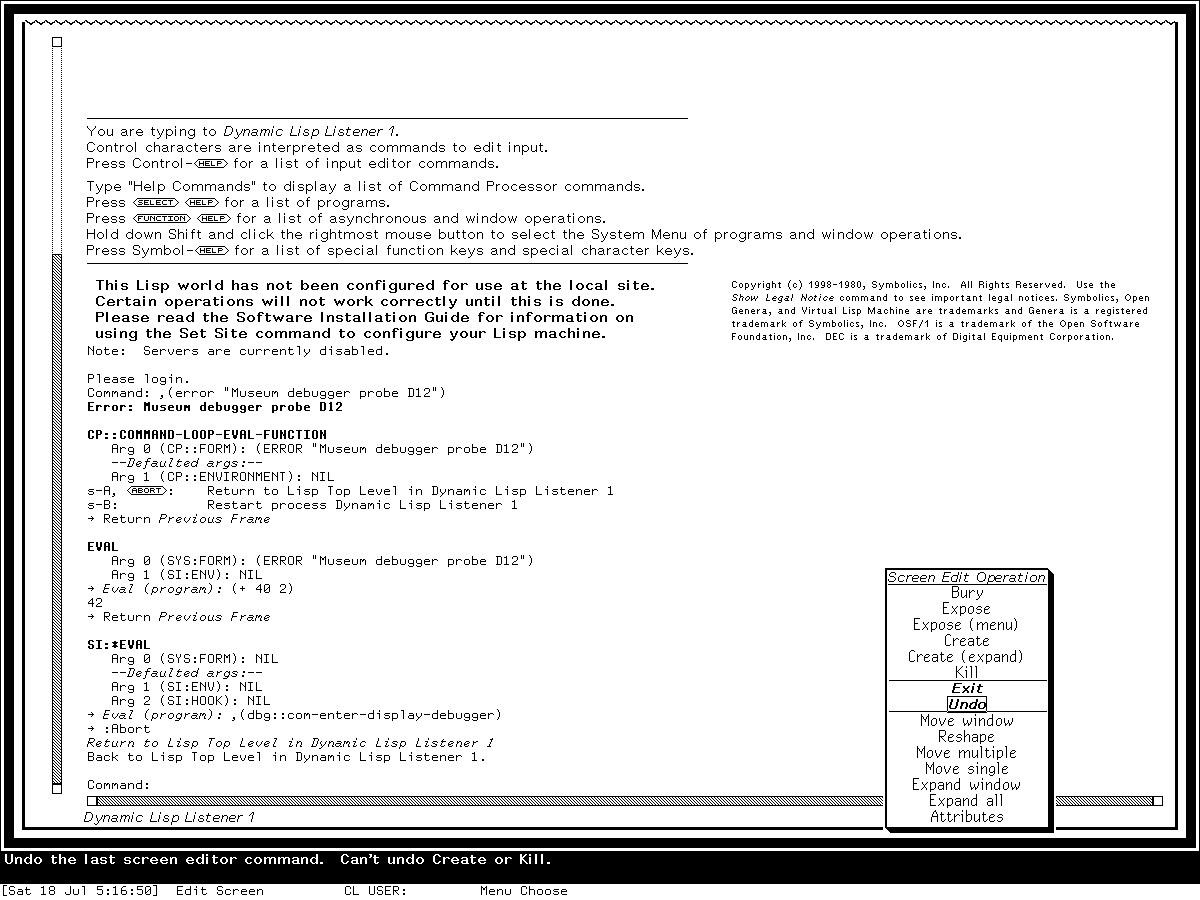
Runtime observation: selecting Edit Screen from the live Genera 8.5 System Menu opened this inherited Screen Editor menu on 2026-07-18. No geometry command was selected. The capture is published to compare the actual menu with the MIT lineage beside substantive source analysis; Symbolics and other underlying interests remain with their rightsholders, and inclusion implies no endorsement.
The rendered menu has the same fifteen labels and grouping established by the licensed source: Bury, Expose, Expose (menu), Create, Create (expand), Kill, Exit, Undo, Move window, Reshape, Move multiple, Move single, Expand window, Expand all, and Attributes. The pointer was on Undo, and the bottom line confirmed the source-defined exception that Undo cannot reverse Create or Kill. The harness then selected Exit without applying a geometry operation and returned to the Listener. The prior synthetic debugger transcript visible behind the menu is session context, not an input to Screen Editor and contains no user data.
| Runtime item | Recorded value |
|---|---|
| Session | debuggers-d12-genera-20260718, generation 2 |
| Interval | 2026-07-18 04:55:22–05:18:00 EDT |
| Licensed input | opengenera2.tar.bz2, 206,213,430 bytes; SHA-256 89fb3e76b91d612834f565834dea950b603acf8f9dbacacdd0b1c3c284a2d36e |
| World | Genera-8-5.vlod, 54,804,480 bytes; SHA-256 a8ee5e86cc7e322f7385af3e0cd579d7650d4dcfc3ce328acbf8b25515dd0672 at start and stop |
| Curated frame | Raw 0029-edit-screen-menu.png, 1200 by 900, 14,224 bytes; PNG SHA-256 c917789c97344cd4b0a5e23ffa0949b3292b197a76a105d96933e90e9992231d; normalized-pixel SHA-256 1c2ba250dffe05ce195acb029cc1748c0053a049e7da7ef3ff1851ec31a620e0 |
| Capture action prefix | 76 records; SHA-256 477e0cbbd983afb4e7f162e29bb1020ff6cb660860885e63c22340d2c9ce0c30 |
| Complete action log | 80 records; SHA-256 c865f298f1710ffd67237ed52a6a7abd8fc72dba38e37a6b8387483e09b96386 |
| Final record | 22,969 bytes; SHA-256 e83a9a7896b44b028d115f0da452b35f38d841bfeead1b805439814984688e03 |
| Shutdown | Prompt, confirmation acceptance, and cleanup progress observed; known Cold Load channel stall then required bounded host termination; no Save World or checkpoint, base world unchanged |
Preservation and rights boundary
The System 46 and LM-3 source observations come from public repositories. The Genera implementation observations come from licensed local media and are presented only as original analysis and artifact metadata. The tracked Genera screenshot is a narrow runtime state, not redistributed source, documentation, pane assets, or a substitute for the software.
All three curated screenshots passed the image- and use-specific review in Publishing runtime screenshots for museum documentation. They are excluded from any repository-wide software or content license. Raw captures, sidecars, logs, disks, worlds, and exploratory states remain under ignored build trees.
Open questions
- Exercise Frame-Up's Preview in a disposable session to measure how the simulated model differs from the generated live constraint frame for several constrained pane types.
- Determine from release history when
:TREE-BROWSERbecame a registered Frame-Up pane type and whether a public manual revision documents it. - Establish whether any later patch repaired the source-commented duplicate-type pane-naming bug or interactive state-variable editor.
Sources
- MIT, System 46 Screen Editor source, pinned public release revision; verified 2026-07-19.
- MIT, System 46 operator manual source, “The Screen Editor”; verified 2026-07-19.
- LM-3 project, System 303 Screen Editor source, pinned Fossil check-in; verified 2026-07-19.
- LM-3 project, pinned System 303 choice-variable source, alternate rubout-handler source, stream source, mouse encoder source, System Menu/pop-up source,
WINDOW-CALLsource, basic-window source, and sheet traversal source; verified 2026-07-19. - LM-3 project, System 303 operator-manual source, pinned Fossil check-in; verified 2026-07-19.
- Symbolics, Genera User's Guide, “System Menu”; verified 2026-07-19.
- Symbolics, Genera Workbook, “Editing the Screen Using the System Menu” and walk-through; verified 2026-07-19.
- Symbolics, Programming the User Interface, “Using Frame-Up” and “Window Hierarchies”; verified 2026-07-19.
- Local licensed Genera 8.5 source and extracted documentation artifacts identified by the byte counts and SHA-256 records above, inspected 2026-07-19; not distributed.