SUPDUP, Telnet, and the Genera Terminal program
The CADR SUPDUP system and Genera's Terminal program solve the same user problem—interactive remote login—but they are not merely two skins over one terminal emulator. Maintained System 303 source has separate Supdup and Telnet window flavors built on a shared two-process network-virtual-terminal core, although the preserved System 303-0 band does not expose the maintained source's Create-menu registrations. Genera 8.5 turns that design into one protocol-composed Terminal activity: the network service chooses a login protocol, filter chains translate input and output, and a selectable terminal simulator handles the final display language.
That distinction explains several visible differences. The CADR program exposes a small fixed Network-key command language and extensive SUPDUP-era display emulation. Genera retains SUPDUP, Telnet, Imlac, ARDS, SUDS, and graphics compatibility while adding Dynamic Windows scrollback and marking, keyword-controlled connection setup, Command Processor commands, journal files, kill-ring transfer, and pluggable Glass TTY, Ambassador, Imlac, and VT100 simulation.
No successful remote session is asserted. The preserved machines are deliberately network-isolated, and neither was pointed at an uncontrolled peer. Genera application entry and its disconnected state were verified directly. The CADR run verified the base band's missing S/T keys and reached only explicitly source-injected Supdup and Telnet shells, not a pristine loaded application. End-to-end negotiation and display behavior require deterministic peers inside the disposable network namespaces.
The implementation-ready contract is the network terminal applications reimplementation specification, with exact CADR and Genera companions. This page remains the shorter historical dossier.
Evidence and release boundary
This article distinguishes three source generations:
| Boundary | Evidence used | What it establishes |
|---|---|---|
| Public MIT System 46 | Selected lmwin/supdup.105, with lmio/supdup.196 and lmio1/escape.6 retained as separately labeled shadow-lineage evidence |
The selected LMWIN NVT and, separately, the older Escape-N lineage; the files are not averaged into one release profile |
| Public maintained LM-3 System 303 | Fossil check-in 4df393c68d7f083ce42d5c377039d26043cc18a9031ace28258dc97f4137eb91, especially window/supdup.lisp, window/sysmen.lisp, and sys/sysdcl.lisp |
The complete maintained CADR architecture, controls, SUPDUP/Telnet engines, and registered system boundary |
| Licensed Genera 8.5 media | Local og2/sys.sct/network/telnet.lisp.~1600~, installed Network User's Guide and keyboard documentation, and the isolated VLM world |
Terminal's activity identity, commands, protocols, simulator stack, documented UI, and the exact base-world runtime boundary |
The selected System 46 lmwin/supdup.105 is 45,341 bytes with SHA-256 71e93d749b5a0857ef04a79d0258df30119961d7e5e20837169aecd3024806fb. The maintained window/supdup.lisp is 110,143 bytes with SHA-256 e329911a2860d69976890f05c4a1c5fbf69f44b7831cb9fd72fe07fa81e28ca4. The locally inspected Genera source file is 142,464 bytes with SHA-256 8560d82fc6327e1638769d200c6b9aa32b47a486de4ecdeb7484b1715e8239e5. The latter checksum records a licensed local observation; the proprietary file is not tracked or reproduced here.
What “NVT” means here
Both implementations use “NVT” as a program abstraction for a network virtual terminal, not as a claim that every connection is only the minimal Internet Telnet Network Virtual Terminal. The shared job is to coordinate:
- a window or display stream;
- a keyboard-to-network path;
- a network-to-display path;
- a connection/login protocol;
- character and function-key translation;
- local escape commands that must not be sent to the peer; and
- terminal-specific output operations.
System 303 encodes most of those choices in flavor inheritance and protocol-specific methods. Genera makes the stages explicit as streams, filters, state blocks, login protocol declarations, and terminal-simulator flavors.
MIT CADR and LM-3
Entry points and window reuse
The selected public System 46 LMWIN implementation registers System-S for Supdup, System-T for Telnet, and both names in its Create menu. The separate LMIO/LMIO1 Escape-N dispatcher described below is an older shadow lineage and is not silently added to that selected profile.
Maintained System 303 declares the SUPDUP system and provides these source-visible paths:
| Entry | Result |
|---|---|
| System Menu Create Supdup | Select or create a separate Supdup window when the subsystem is loaded |
| System Menu Create Telnet | Select or create a separate Telnet window when the subsystem is loaded |
(SUPDUP path mode) |
Choose separate-window or bound-window operation according to mode |
(TELNET path mode) |
Telnet equivalent of SUPDUP |
SUPDUP-SEPARATE, TELNET-SEPARATE |
Reuse a connected window when called without a path; otherwise reuse an idle window or create one |
SUPDUP-BIND, TELNET-BIND |
Overlay the caller's selected window and use the current process for type-in until the NVT returns |
| Peek host action | Open Supdup or Telnet for the selected host from Peek's host display |
The default *SUPDUP-MODE* is true, so the ordinary Lisp entry chooses a separate window. The distinction is architectural, not just geometry: bound operation borrows the current process and substitutes its overlay for the caller's window, while a separate window owns its normal type-in and type-out processes.
The current maintained file has no System-S or System-T registration. The preserved base band's live System Help likewise listed Top-L, E, I, L, and P but not S or T. An earlier maintained supdup.lisp.322 did register S/T, so that is a versioned lineage difference rather than permission to add the keys to the selected current source profile.
The older System 46 LMIO Escape-N dispatcher exposed a numerical policy: no argument or zero found or made Supdup; argument 1 selected Telnet; 2 made a new Supdup; 3 made a new Telnet; and a list/precomma argument selected an existing instance. That exact dispatcher is recovered in the public on-line Help corpus. It is shadow-lineage evidence, not part of the selected System 46 LMWIN implementation and not a claim that System 303 retains the same Escape-N UI.
Host and contact syntax
At the disconnected prompt, Help describes the same grammar that PARSE-PATH implements:
| Form | Meaning |
|---|---|
host |
Resolve a Chaosnet or Internet host and use the protocol's default contact |
| numeric value | Treat it as a Chaos address when possible |
chaos-host/contact-name |
Use an explicit Chaosnet contact |
internet-host/socket-number |
Use an explicit Internet socket; the source parser reads the number as decimal in this maintained version |
gateway Altmode internet-host |
Reach the Internet host through an explicit Chaosnet gateway |
gateway Altmode internet-host/socket-number |
Combine gateway and explicit socket |
| empty/default path | Use the associated machine or configured default path |
There is an important lineage discrepancy. The nearby maintained source comment and Help prose call explicit Internet socket numbers octal, while PARSE-NUMBER is passed radix 10 for slash-suffixed Internet socket values. The executable code therefore wins for System 303: the source documentation is stale on that point. Default Supdup and Telnet sockets remain written as octal constants corresponding to their historical service ports.
Complete local Network-key inventory
The default escape is the physical Network character. Pressing it displays a temporary CMND--> prompt on the bottom line and consumes one following command. The complete maintained dispatch is:
| Following key | System 303 behavior |
|---|---|
| Call or P | Deselect/bury locally without breaking the connection |
| A | Send an interrupt when the protocol supplies :SEND-IP (Telnet) |
| B or Break | Leave super-image mode, enter a local Lisp breakpoint, then restore super-image mode |
| C | Read and install a new escape character |
| D | Disconnect; reports “already disconnected” if applicable |
| E | Leave super-image keyboard mode |
| I | Toggle Imlac simulation when the selected protocol implements it |
| L | Ask the remote protocol to log out, then disconnect and quit |
| M | Toggle More processing when supported |
| O | Toggle overprinting when supported |
| Q | Disconnect and return to the caller/top window |
| Help or ? | Display the locally computed command list, including only operations supported by this flavor |
| Rubout | Cancel the local command without action |
| the escape character itself | Send one literal escape character through to the remote side |
| anything else | Beep and restore the saved cursor position |
E is a source-only command. The maintained implementation handles it, but the computed Network-key Help does not list it. Its immediate effect is to restore normal keyboard interpretation rather than super-image pass-through. No manual claim is inferred about how a user was expected to re-enter super-image mode after using it.
SUPDUP behavior
Supdup connects to the SUPDUP Chaos contact or its historical gateway socket. It sends the peer a packed terminal-description block containing dimensions, character cell metrics, scrolling and option flags, followed by the machine's Finger location. It then consumes an ASCII greeting until the SUPDUP no-operation delimiter.
The maintained display dispatch covers the following effect classes at its defined code positions:
| Class | Implemented effects |
|---|---|
| Cursor and text | absolute move, move-with-zero base, backspace, carriage return, line feed, CRLF, space, quoted character, cursor-position report |
| Erasure and insertion | clear to end of screen, clear to end of line, clear character, clear screen, insert/delete lines, insert/delete character positions |
| Regions and attributes | scroll region up/down, black-on-white/reverse attribute, reset |
| Notification | terminal bell with repeated-beep coalescing |
| Graphics | SUPDUP graphics protocol with move, limit, physical/virtual coordinates, XOR/IOR, line, point, rectangle, string, bit pattern, run drawing, and screen erase |
| Historical display compatibility | GT40 display lists and blinking, ARDS long/short vectors, and optional SUDS-related local editing/display machinery |
| Unsupported slots | explicit no-operations preserve protocol position without inventing behavior |
Function keys and bucky bits are translated into the ITS 12-bit character space. Nonzero modifier bits are sent through the Intelligent Terminal Protocol escape sequence; the protocol escape byte itself is doubled. Network L emits SUPDUP's two-byte logout sequence before closing.
Two implementation limits are not evident from the small Help table:
- a connected Supdup window refuses size changes because the advertised geometry would become false; and
- Supdup deliberately refuses local More processing. The source says enabling it can wedge the output process so completely that input cannot release it.
Character insertion/deletion capability is also not always advertised. It is enabled for system types such as WAITS and Multics where the remote implementation needs or benefits from it; otherwise the source favors faster output over the extra capability.
The default maintained SUPDUP-FLAVOR is ordinary SUPDUP. Recording and local editing are alternate flavor behavior selected only when that flavor variable is changed; their presence in the file does not make them defaults. GT40 and ARDS also retain partly global state, so separate windows can interfere in ways the small Help surface does not disclose.
Telnet behavior
Telnet shares the NVT window lifecycle but performs Internet NVT translation and option negotiation. The maintained implementation:
- sends CR as CRLF;
- doubles IAC in new-Telnet mode;
- negotiates Echo, Suppress Go Ahead, Transmit Binary, Timing Mark, Logout, and SUPDUP-OUTPUT;
- locally echoes when the remote side is not echoing;
- maps Lisp-machine function characters and Control/Meta bits into NVT codes;
- treats CRLF as newline and a bare CR as cursor-to-column-zero;
- rings the local remote-terminal bell for Control-G outside binary Imlac mode;
- can switch the output stream into SUPDUP-OUTPUT subnegotiation; and
- can send Telnet Interrupt Process plus Data Mark through the Chaos-to-Internet gateway's interrupt packet convention.
When SUPDUP-OUTPUT is active, the window additionally reports mouse position and buttons in the peer's expected text encoding. The who-line documentation changes to advertise buffer-like pointer actions in that mode. This is protocol-specific remote UI support, not a general presentation system.
Maintained-tree variants that are not separate applications
window/telnet-code.lisp and window/telnet-front-hack.lisp are source-present compatibility experiments. The former contains the special four-byte Lisp-machine character stream and server/client override. The latter is a divergent copy of the current Supdup/Telnet implementation: it defaults overprint true, uses older syntax and :characters nil, and adds direct raw-Telnet output wrappers. It does not carry the four-byte server work. Neither file is selected by the declared SUPDUP system or registered as another user application. Their presence documents experimental integration branches, not a third terminal product.
Symbolics Genera 8.5
One official Terminal activity
Genera registers the official activity and Create-menu name Terminal, adds Select T, and creates an NVT-WINDOW. The source explicitly says “NVT” is too specialist for the public name. The entry routes do not share one allocator: Create always makes and selects a fresh window; Select T uses the generic activity-selection policy and Control-Select T forces creation; Peek and direct remote-login requests scan the previously selected array and reserve the first idle Terminal, creating one only if none qualifies. A window counts as in use when it already has a network stream or a pending connection target.
The live release inventories establish all three registrations in the inspected world:
| Registry | Observed Genera 8.5 value |
|---|---|
| Activity table | Terminal present |
| Select-key table | T maps to Terminal |
| default window Create list | Terminal present |
Window and process architecture
The Genera frame still owns separate type-in and type-out processes, but its data path is decomposed:
keyboard/presentation input
  -> local Network-key escape filter
  -> login-protocol type-in filters
  -> network service stream

network service stream
  -> protocol negotiation/output filters
  -> terminal simulator
  -> viewport/recording stream
  -> Terminal screen
NVT-WINDOW owns the screen, Dynamic Windows typeout surface, network stream, filter chains, output recording, wallpaper file, connection options, and processes. Protocol-specific mutable state lives in lazily created state blocks rather than in one Telnet subclass. The output process notices state changes with a tick so option changes can rebuild or reset the relevant filters safely.
Connecting and all connection keywords
At Connect to host:, Return after a host accepts defaults. Space after the host opens keyword parsing. The complete source-defined keyword surface is:
| Keyword | Meaning |
|---|---|
Login Protocol |
Protocol that interprets the remote login stream; selected automatically when omitted |
Connection Protocol |
Network service protocol used to establish the stream; can deliberately name a non-LOGIN service for debugging |
Terminal Simulator |
Final display emulator |
Echo |
Local echo boolean |
Overstrike |
Preserve printing-terminal overstrikes instead of erasing before replacement |
Record Output |
Retain output records for scrolling and mouse/marked-text interaction; defaults true |
Wallpaper File |
Journal output to a named file |
The installed manual documents all except Record Output in its connection-keyword list, although its next section describes the behavior output recording enables. The source makes the option and its default explicit.
Complete Terminal-specific command inventory
The source defines sixteen commands in the Telnet Command Processor table. Connect is deliberately a parser template: calling its body signals an error, while the Terminal top-level uses its argument parser and then invokes the window's real :CONNECT method. This is an implementation detail hidden behind an ordinary prompt.
| Command | Arguments and effect | Direct accelerator |
|---|---|---|
| Connect | Host plus the seven connection controls above; parser template only | initial prompt |
| Send Interrupt | Send protocol-specific interrupt | Network-A |
| Disconnect | Optional Logout and Deselect booleans; closes and returns to connection prompt | Network-D; L supplies Logout; Q supplies Deselect |
| Set More Processing | Boolean, default true | Network-M toggles; numeric argument forces state |
| Set Output Recording | Boolean, default true; refreshes the output-process tick | none in canned Help |
| Send File | Pathname, serial transfer format, and format-specific options | Network-F is registered but omitted from canned single-key Help |
| Receive File | Pathname, serial transfer format, and format-specific options | none |
| Send String | Send a supplied string through the type-in filter chain | Network-Control-Y sends top of kill ring |
| Set Terminal Simulator Type | Choose a registered simulator | extended command |
| Set Escape Character | Choose the local escape character | extended command |
| Set Wallpaper File | Open, replace, or disable the journal file | extended command |
| Set Overstriking | Boolean and output-state refresh | extended command |
| Set Local Echoing | Boolean in the Echo state block | no canned listing |
| Set NVT Options | Accepting-values panel for escape, More, overstrike, recording, wallpaper, local echo, and simulator | Network-X |
| Help | Print canned accelerators and the curated extended-command list as presentations | Network-Help |
| Bury Window | Hide the window while retaining its connection and wait until it is selected again | Network-B |
Network-colon enters extended-command parsing. Network-Meta-W invokes the shared “push all marked text onto kill ring” accelerator. The installed keyboard manual instead says that Meta-W “wipes” marked text, while both Terminal's canned Help and the command symbol identify a kill-ring push. The source and live command definition support “push”, so “wipes” is treated as a documentation error.
The canned extended list contains Set Terminal Simulator Type, Set Escape Character, Set Wallpaper File, Set Overstriking, Send File, and Send String. It omits several commands that nevertheless exist in the table: Receive File, Set Output Recording, Set Local Echoing, and the parser-only Connect command. A complete source audit must therefore not equate Network-Help's curated list with the full command table.
The exact connected Network reader has 63 normalized fixed accelerator cells: 37 Standard Arguments cells, 12 unshifted argument cells, three full-command cells, and 11 Terminal-local cells. It compares letters case-insensitively. Fixed bindings win before the configurable literal-escape test, so changing the escape to A, colon, a digit/argument key, or another fixed cell does not override that command. Rubout normally cancels, but becomes literal when it is the configured escape. Help alone reprompts; unknown input beeps, clears the pending argument, reports, and reprompts.
Only Network-M accepts a numeric argument among local leaves: absent toggles, zero disables, and every nonzero value including a negative one enables. The source reader holds a (kind,value) pair, initially (nil,1): minus resets it to (:sign,-1), Control-U replaces the kind and multiplies the current value by four, Infinity uses 2^40 * signum(value), and the first digit after any nondigit kind replaces the magnitude using signum(value). Consequently Control-U then minus resets to -1, zero then Infinity stays zero, and minus-0 followed by another digit becomes positive. The disconnected Connect prompt, extended commands, pathname/format arguments, and Network-X are separate CP/Input Editor or Accepting Values contexts with their own complete inherited trees. The Genera companion is the normative exhaustive inventory.
Dynamic Windows behavior and pointer controls
With output recording enabled, the manual documents a small user-facing subset. The effective surface is larger because the Terminal participates in the Dynamic Windows 96-cell pointer resolver and conditional handler registries:
| Gesture | Effect |
|---|---|
| Control-Left drag | Mark and underline a region |
| Control-Shift-Middle over a word | Mark that word |
| Control-Middle over a word | Send that word as input |
| Control-Right | Open the applicable Marking and Yanking menu |
| menu Yank Marked Text | Send marked text as Terminal input |
| menu Yank From Kill Ring | Send the selected shared kill-ring entry |
| menu Save Marked Text | Push marked text to the shared kill ring |
| menu Unmark / conditional clear and extend actions | Update the selected marked region |
| conditional Hardcopy marked text | Print the marked region when Hardcopy and a route are resident |
| conditional Pick up image from screen | Image Substrate global handler; source-visible but exact world residency is unverified |
| scroll bar | Navigate recorded input/output history when the active protocol/simulator permits it |
The Terminal does not attach semantic application-object presentation types to remote text. Its input loop does create a narrow TERMINAL-INPUT context so selected recorded text can be converted back into characters, and its prompts, Help, commands, typed arguments, and Accepting Values panel use Command Processor/Dynamic Windows presentations. This reconciles the source with the manual: semantic remote objects are absent, but presentation-based control paths are not.
The Release 7 manual describes protocol-dependent history depth: Telnet and CTERM can retain the full recording, while SUPDUP, 3600-LOGIN, and VT100 simulation expose only one screenful because remote cursor addressing and destructive operations make deeper scrollback misleading. The selected readable source and System 452.22 runtime have not yet confirmed those exact per-protocol limits; they remain the normative specification's TODO-ORACLE-G-HISTORY-*, not a source/runtime fact.
Login protocols and filter composition
The exact file declares seven login protocols:
| Protocol | Desirability | Type-in path | Type-out path and role |
|---|---|---|---|
| 3600-LOGIN | 0.85 | local escape, 3600 character encoder | 3600 display effector decoder |
| SUPDUP | 0.80 | local escape, ITS Intelligent Terminal Protocol | SUPDUP display-code decoder |
| TELSUP | 0.75 | local escape, ITP-over-Telnet, NVT ASCII | IAC negotiation plus Imlac simulator |
| TELNET | 0.70 | local escape, Telnet character translation, NVT ASCII, local echo | IAC negotiation, echo, selected ordinary simulator |
| CHAT | 0.70 | local escape, Telnet translation, PUP interrupt restriction | PUP BSP-mark handling plus Glass TTY |
| TTY-LOGIN | 0.50 | local escape, Telnet translation, echo, serial control | parity stripping, echo, Glass TTY |
| LISPM-NULL-TELNET | 0 | local escape and echo on character streams | echo only; no terminal decoding |
These desirability values participate in service selection; they are not measured performance rankings. Host and service declarations can override the generic choice.
Terminal simulators
Four simulator types are registered in this source boundary:
| User name | Implementation scope |
|---|---|
| Glass TTY | Plain control-character interpretation, wrapping, tabbing, bell, CR/LF/backspace, and character output |
| Imlac | Imlac escape handling with selected SUPDUP display operations |
| Ambassador | ANSI-derived simulator with Ambassador-specific escape operations and line movement |
| VT100 | ANSI-derived selected subset with four arrow-key input translations, cursor/erase operations, selected modes and regions; keypad state is written but not consumed, and broad function/report support is not implemented |
The shared ANSI simulator parses a selected ESC/CSI subset, selects character sets, controls cursor position and erasure, and sets character attributes. Unsupported sequences are consumed. SGR examines only the first parameter; blink state is stored but has no selected drawing branch. VT100 adds only the four directional input translations to ESC [A through [D. ESC = and > mutate a keypad-mode slot that the selected source never reads; device reports, cursor-position reports, broad keypad/function translation, and many ANSI/VT52 operations remain unimplemented comments. Ambassador and VT100 specialize the base without filling those gaps. Simulator choice can be a host default or a connection option and can be changed while connected through Set Terminal Simulator Type.
SUPDUP and Telnet compatibility retained inside Genera
Genera's SUPDUP state block implements the same broad effect families as System 303: cursor movement and reports, clearing, CR/LF/space/backspace, insert/delete lines and characters, scrolling regions, bell, reset, attributes, graphics, GT40, ARDS, and SUDS. The implementation is reorganized around a SUPDUP-FILTER, state block, viewport, and separate graphics state rather than direct calls from a BASIC-SUPDUP window.
The Telnet state block recognizes Echo, Suppress Go Ahead, Timing Mark, Transmit Binary, Logout, and SUPDUP-OUTPUT negotiation. NVT ASCII input quotes IAC and converts Return to CRLF. Unsupported negotiations receive WONT or DONT rather than being silently accepted. SUPDUP-OUTPUT can feed bounded embedded SUPDUP display records through the same state block.
Source findings absent or easy to miss in the manuals
- The official public name is intentional. A source comment says Terminal was chosen because “NVT” would not mean much to a non-network specialist.
- Connect is not an executable command body. It exists to reuse Command Processor parsing and intentionally errors if called directly.
- The Help list is curated, not exhaustive. Four live command definitions and the Network-F accelerator fall outside its printed lists.
- Receive File exists beside Send File. Its default format is XMODEM, while raw Send File defaults to raw text. Transfer temporarily coordinates the type-out process rather than letting terminal decoding consume the file protocol.
- A mouse-position translator is reader-commented out. The file contains a proposed blank-area Left gesture that would send coordinates, but
#|| ... ||#excludes it. It is design residue, not a Genera 8.5 feature. - Output recording is an explicit connect and runtime option. The user guide describes scrollback but omits the keyword from its connection-option table.
- Overstrike defaults are host-sensitive. Unix and VMS family types are listed as refusing overstrike; WAITS and Multics are singled out for character insertion.
- Bury is deliberately connection-preserving. Its command waits for deexposure and later re-exposure to suppress misleading type-in/type-out notifications.
Runtime verification
CADR source-injected shell evidence

Runtime observation: a maintained-source Supdup window injected into the isolated System 303-0 band, captured 2026-07-19. It establishes only the source-injected full-screen surface, who-line relationship, and disconnected label. It is not a pristine base-band application claim. Underlying software and display material remain the property of their respective rightsholders; reproduced for criticism, scholarship, and historical documentation under 17 U.S.C. section 107. No affiliation or endorsement is implied.

Runtime observation: an explicitly constructed maintained-source Telnet shell in the same session. Its process slots were deliberately NIL after ordinary TELNET-SEPARATE exposed a source/band initialization mismatch. It proves the distinct label and shared static window structure only, not process or connection behavior. Underlying software and display material remain the property of their respective rightsholders; reproduced for criticism, scholarship, and historical documentation under 17 U.S.C. section 107. No affiliation or endorsement is implied.
Exact image identities, run provenance, and the reconstructed ordered input sequence are in the curated CADR asset catalog. Publication is limited by the D10 capture-specific rights review.
The fresh run first proved that live System Help contains no S/T registration. The base band reported older compiled definitions from SYS: WINDOW; SUPDUP, while the pinned maintained file had to be loaded through the private FILE bridge and accepted redefinitions. The resulting Supdup type-in process encountered the isolated absent- peer/path boundary. Ordinary maintained-source Telnet creation then encountered an unbound process slot, which is why the second image is explicitly a static shell witness. The run stopped cleanly with the base disk unchanged. There is no configured System 46 band, so its runtime appearance remains a named blocker.
Genera disconnected state
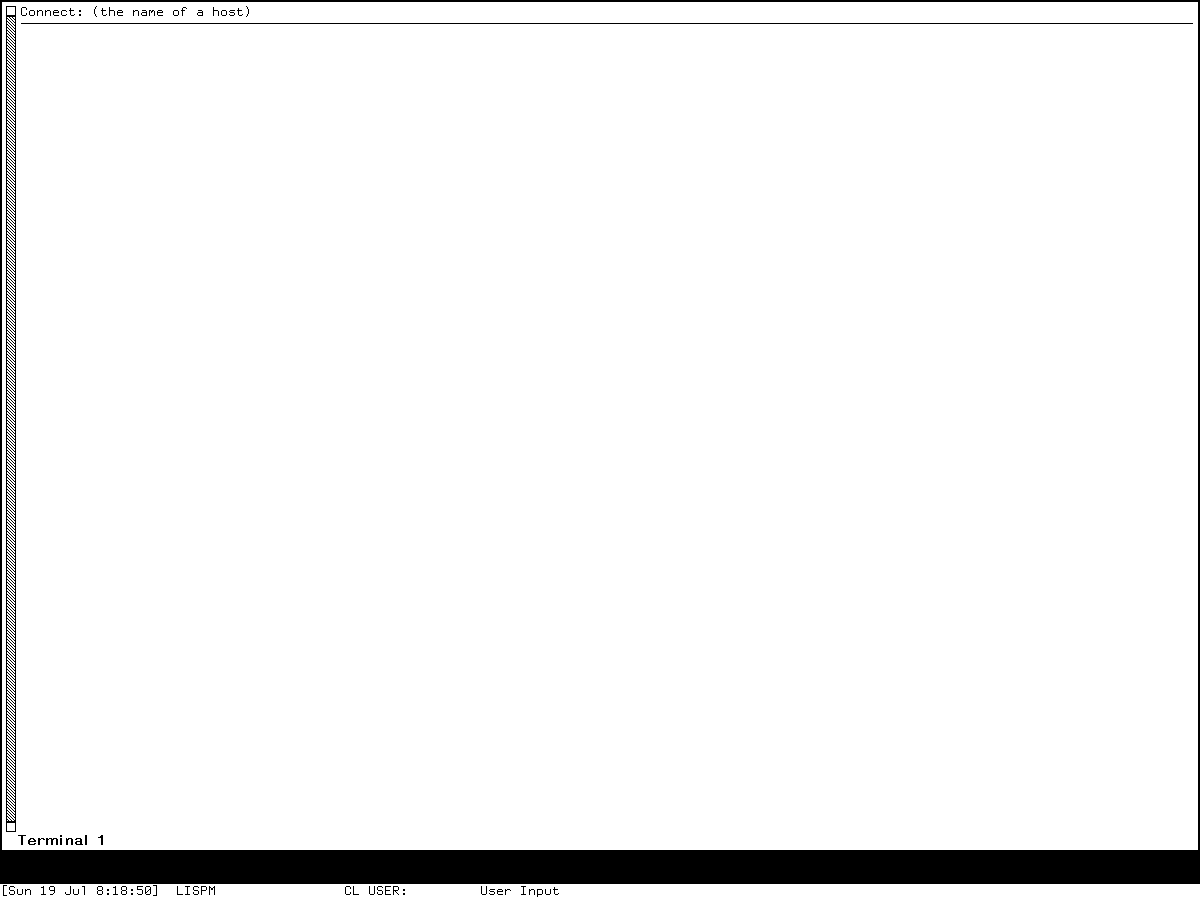
Runtime observation: Genera 8.5/System 452.22 immediately after local login and Select T, captured 2026-07-19. It establishes the exact prompt, initial label, scrollbar, blank surface, who-line, and relative geometry only. Underlying Symbolics software and display material remain the property of their respective rightsholders; reproduced for criticism, scholarship, and historical documentation under 17 U.S.C. section 107. No affiliation or endorsement is implied.
The live prompt contradicts the manual's nearby wording, and the rendered label is exactly Terminal 1. The pixels cannot reveal the hidden label tag or establish when source-profile label recomputation occurred; that relationship remains an oracle. The capture contains no Help/manual prose, source, peer data, artwork, or private content. A later raw Network-Help capture remains ignored. Exact provenance is in the curated Genera asset catalog, under the same D10 rights decision.
What still requires deterministic isolated peers
The following remain explicit oracles:
- successful native Chaos SUPDUP and gateway Telnet connection establishment;
- Telnet first-IAC and steady-state negotiation, binary and echo transitions;
- SUPDUP terminal-variable exchange and every display/graphics effector;
- interrupt, logout, More, literal escape, wallpaper and disconnect behavior while connected;
- protocol-specific history limits and simulator output;
- send/receive file behavior using disposable project-owned data; and
- exact source-to-compiled-world identity for both tested bands.
Each peer must live inside the throwaway namespace, expose no external route, real credentials, or uncontrolled login service, and record both byte directions. It must not pretend that a protocol test fixture is an historical ITS, TOPS-20, Unix, VMS, or Symbolics site.
Preservation notes
The public CADR source and recovered Help fragments can be cited and redistributed under their own recorded provenance. The Genera source, manuals, world, and raw session artifacts remain licensed local inputs. This article records their behavior in original prose and identifiers; it does not reproduce the source file or manual.
SUPDUP is historically important here because it is not simply “old Telnet.” It advertises a rich intelligent display, accepts screen-editing effectors, transports Lisp-machine function characters, and includes graphics and older display emulation. Genera did not discard that lineage when it gained Telnet and ANSI terminals. It recast the protocols as composable filters beneath one user-facing Terminal program.
Sources
- Maintained LM-3
window/supdup.lisp, pinned at the System 303 check-in above. - Maintained LM-3
sys/sysdcl.lisp, for the declaredSUPDUPsystem. - Recovered System 46 Supdup window Help contexts and Escape-N dispatcher.
- Locally inspected Genera 8.5
og2/sys.sct/network/telnet.lisp.~1600~, identified by size and SHA-256 above. - Locally recovered installed Network User's Guide topic
doc/installed-440/netio/netio1, 10,688 bytes after text normalization, SHA-256172e25d09c4a94aba0e74b20afe2098139ab77bbebe3499fd83083995aac3fef. - Locally recovered installed keyboard topic
doc/installed-440/lms/lms5, 32,831 bytes after text normalization, SHA-25612cc014888759edb02a506da346803e05f2b6f758959a1f0a0d8ac690bfdbd1d. - RFC Editor primary protocol cross-checks: SUPDUP RFC 734, Telnet SUPDUP option RFC 736, SUPDUP graphics RFC 746, SUPDUP extensions RFC 747, SUPDUP-OUTPUT RFC 749, and Telnet RFC 854. These define standards vocabulary; the selected implementation source determines historical compatibility behavior.
- MIT CADR and LM-3 software catalog and Genera 8.5 software catalog, for registration and release reconciliation.
Last verified: 2026-07-19.