Directory, difference, and buffer editors on CADR and Genera
Dired and Edit Buffers are not dialog boxes wrapped around file and buffer APIs. They are special-purpose Zwei editors: each turns structured objects into a read-only textual buffer, retains release-specific row identity or parsed metadata, and reuses normal editor motion, arguments, searching, Help, and command dispatch. System 46 stores parsed scalar fields rather than a pathname object on each row. LM-3 System 303 also has BDired, the Balance Directories Editor, which compares two directory models and schedules transfers between them.
The family changed substantially. MIT System 46 Dired parses the fixed-format output of a DIR device into one global *DIRED* buffer. System 303 gives each invocation its own Zmacs buffer, supports multiple and nested directories, and adds BDired and a four-column buffer-operation editor. Genera retains the editable-list idea but replaces much of the implementation: Dired becomes a protected special node over FS:DIRECTORY-LIST, and Edit Buffers reduces each row to one action while adding presentations, filtering, comparison, and a separate multiple-choice buffer manager.
This article separates three evidence boundaries:
| Boundary | Evidence used | What it establishes |
|---|---|---|
| MIT CADR System 46 | Public source snapshot and operator documentation at commit 8e978d7d1704096a63edd4386a3b8326a2e584af |
The early implementation and complete local Dired table |
| LM-3 System 303 | Maintained public Fossil tree at check-in 4df393c68d7f083ce42d5c377039d26043cc18a9031ace28258dc97f4137eb91, plus a fresh System 303 run |
Later Dired, BDired, Edit Buffers, and one observed implementation defect |
| Symbolics Genera 8.5 | Licensed local source, Genera 8 manuals, and an isolated Open Genera runtime observation | The later specialized editors; no licensed source or extracted data is reproduced |
The editor substrates and global bindings are documented separately in the cross-system editor history, the System 303 binding inventory, and the Genera binding inventory. This page inventories every local command cell in the specialized modes, including aliases, but does not repeat the ordinary inherited Zwei motion and search tables. The implementation-ready directory, difference, and buffer-editor specification normatively incorporates those inherited trees and supplies state machines, exact failure order, protocol surfaces, release deltas, and conformance tests.
These applications are not CLIM applications in any selected profile. System 46 and System 303 use ZWEI over TV; their menus, typeout items, and multiple-choice windows are TV facilities. Genera retains ZWEI and TV while using Dynamic Windows presentations for List Buffers and Command Processor typed arguments and resortable output for Compare Directories. The inspected systems and packages define no CLIM application frame, CLIM port, or direct CLIM protocol dependency for these surfaces.
MIT System 46 Dired
Entry points and representation
Dired is available as a named Zwei command, as the current-file directory command, and as the Lisp function DIRED, whose standalone top-level editor makes the same mode usable without entering Zmacs first. The implementation selects the special buffer *DIRED*, reads a DIR device stream, and parses each fixed-column row into line properties for first name, version, size, creation date and time, reference date, and status flags. It then marks the interval read-only.
This is a view of one directory at a time. The early code assumes directory output sorted by file name and numeric version so it can compute the highest-version > flag. The mode line carries the device and directory, not a pathname object attached to a unique buffer. That architecture explains why the later System 303 rewrite is more than a command-table expansion.
Complete System 46 local controls
| Binding(s) | Operation |
|---|---|
Space |
Move to the next real line |
! |
Find the next file not backed up |
$ |
Select COM-DIRED-COMPLEMENT-NO-DELETE-FLAG; its body is absent from the complete pinned public source tree and generated command listing, so strict selected-source behavior is not-implemented and its intended effect remains TODO |
?, Help |
Show Dired's local command explanation |
D, d, Control-D, K, k, Control-K |
Mark one or more files for deletion |
E, e |
Edit the current file |
H, h |
Mark excess versions automatically; a numeric argument applies it to the directory |
N, n |
Find the next file with more retained versions than allowed |
P, p |
Mark the current file for printing |
Q, q, End |
Review and process requested operations, then exit |
U, u |
Cancel a deletion mark on the current or preceding applicable row |
V, v |
View the current file without reading it into an edit buffer |
X, x |
Enter an extended command |
Rubout |
Move upward and cancel the preceding deletion mark |
Mouse-3-1 |
Open Dired's ten-item menu |
The fixed menu contains increasing and decreasing sorts by reference date, creation date, file name, and size, followed by Automatic and Automatic All. These ten actions, the local table above, and inherited Zwei commands are the complete source-defined System 46 Dired surface at this boundary. Copy, rename, nested subdirectories, load, source comparison, and BDired are not present in this version's local table.
The selected Dired and Standard/standalone tables supply no Abort leaf. An ordinary Abort input is therefore undefined at this evidence boundary, not a hidden “leave without executing” command. The later System 303 and Genera cancellation behavior must not be backported.
Deletion and printing are deferred, but exit is a two-class state machine rather than one transaction. Q first presents and queries Print requests, then Delete requests. Y performs that class sequentially. N returns to Dired. At the Print query, Q or X skips/finishes that class and proceeds to the Delete phase; at the Delete query, Q or X exits without deleting. Per-file string errors are reported and later files continue, so completed prints or deletions survive a later failure or refusal. Automatic deletion retains *FILE-VERSIONS-KEPT* versions (default 2) and treats the configured second names (FN2) MEMO, XGP, @XGP, UNFASL, OUTPUT, and OLREC as its ordinary automatic-cleanup family. It skips rows whose parsed flags contain $. The missing $ command body prevents a source-grounded claim about how that protection flag was toggled.
LM-3 System 303 Dired
A pathname-backed, nested view
System 303 creates a unique read-only ZMACS-BUFFER for each Dired invocation, marks its special type :DIRED, and retains a list of exact pathname objects. Each file row stores :PATHNAME and its nesting LEVEL. A Dired buffer can show several directories, expand a subdirectory inside the existing view, and remember which subdirectories were open when the buffer is reverted. Directory operations use the stored translated pathname rather than reconstructing it from display text.
The first column is an operation/state column: D means delete, lowercase d means already deleted, U undelete, P print, F find into the editor, and A apply a function. Exit groups work where file servers support multiple-file operations. Viewing or editing a directory descends into a Dired view rather than treating it as ordinary file text.
Complete System 303 local controls
| Binding(s) | Operation |
|---|---|
Space |
Move to the next real line |
! |
Find the next file not backed up |
@, #, $ |
Toggle do-not-delete, do-not-supersede, and do-not-reap flags |
., , |
Change file properties; print file attributes |
=, raw character 036 octal |
Source-compare with newest; source-compare with a selected file; the historical keycap spelling of 036 is not asserted |
?, Help |
Enter Dired's augmented Help dispatcher |
A, a |
Mark files for applying a function |
C, c |
Copy the row's file |
D, d, Control-D, K, k, Control-K |
Mark for deletion |
E, e; Control-Shift-E |
Edit, or enter Dired for a directory; edit in two windows |
F, f |
Mark a file to be found in the editor at exit |
H, h |
Apply automatic version cleanup |
L, l |
Load the file |
N, n |
Find the next file with excess versions |
P, p |
Mark for printing |
Q, q, End |
Process marks and exit |
R, r |
Rename |
S, s |
Show or remove a subdirectory in the current buffer |
U, u |
Mark an already deleted file for undeletion, or cancel another mark |
V, v |
View a file, or open a directory view for a directory |
X, x |
Execute all requested operations and remain in Dired |
0–9 |
Build a numeric argument |
<, > |
Edit the superior directory; move to the most recent version |
Rubout |
Move upward and unmark |
Abort |
Leave without executing pending operations |
Mouse-3-1 |
Open the file-sensitive Dired mouse menu |
This is the complete 62-cell local table: 46 direct cells and 16 lowercase aliases. Its named menu commands provide Automatic, Automatic All, and eight increasing or decreasing sort choices over reference date, creation date, file name, and size. A separate file-sensitive mouse menu offers delete, rename, copy, subdirectory, unmark, property change, edit, view, compare, find-on-exit, load, and hardcopy.
S is more capable than its short label suggests. With no numeric argument it inserts or removes the selected subdirectory; an argument can ask for only a wildcard subset. Revert records the open subdirectory pathnames, reconstructs the directory list, and attempts to reopen the same nested views.
Several source-visible failure boundaries are stricter than the manuals imply. Revert deletes the interval before all directory reads and remembered-subdirectory reopens succeed, so an error can leave an empty, partial, or only partly reopened view. Counted D checks :DONT-DELETE only on the starting row, allowing a later protected row in the same traversal to receive a deletion mark. File-property flags mutate the cached row property before the filesystem call, while copy and rename can complete externally before their display rows are fully inserted or refreshed. None of these operations is transactionally rolled back.
The installed > command comes from System 303 patch ZWEI-126-2, not the main Dired body alone. It walks the contiguous same-name/same-type group and stops on the last row before a differing successor, relying on listing order rather than comparing version numbers. Its loop resolves the successor pathname before its intended end test, so a terminal or non-file successor can signal before the explicit end-of- display branch. A compatible strict implementation preserves that evaluation order.
BDired: Balance Directories Editor
BDired is present in the maintained System 303 tree but not in the inspected System 46 or Genera Dired sources. It asks for two directories, builds a compiled-directory model for each, calls FS:COMPARE-CDIRECTORIES, and renders both sides in one read-only Zwei buffer. Each row retains both a compiled-file object (:CFILE) and a pathname; each compiled file also knows the alternate directory.
The comparison engine supplies initial transfer destinations, which BDired displays as T marks before the user edits anything. End or Q configures transfer mode for both directory models and performs their queued transfers. Abort exits without performing them.
Complete BDired local controls
| Binding(s) | Operation |
|---|---|
Space |
Move to the next real line |
= |
Source-compare the row's file with its newest version |
?, Help |
Enter Help with BDired's mode explanation added |
C, c |
Copy |
P, p |
Immediately print the row's transfer-destination Lisp object; it does not hardcopy the file |
Q, q, End |
Perform selected transfers and exit |
R, r |
Rename |
T, t |
Mark for transfer to the alternate directory |
U, u |
Remove the transfer or other row mark; with no explicit argument, use the previous row when the current row is non-file or blank |
V, v |
View the file |
Rubout |
Move upward and unmark |
Abort |
Exit without performing transfers |
These are all 21 local cells: 14 direct entries and seven lowercase aliases. Source contains an I/i “Resolve Inconsistency” implementation inside a large COMMENT form, and its table entries are themselves commented. It is unfinished historical code, not an available System 303 command.
The installed BDired Help describes P as a hardcopy operation, but the selected source body prints the transfer-destination object. Copy and Rename also reuse Dired row operations without refreshing :CFILE, so a displayed pathname can retain a stale compiled-file identity. Transfer itself has no overall confirmation: the two compiled-directory graphs enter transfer mode and execute in order, and an error or per-file prompt can leave earlier setup or transfers intact.
System 303 Edit Buffers
Four independent operation columns
System 303 Edit Buffers renders every Zmacs buffer as an ordinary line with four operation columns before its modification marker and name:
| Column | Marks | Meaning |
|---|---|---|
| 0 | K |
Kill the buffer |
| 1 | S, W, R, ~ |
Save, write to another pathname, revert, or declare unmodified |
| 2 | P |
Print the buffer |
| 3 | . |
Select the buffer after processing |
Several independent actions can therefore be scheduled on one row. At exit the implementation handles column 1, then printing, selection bookkeeping, and killing. A newly requested kill also requests saving when the buffer needs it and moves the selection mark if necessary.
Rebuild is not initially neutral: it premarks S on buffers that already need saving and . on the most recently used non-editor buffer. Pressing End immediately can therefore save buffers and select another one; it is not necessarily a no-op.
Complete System 303 local controls
| Binding(s) | Operation |
|---|---|
Space |
Move to the next real line |
S, s; W, w; R, r; ~ |
Mark save, write, revert, or unmodify in column 1 |
K, k, D, d, Control-K, Control-D |
Mark kill in column 0 |
. |
Mark the row for selection in column 3 |
U, u |
Cancel operations on the current row, or the prior row when already clear |
N, n |
Cancel only the row's file-I/O request; with no explicit argument, use the previous row when column 1 is already blank |
P, p |
Mark printing in column 2 |
Help |
Show the mode-specific operation summary |
Rubout |
Move upward and cancel operations |
Abort |
Exit without executing marks |
End, Q, q |
Execute marks and exit |
These are all 27 local cells: 18 direct entries and nine lowercase aliases.
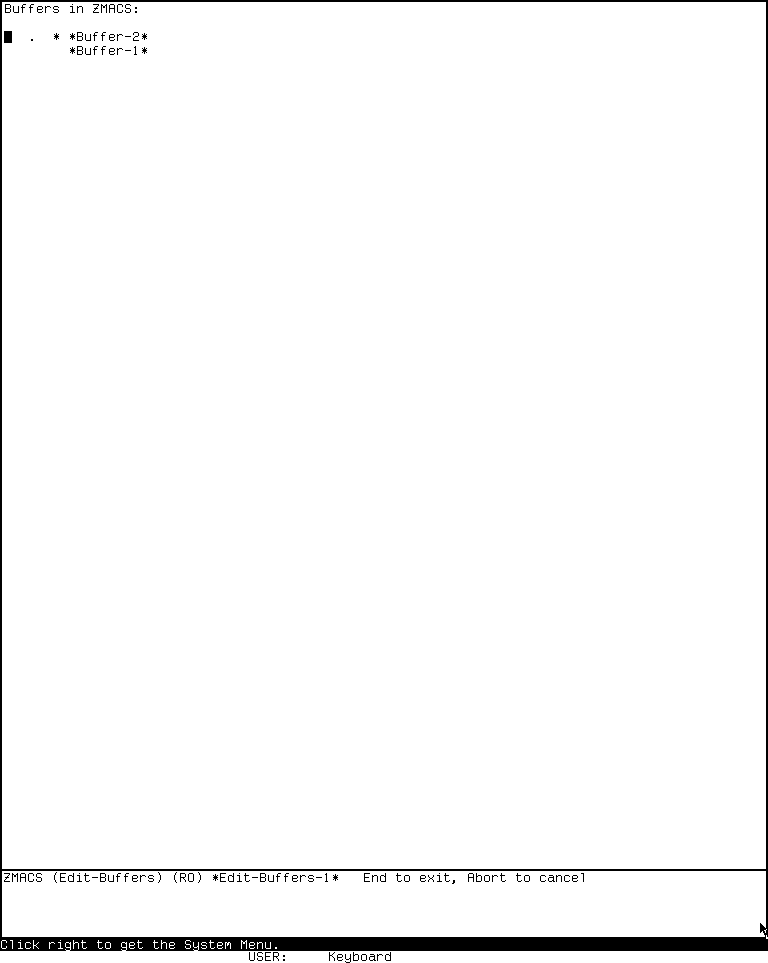
Runtime observation — System 303-0, session d06-d07-20260718, generation 1, 2026-07-18: the named Edit Buffers command displayed two rows, four action columns, a read-only Edit-Buffers mode line, and visible End/Abort guidance. The 768-by-963 PNG has SHA-256 bfb96fecd7fc0bac92cc795a687eb0b1e938756fab07ccd9a3a28635f4453a0b and normalized-pixel SHA-256 7e7e951204b44fe98b13b8c0d9e0bdc00fcbc25c4476e0ec74bf7650505a1be2. It establishes only this initial visible state, not the later unmark defect or any destructive effect; full portable provenance and publication review are in the CADR screenshot catalog. Published for reviewed fair-use scholarship; MIT, LM-3, and contributors do not endorse this museum.
A source-and-runtime-confirmed unmark bug
The Help text says U cancels every operation on a buffer. The implementation should clear columns 0, 1, and 2, but assigns a space to column 0 three times. In a fresh System 303 run, a row was marked K and P; U removed K while leaving P visible. This is not a hypothetical static-code complaint: source and observed behavior agree, and the installed Help disagrees with both.
The defect is historically instructive because it follows directly from the four-column representation. The later Genera editor uses one action column, so the same class of partial-unmark error cannot occur there.
Two other ordering defects matter to a compatible reconstruction. W retargets the buffer pathname and clears its file identity before output, so a failed write can leave a detached or retargeted buffer. The selected KILL-BUFFER accepts but ignores its no-save parameter, so Edit Buffers can still prompt to save a modified buffer even after N clears the file-I/O column. Earlier per-row and per-column effects survive a later error.
System 303 List Buffers and Kill Or Save Buffers
List Buffers is a TV typeout report
Control-X Control-B emits a transient report rather than entering Edit Buffers. Rows follow the current window's buffer history when that option is active, otherwise the global buffer list. A single status glyph is chosen by priority: new file +, otherwise read-only raw 036, otherwise modified *, otherwise blank. Each row is a TV typeout item carrying the buffer object.
Mouse-1-1 selects the buffer. Mouse-3-1 opens the seven-operation row menu in source-registration reverse order: Compile File, Kill, Print, Unmod, Save, Write, Select. These operations take effect independently; the report supplies no modal keyboard table or report-level transaction.
Kill Or Save Buffers is a TV multiple-choice surface
This surface is available as a named/extended command and generic Zmacs menu item; the selected System 303 tables provide no dedicated fixed key. Rows group modified, new, ordinary, and read-only buffers. They offer Save, Kill, UnMod, and a conditional Compile choice for Lisp-syntax file buffers. The chooser owns pointer boxes and bottom-margin Do It and Abort affordances, not an application keyboard comtab.
Default state depends on the exact numeric value: ordinary value 1 selects Save for buffers needing it; Control-U value 4 clears those defaults; Control-U Control-U value 16 selects Kill for every row without clearing preselected Save. Do It moves the current buffer last and performs Save, Compile, UnMod, Kill per row. The same ignored no-save defect means a Kill-only modified buffer can still prompt. Abort or deexposure performs none of the selected actions; an error leaves earlier rows' effects intact.
Genera 8.5 Dired
Genera preserves the one-row-per-file interaction but implements the buffer as a DIRED-NODE-MIXIN over a read-only node. Revert uses FS:DIRECTORY-LIST :SORTED :DELETED, attaches pathname metadata to file rows and switch metadata to switch rows, leaves headers and the disk-space summary as nonrows, and places point on the first file row. The protected-update wrapper copies the old nonempty interval and records one sort property. If rebuild aborts, it removes the new contents, reinserts that saved interval, and restores that property. This is bounded display recovery, not a general transaction: it does not establish restoration of point, ticks, every buffer property, an initially empty interval, or prior filesystem effects.
Dired is available through Edit Directory, the synonymous Dired Zmacs command, and Control-X D for the current file's directory. The Genera workbook additionally documents Command Processor entry through Edit Directory pathname.
Complete Genera local controls
| Binding(s) | Operation |
|---|---|
Space |
Move to the next real line |
!, @, $ |
Next not-backed-up file; toggle Don't Delete; toggle Don't Reap |
., ,, = |
Change properties; describe attributes/compilation data; source-compare |
0–9, - |
Build or negate a numeric argument |
?, Help |
Show Dired's local Help |
A, a |
Mark files for applying a function |
C, c |
Copy |
D, d, Control-D, K, k, Control-K |
Mark for soft deletion |
E, e |
Edit a file, or open another Dired buffer for a directory |
F, f |
Mark for formatting and hardcopy |
G, g |
Set and enforce generation retention |
H, h |
Mark excess versions automatically |
I, i |
Execute marked operations immediately, refresh, and remain in Dired |
L, l |
Load into Lisp |
N, n |
Find the next file with excess versions |
P, p |
Mark for hardcopy |
Q, q, End |
Confirm marked operations and exit |
R, r |
Rename |
U, u |
Remove a deletion or other pending mark |
V, v |
Show a file or directory without editing it |
X, x |
Enter an extended command |
Rubout |
Move upward and unmark |
Abort |
Exit without executing marks |
Mouse-3-1 |
Open Dired's fixed mode menu |
The local named command Show File Properties supplements the keys. The fixed menu has 14 items: increasing and decreasing sorts by reference date, creation date, file name, size, and partition; Automatic and Automatic All; Change File Properties; and Describe Attribute List.
An undelete is not represented by a U glyph in this release. U writes a blank; at execution, blank plus the row's independent deleted state means undelete, while blank on an ordinary row means no deferred action. The displayed confirmation choices are Dynamic Windows presentations as well as character choices, so selecting one with the pointer returns the same Yes, conditional Expunge, No, or Abort result. Expunge is offered only when deletion work exists and either the host supports undelete or the mutable always-offer option is true; that option defaults to NIL.
Dired-buffer reuse is identity-sensitive: the requested pathname must be EQ to the stored object, not merely pathname-equal. After confirmed operations, the mutable exit policy retains the Dired buffer by default, may kill it, or may ask; the ask occurs after file effects, so abort there does not roll them back.
Two implementation details extend the manual's task-oriented account. First, before hardcopying, Dired accepts a canonical file type with an installed hardcopy formatter or applies a conservative text heuristic; it rejects known binary or structured types and considers byte size and host machine type. Second, aborting a failed protected buffer rebuild restores only the copied old interval and recorded sort property described above. The configured source default for disposable file types is exactly (:UNBIN :OUTPUT); docstrings that additionally mention Press do not match that default. Because the variable is mutable, its value in the exercised world remains a read-only runtime TODO.
Genera Edit Buffers, List Buffers, and Kill Or Save Buffers
Edit Buffers is a read-only special node with line-property rows
Genera's EDIT-BUFFERS-BUFFER is a read-only special-purpose node whose filter can be absent, one case-insensitive substring, or an OR-list of substrings. A numeric argument to Edit Buffers prompts for one substring; the presentation/internal route can preserve a list. Its heading is a ZMACS-BUFFER-LISTING presentation, so a displayed List Buffers result can be translated directly into an editable list with the same filter. Edit Buffers rows themselves store the actual buffer in the line's :BUFFER property and use an action character at column zero; they are not emitted by the presentation wrapper used for List Buffers report rows.
Unlike System 303, there is one column per row: . marks the current buffer after a rebuild, while D, S, and ~ are deferred actions and blank means no mark. An action overwrites the period. E immediately selects the row's buffer without executing any other marks. Exiting conditionally selects a buffer when point is on a buffer row, then performs saves, not-modified operations, and kills. H automatically marks modified or new file buffers for saving.
Complete Genera Edit Buffers local controls
| Binding(s) | Operation |
|---|---|
Space, Q, q, End |
Execute marked actions, conditionally select when point is on a buffer row, and exit |
?, Help |
Show the local command explanation |
D, d, Control-D, K, k, Control-K |
Mark for deletion |
E, e |
Select immediately without executing marks |
H, h |
Mark every modified or new file buffer for saving |
S, s |
Mark for saving |
U, u |
Without an explicit argument, unmark the previous row when the character under point is Space and the current row for any non-Space; explicit counts set direction |
X, x |
Enter an extended command |
~ |
Mark the buffer not modified |
= |
Source-compare the buffer with its associated file |
0–9 |
Build a numeric argument |
Rubout |
Move upward and unmark |
Abort |
Exit without taking marked actions |
The source table contains 36 local cells when digit expansion and lowercase aliases are counted. At the surrounding Zmacs level, Control-X Control-Shift-B invokes Edit Buffers in the inspected source; Control-X Control-B is List Buffers. The isolated runtime capture agrees: its Buffers in Zmacs heading, explanatory status-character legend, and unchanged Zmacs (Fundamental) mode line identify the nonmodal List Buffers typeout report. The earlier Edit Buffers classification was a documentation error, not a source/runtime discrepancy.
Source evidence is exact for the selected profile: zwei/zmacs.lisp.~1058~:141 binds C-X C-B to List Buffers and :155 binds C-X C-Shift-B to Edit Buffers; zwei/buffer-editor.lisp.~12~:64-93,155-185 defines the Edit Buffers local table, mode line, and line-property rebuild, while :328-346 defines List Buffers and its presentation-wrapped report rows. The reclassified 1200-by-900 PNG is zmacs-list-buffers.png, SHA-256 970c299ec6f091dd2895022bd24935abb897931110b592e8c3517cde6a936963.
= requires a file buffer with an associated pathname. Its bit-decoded numeric argument uses bit 2 to ignore case and character style and bit 4 to ignore whitespace. This source-visible comparison control is absent from the concise manual description of Edit Buffers.
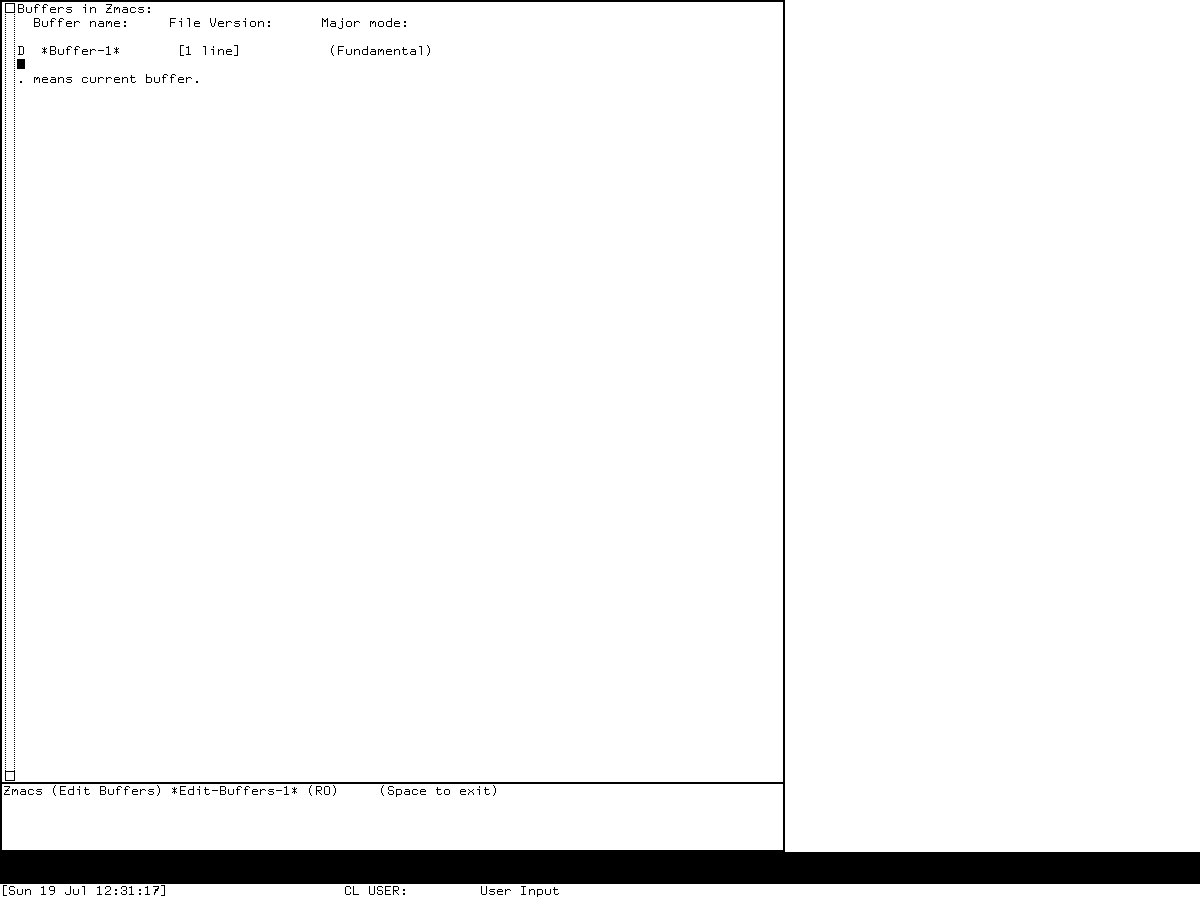
Runtime observation — Genera 8.5, session d06-edit-buffers-genera-20260719, generation 1, 2026-07-19: explicit modifier events delivered Control-X Control-Shift-B; the mode line identified Zmacs (Edit Buffers) *Edit-Buffers-1* (RO); and lowercase d put D in the single action column. No marked action was executed. The 1200-by-900 PNG has SHA-256 72ab740da8adc1cbe6c1b784ece34679b5b21d12ad01a54a686d53badc1b1de0 and normalized-pixel SHA-256 61469b3f957c209b6860ef00c273393968fc0b735a49466ccce01b992b5ce133. It proves only the recorded entry and visible mark transition; full provenance, shutdown limits, and publication review are in the Genera screenshot catalog. Published for reviewed fair-use scholarship; Symbolics and other rightsholders do not endorse this museum.
List Buffers is a mouse-sensitive report
List Buffers is not merely the non-editable spelling of Edit Buffers. It sorts by recent selection unless *SORT-ZMACS-BUFFER-LIST* is false, shows the buffer name, version or description, and major mode, and emits each row as a presentation. Its status characters distinguish a new or non-file buffer, a modified file, read-only state, and truncation. List Buffers passes no current-period flag, so it neither shows nor explains a current-buffer period; that period belongs to Edit Buffers. A numeric argument filters names by a prompted substring. A concrete live row hit and winning presentation translator remain TODO; the reviewed report screenshot alone does not prove recognition.
Kill Or Save Buffers is a multiple-choice manager
Control-X Control-Meta-B invokes a separate TV:MULTIPLE-CHOOSE interface. It groups modified files, new/non-file buffers, unmodified files, and read-only buffers, then alphabetizes within groups. Without a numeric argument, Save is preselected only where the buffer's :MODIFIED-P :FOR-SAVING result is true: modified existing-file buffers and new/never-read file buffers. An ordinary nonempty non-file buffer can display + yet does not receive the default Save selection. Any numeric argument suppresses default Save, regardless of magnitude.
Each row offers Save, Kill, Unmodify, and Hardcopy. Save or Kill clears Unmodify; Unmodify clears Save but not Kill; Hardcopy is independent. Do It moves the current buffer last and executes the source-defined order Unmodify, Save, Kill, Hardcopy per row. This must not be called a safe order: selecting Kill and Hardcopy attempts the hardcopy operation on the buffer object after removal, and that exact runtime result remains TODO. Abort performs no selected operation; a later error does not roll back earlier rows.
This three-way split is easy to miss in a feature list:
| Surface | Best use | Interaction model |
|---|---|---|
| List Buffers | Inspect and point at buffers | Presentation report and source-defined row menu; live exact-hit probe pending |
| Edit Buffers | Schedule one main state change per row with keyboard motion | Special read-only Zwei node |
| Kill Or Save Buffers | Apply several lifecycle actions across many buffers | Multiple-choice graphical menu |
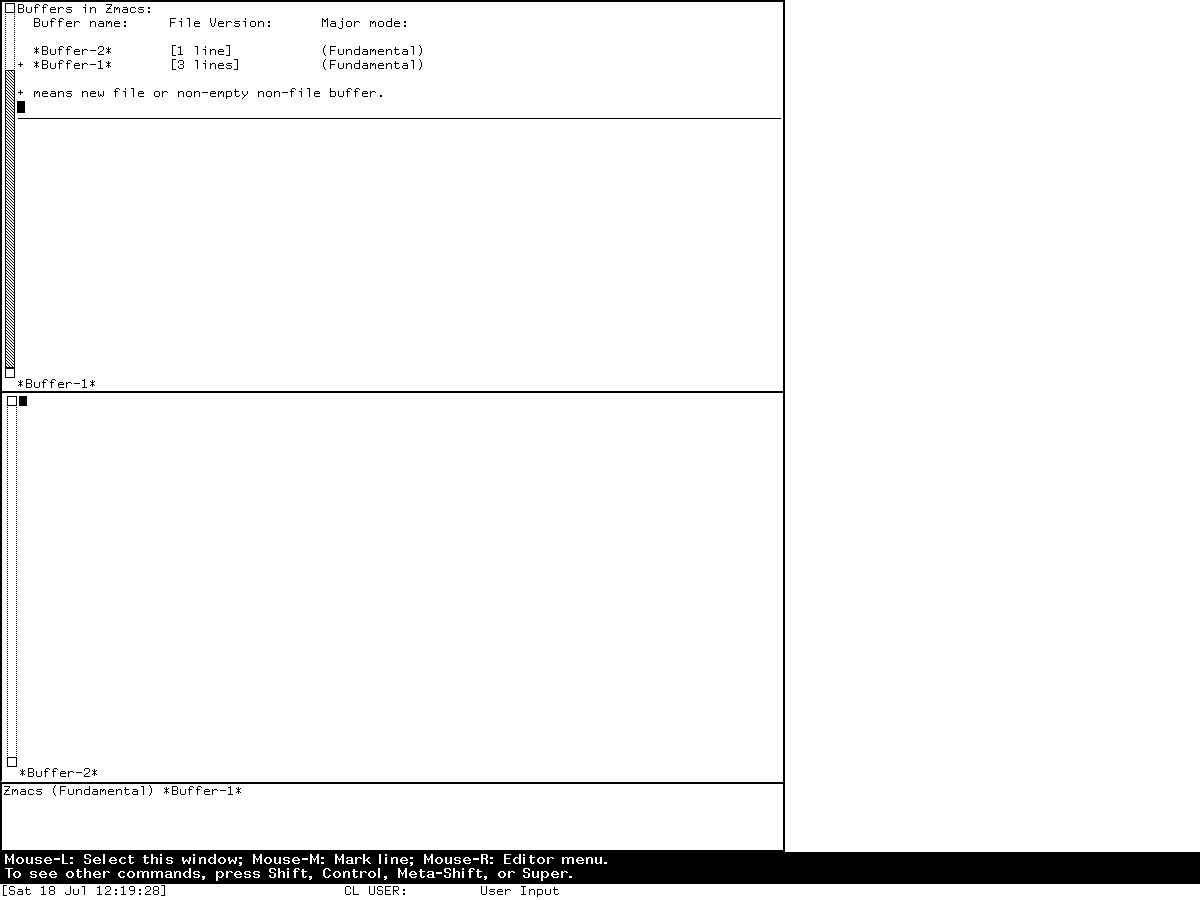
Runtime observation — Genera 8.5, session zmacs-research, generation 1, verified 2026-07-18 and reclassified 2026-07-19: Control-X Control-B displayed the List Buffers typeout report containing *Buffer-2* and *Buffer-1*. Its heading, legend, and unchanged Fundamental mode line rule out the distinct Edit Buffers application. The image remains evidence for the presentation-backed report; its full provenance and publication review are in the Genera screenshot catalog. Published for reviewed fair-use scholarship; Symbolics and other rightsholders do not endorse this museum.
Compare Directories is a Command Processor report, not BDired
No active Genera BDired implementation was found in the selected source corpus. The directory-difference surface is the typed Command Processor command Compare Directories. It accepts two wildcard-version pathnames and an explicitly mentionable Boolean Ignore Versions argument, then obtains both listings and emits up to two separately resortable Dynamic Windows records, one per nonempty difference side. Its six application views are Name, Type, Smallest First, Largest First, Oldest First, and Newest First.
The comparison is metadata identity, not content diffing: name and type are compared with Common Lisp EQUALP, and version is included unless Ignore Versions is true. Device, directory components, and contents are not compared. The command performs no file mutation and owns no raw key, prefix leaf, pointer translator, or menu accelerator; it inherits Command Processor input editing and generic resortable-output behavior. The both-empty, equal-but-not-identical pathname branch and a live six-view report remain explicit runtime TODOs.
Fresh System 303 runtime observations
A fresh isolated CADR session named d06-d07-20260718, generation 1, used the System 303-0 load band and the current LM-3 private copies. The run began at 04:37:29 and ended at 04:57:54 EDT on 2026-07-18. It stopped cleanly: forced_stop=false, state_may_be_incomplete=false, and both emulator and Xvfb exited zero. The base disk remained byte-identical.
| Item | Recorded value |
|---|---|
| Load band / base disk | SHA-256 bb16e46ad81decfe1efe691d36b6aa4ce3fd4ffb82474365de3520989d397cb5 at start and stop |
| Public System tree | check-in 4df393c68d7f083ce42d5c377039d26043cc18a9031ace28258dc97f4137eb91 |
| Public L tree | check-in d1250f90044f09b6c92014a9aef65f9574e1bcbf8a7163004e53cc6dbed0f2d6 |
| Public emulator / site / Chaos trees | 330d8248ec2e12af071e287920e681600f75df9ffd854aada5f8a64c9adad64d; 8f717978b458b40adf1e238aaf177f5bc54ef46881268e03b787ba57b0d30a0e; db2953fde68d726a605d1d1699bab6c926ef252bd4991f692bae6ee5a634764e |
| Private System / site / Chaos tree hashes | 21f5215de973aa6ccbddb817f2d64edd95ee1014c3028a9b0711ea7c741b807e; adbb720339db225e6635977a869cf3f3d50b507e614b37a976f4a6548d212a81; 34ab197641aae909e9a224edc307020fddec263e732207a74573d51dac0daa87 |
| Emulator at start and execution | SHA-256 707a77d23e28ea1c45ae0eb0145dc181fa7ba649b9defc30044d4f847ac2c5be for both recorded phases |
| Machine artifacts | promh.mcr 2c667f99f014a7130a55b255d31df02588d9396beace78abfe9325269e4ff3e6; promh.sym e9e3dd6a541511dd9541ae96b99dae19cb185d8b79fa09959f21fa52224f233d; ucadr.sym 9071decf16fa8f11d7970c4662db0d6e95600fe43ec86ac41c77b37dbd7caa2a |
| Toolchain | manifest.scm SHA-256 3adae999bbe420182f22adc2499fcc82449a46eaf580a362de9c0e718fa6b37d |
| Window | LOCAL-CADR [running], XID 2097202, 768 x 963 |
The meaningful input sequence was: finish the date dialogue; enter Zmacs with (ED T); invoke Dired; abort the unconfigured remote-file login path; invoke Edit Buffers; display local Help; mark and unmark rows; create the combined kill-and-print case and test U; abort without executing it; then exercise editor and System Help. Earlier mistyped date-dialogue input is setup noise and supports no application claim.
Three visible conclusions were established:
- Dired prompted with the default
ED-FILE: WILDand then attempted an ED-FILE login. This preserved world has no configured credentials or file-service session, so a populated Dired listing was not reached.Abortleft a modified special buffer prompt, which was declined. Full Dired and BDired filesystem workflows remain runtimeTODOs requiring a disposable, deliberately configured service. - Edit Buffers displayed
*Buffer-2*and*Buffer-1*, with a mode line identifying the read-only Edit-Buffers mode and itsEnd/Abortchoices. Lowercasedvisibly produced the implementation'sKkill mark;Ruboutcanceled it. - The combined
KandPexperiment reproduced theUdefect described above.Abortthen exited without executing either pending action.
Raw captures and records remain in the ignored session tree. Only the minimal initial-state capture embedded above passed the exact-use publication review. The later raw frame that visibly contains the combined marks and partial unmark remains local; the tracked defect claim is instead grounded in the source, linked runtime actions, and observation record. No ignored build path is linked from this article.
Source findings the manuals do not make obvious
- System 46 does not merely have fewer Dired commands; it consumes a different directory representation and reuses one global special buffer. System 303's pathname and nesting model is an architectural rewrite.
- System 303 Dired remembers expanded subdirectories across revert and can operate on several directory pathnames in one buffer.
- BDired's apparent file list is a view over two mutable compiled-directory graphs. Transfer destinations exist in the model before the editor paints
Tmarks. - System 303 Edit Buffers can schedule four independent classes of work on one row, which produces both its flexibility and the live
Ubug; its ignored no-save parameter and pre-output Write retargeting create two additional failure edges. - System 303 List Buffers uses semantic TV typeout items, while Kill Or Save Buffers uses a TV choice window with exact numeric-argument-dependent defaults. Neither is the Edit Buffers mode.
- Genera's Edit Buffers heading is a
ZMACS-BUFFER-LISTINGpresentation, while its editable rows are line-property records. List Buffers instead emits each report row as a buffer presentation. The filtered report heading can therefore enter the editable view without making the two row models identical. - Genera's
Kill Or Save Buffershas asymmetric choice implications, a Save default that is narrower than the visible+group, source-defined effect ordering, and current-buffer-last handling. None follows from the four visible choice labels. - Genera Dired provides bounded recovery for a copied nonempty interval and one sort property after an aborted rebuild; it does not provide general transactional rollback.
- Genera's directory comparison is a nonmutating Command Processor/Dynamic Windows report, not a surviving BDired editor and not a file-content comparison.
Preservation and open questions
- Complete a safe System 303 Dired and BDired runtime study against a disposable local file service. Do not enter credentials into a preserved public session.
- Capture a fresh Genera Dired listing and confirmation screen in the isolated VLM only after a non-external, disposable guest-visible pathname is established. The current harness intentionally exposes no host file service.
- Exercise System 303 and Genera List Buffers with an exact semantic row hit, and exercise both Kill Or Save chooser variants using disposable synthetic buffers; abort before any unwanted action.
- Exercise Genera Compare Directories against two disposable guest directories, including all six resort views and equal-but-distinct pathname objects.
- Read the live Genera Dired retention and disposable-type variables without mutation, and test the no-printer and Kill-plus-Hardcopy source-order edges only with disposable fixtures.
- A Dired login prompt is not a substitute for a populated listing and should not be published decoratively.
Sources
- MIT CADR System 46,
nzwei/dired.55, 34,913 bytes, SHA-256fc5f0853854383b4c6dc81949b67fb452a478fd728b8b6eae88112ec3e40c3eb. - MIT CADR System 46,
nzwei/macros.36, 21,668 bytes, SHA-25698bb23fae9aec8c3d8582df0b475d11c7dc5241a8fa29fcfc806ce27e1773b51. - MIT CADR System 46,
lmwind/operat.27, contemporary operator documentation for the reusable window and Help environment. - LM-3 System 303,
zwei/dired.lisp, 110,561 bytes, SHA-25634155fec3311a969cfbed31c640b59159f28251b179f51b4c4a6c08b19c9eb34. - LM-3 System 303,
zwei/bdired.lisp, 16,636 bytes, SHA-25658c365d9972cb22448e035ed220535e47dc2dc9ea02444a1416441b0c7009d22. - LM-3 System 303,
zwei/zmacs.lisp, 115,156 bytes, SHA-256513f39d440a6612ff7d3d540a62b397fe6348456bd36a450262ff6fa372799d0. - LM-3 System 303,
zwei/patch/zwei-126-2.lisp, 24,793 bytes, SHA-25645e055c0bda04612dccef58bf6f8994fb0591b78c69fa0f2aa4c23a131871f6a. - Symbolics, Genera Workbook, “The Directory Editor - Dired” and its walk-through.
- Symbolics, Genera User's Guide, entries for Dired, Edit Buffers, List Buffers, and Kill Or Save Buffers.
- Licensed local Genera 8.5
zwei/dired.lisp.~465~, 78,695 bytes, SHA-256d988987ca7220fd156a0c35eca2651e009c0054a8b9b86774890bfcaa6055da5,zwei/buffer-editor.lisp.~12~, 24,248 bytes, SHA-256f339b6b55994148b02c46dbca3fd532a4784d67b8ae24d89fa9ef954c07bef14,zwei/zmacs.lisp.~1058~, 31,456 bytes, SHA-256082959472626b04d74631ada24bb8ad164bc44ef19f292343f905fbf10bf1d2f,zwei/zmacs-buffers.lisp.~54~, 64,709 bytes, SHA-2565e7866786dffc8ec03cc3df6b0cd21277ac34656351a494c8e7656a837549bcf,zwei/files.lisp.~378~, 88,157 bytes, SHA-256f627f666b0fe9ca7a1450526f081685b95b2c7e522a06d71b6db962345e957bc,zwei/macros.lisp.~276~, 71,023 bytes, SHA-256c7db63e24f706e2fa102db25026a8556ebfbc950d18592c0817f7b48274ad59d,zwei/spcbuf.lisp.~295~, 22,232 bytes, SHA-256ad8abc312034282e2b4d5430dec03d26c2d031e6ad32951cf6bc5b3f9f18b83e,io1/fquery.lisp.~104~, 13,320 bytes, SHA-256022823ae8dddbf64c598ab59bde00945c9b5e621191617b1374a84f020730e0f, andcp/development-commands-2.lisp.~35~, 53,146 bytes, SHA-25697c058d361860a393fe32e0c02bc03f5e5d1ceaff5f3bb4640b96f899439c3ce. - Fresh System 303 Xvfb session
d06-d07-20260718, generation 1, observed 2026-07-18; Genera sessionszmacs-research, generation 1, andd06-edit-buffers-genera-20260719, generation 1, with limits described above and in the curated catalogs.
Last verified: 2026-07-19.