Help, self-documentation, and Document Examiner on CADR and Genera
On the Lisp Machine, Help is an active protocol among command tables, key registries, object metadata, presentation types, application handlers, and document databases. It is not one manual viewer and it is not reducible to a Help key.
MIT System 46 already has three distinct layers: ZWEI can explain its live command environment, the window system can enumerate registered System and Terminal keys, and Lisp and Flavors retain documentation with definitions. The maintained LM-3 System 303 tree extends those paths and makes their runtime limits visible. Genera keeps editor self-documentation, adds reusable pop-up Help and program-aware Help frameworks, and supplies the Document Examiner for searching and reading the full installed Sage documentation database.
The result is best understood as a routing graph:
| Request | Runtime authority | Typical result |
|---|---|---|
| “What does this editor key do here?” | Active Zwei command-table chain, command hooks, and command documentation | Context-sensitive key explanation |
| “Where is this editor command?” | Active command tables and named-command alists | Current binding or absence |
| “What can follow System/Select or Terminal/Function?” | Mutable key registry | Live table of program or display commands |
| “What is this Lisp definition or flavor?” | Definition properties, compiled debugging records, flavor metadata | Docstring or structural description |
| “What does this program command/menu/option mean?” | Genera Help Program mapping plus the Sage topic index | Program-specific topic in Help or Document Examiner |
| “What documentation discusses this idea?” | Document Examiner topics, types, keywords, links, candidates, and tables of contents | Searchable installed documentation |
The companion preservation articles explain how the public CADR help corpus and the licensed Genera databases are recovered. This dossier concentrates on the user-facing programs and the code paths that produce their behavior. The implementation-ready companion is the Help, self-documentation, and Document Examiner reimplementation specification, which carries the exhaustive effective input trees, source-visible defects, binary private-document grammar, failure ordering, runtime oracles, and conformance tests.
Evidence and release boundaries
| Boundary | Evidence | Limitation |
|---|---|---|
| MIT CADR System 46 | Public source and operator manual at commit 8e978d7d1704096a63edd4386a3b8326a2e584af |
Source snapshot, not a live census of every historical band |
| LM-3 System 303 | Maintained public Fossil check-in 4df393c68d7f083ce42d5c377039d26043cc18a9031ace28258dc97f4137eb91 and a fresh System 303 run |
Maintained restoration tree; loaded-world metadata can differ from source |
| Symbolics Genera 8.5 | Licensed local source, installed documentation inventory, Genera 8 manuals, and isolated runtime evidence | Licensed prose and source remain untracked and are described only in original words |
System 46 ZWEI self-documentation
Help is a dispatcher over the active editor
System 46 Help runs COM-DOCUMENTATION, which reads one more character and dispatches to a documentation operation. The complete System 46 dispatcher is:
| Option | Operation |
|---|---|
A |
Command-name apropos; also reports known bindings |
B |
View the basic ZWEI introduction at AI: ZWEI; BASIC ZWEI |
C |
Read a key and document its command in the active command table |
D |
Read a named command with completion and show its full documentation |
L |
Show the recent input history (“lossage”) |
U |
Invoke Undo |
V |
Search documented editor variables by name |
W |
Read a named command and find every key that invokes it |
Space |
Repeat the preceding Help request |
? |
Explain the Help dispatcher itself |
The B path is a real runtime file consumer, but the public System 46 source tree's basic.zwei is only a short historical placeholder. It proves the intended entry point, not recovery of the missing tutorial.
What “document this key” actually handles
The implementation does more than look up a symbol and print a string. It follows aliases, descends into prefix command tables, can list every subcommand of a prefix, identifies user keyboard macros, enumerates menu-command members, and invokes HOOK-DOCUMENTATION-FUNCTION handlers contributed by active command hooks. A command can provide an ordinary documentation property or a DOCUMENTATION-FUNCTION that computes its display name, short description, or full description for the particular key.
This is why editor Help can describe a mode-sensitive key accurately when a static manual cannot. The lookup begins with the active command table, not with a global binding appendix. Where Is traverses prefix tables and the current documentation dispatcher as well as direct keys; Apropos can state how a matching command is invoked.
The source-visible boundaries also matter. A named command without a documentation property can appear in a command table but produce little useful prose. A basic-help pathname can exist while its target is missing. Macro expansion, mode hooks, and runtime table mutation can change the answer after the source is loaded.
System and Terminal Help on CADR
System Help and Terminal Help belong to the window/keyboard system, not to ZWEI.
SYSTEM HELP walks TV:*SYSTEM-KEYS*, a mutable registry whose rows identify a character, a window or flavor, printable documentation, and how a new window may be created. The same registry drives actual program selection. System 46 preserves exact modifier identity and does not give Control a generic create meaning. System 303 instead records Control as force-create, strips it before lookup, and creates where the row permits. System Rubout cancels the prefix. The contemporary operator manual explicitly recommends System Help because sites and programs can add choices.
TERMINAL HELP walks the independent *ESCAPE-KEYS* table. Each row contains a character, handler, optional documentation, and execution options such as preserving typeahead or running in the keyboard process. Rows with no documentation are omitted; the display then appends the fixed special-function-key summary. This is a generated view of the table, not a hard-coded list pretending the registry cannot change.
The System 46 operator manual describes the ordinary Help key as a request for on-line documentation or programmed assistance and points readers to these two prefix-help systems. The architecture matches the manual: Help is a convention that individual programs and registries implement, not one global help process.
Lisp and flavor self-description on CADR
The Lisp layer provides a parallel path. System 46 FUNCTION-DOCUMENTATION checks symbol metadata, source lambda forms, and documentation retained in a compiled FEF's debugging information. Flavors carry documentation, instance-variable descriptions, component relationships, and method metadata. DESCRIBE, APROPOS, inspector operations, and DESCRIBE-FLAVOR turn these data into user-visible reports.
These paths overlap with editor Help but are not identical. ZWEI's PRINT-DOC reads the command-oriented DOCUMENTATION and DOCUMENTATION-FUNCTION properties. The general Lisp documentation accessor follows its own document types and compiled function records. A DEFCOM can therefore have useful editor Help even when a general DOCUMENTATION query returns NIL in a particular world.
System 303 changes and complete ZWEI Help choices
The maintained System 303 zwei/doc.lisp removes the System 46 B file-view option and makes the displayed choice list conditional. L appears only when the input stream supports playback; U is unconditional. The predicate filters the prompt, not acceptance, so a hidden L can still be typed. Its A operation is specifically current-mode apropos, whereas a separate implementation path can search the broader command set.
In the fresh runnable world the dispatcher displayed the complete available set:
| Choice | Observed or source-defined role |
|---|---|
C |
Describe a key in the active editor context |
D |
Describe a named command |
L |
Show recent input |
A |
Search commands accessible in the current mode |
U |
Undo the last editor change |
V |
Search editor variables |
W |
Find command bindings |
Space |
Repeat the prior Help request |
Help |
Explain the dispatcher |
Three source-visible edge cases are not apparent in the menu. The initial repeat choice is still B, so fresh Space finds no row and silently reprompts. The code has a ? Help branch after validation, but validation rejects ?, making that branch unreachable. Prompt predicates are evaluated forms and can have effects or fail.
The System 303 key documenter adds explicit mouse-scroll explanation and understands sparse as well as array command tables. The named-command search distinguishes a key-bound command, a command reachable through the local extended-command dispatcher, and a command available only through the broader “any extended command” path.
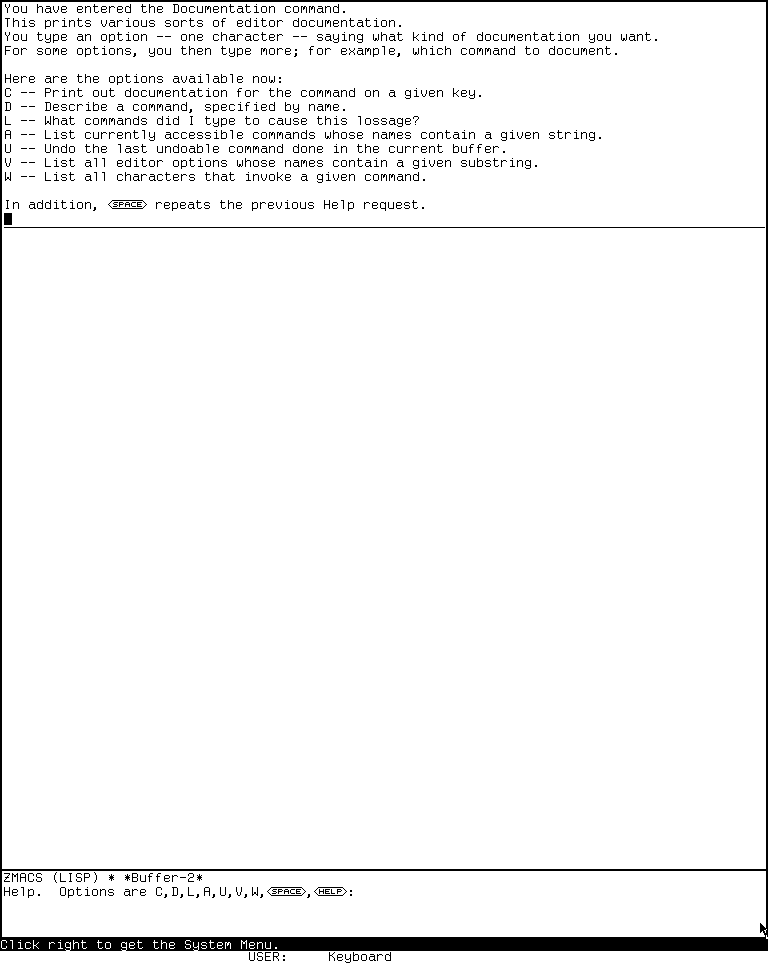
Runtime observation — System 303, fresh session d06-d07-20260718, generation 1, verified 2026-07-18: pressing Help and then Help displayed the current editor dispatcher choices. This reviewed screenshot is evidence for this world, not every CADR load band; full capture and publication provenance are in the CADR screenshot catalog. MIT and other applicable rightsholders retain interests in the screen expression; this minimum image is published under the page-specific fair-use review to support historical criticism, and no endorsement is implied.
Genera Zmacs self-documentation
Genera retains the same command-oriented design while changing the dispatcher. Its complete static option set is:
| Option | Operation |
|---|---|
A |
Search command names and, normally, the first documentation line; a numeric argument restricts the search to names |
C |
Document a key or mouse character in the active command table |
D |
Describe a named extended command |
L |
Display the last 60 input characters when playback is available |
T |
Load, if necessary, and run the Teach Zmacs tutorial |
U |
Offer to undo the last buffer change when change history exists |
V |
Search editor variables |
W |
Report whether and where a named command is bound |
Space |
Repeat the most recent Help request |
?, Help |
Explain the dispatcher |
Abort, Rubout |
Leave the dispatcher without a request |
Genera still initializes the repeat slot to B although it has no B row, so fresh Space silently reprompts. Once ? or Help is entered, that dispatcher-help request becomes the repeat target and the following Space replays it. The L/U predicates filter the displayed prompt but do not prevent direct entry of a hidden option.
Genera Apropos searches both names and short documentation and then processes explicit synonym sets regardless of whether command matches occurred, so it can propose related search words such as insert/yank/paste and kill/delete/remove. Where Is reports that a command is not available in the current context rather than treating presence in a global alist as availability. The key documenter follows aliases and prefixes, enumerates menu members, and can accept a mouse input object.
T is more than a label. If the Teach Zmacs command is not installed, the code loads SYS:EXAMPLES;TEACH-ZMACS with ordinary load chatter suppressed, then invokes the Command Processor's Teach Zmacs command. The tutorial's text remains a licensed local asset described in the Genera help recovery article.
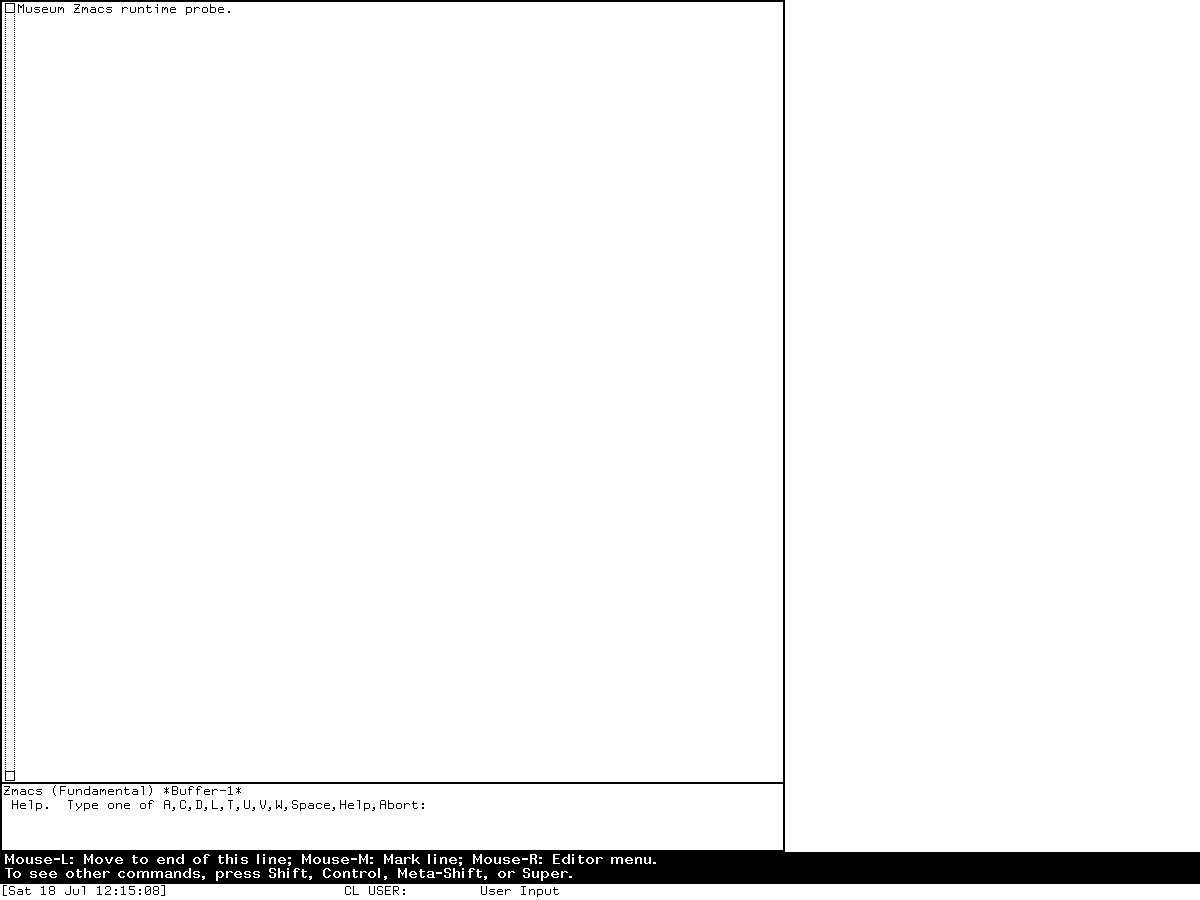
Runtime observation — Genera 8.5, session zmacs-research, generation 1, verified 2026-07-18: host F12 reached the Zmacs Help dispatcher after recorded host-key translation probes. The image establishes that harness mapping and the displayed choices, not the physical location of Help on a Symbolics keyboard. Full provenance is in the Genera screenshot catalog. Symbolics and other applicable rightsholders retain interests in the licensed screen; this minimum image is published under the page-specific fair-use review to support historical criticism, and no endorsement is implied.
Genera's reusable Help Program
The help-program framework lets a Dynamic Windows application map its own concepts onto Sage topics. It defines mappings for:
- an application overview topic;
- a command name in the program's inherited command table;
- a command-menu item at any menu level;
- the program title itself; and
- an Accept Variable Values option, using its prompt as a topic component.
The framework checks the live Sage topic index before offering a result and caches availability only until that index's fill pointer changes. Help-topic completion can mix overview records, program commands, and command-menu items. When a command or menu item maps to an available topic, the framework invokes Sage's Show Documentation command; otherwise it reports that the requested program concept is not documented.
Mouse-middle is assigned the :command-menu-help gesture. Thus a program menu item can use one gesture to invoke its command and another to request documentation about the item. The program's title is itself a program-name presentation that can be translated to Help about the program. This is semantic application Help: the object under the pointer and the active program determine the topic.
Source also contains a missing-help audit that would compare inherited commands and menu handlers with available topics, but the entire definition is block-commented in the inspected revision. It is evidence of an intended maintenance tool, not an installed command.
The Genera pop-up Help frame
The nonselectable help program inherits from Help Program and supplies the ephemeral frame used by Select Help, Function Help, Symbol-Help, and debugger Control-Help. SHOW-HELP finds or creates a matching frame in the caller's optional console/superior domain, changes its title and display function, selects it, and can wait for the user to return. Deexposure buries the frame, so it behaves like a temporary inspection surface rather than a permanent application activity.
Its fixed frame-specific leaves and commonly visible inherited controls are:
| Binding or gesture | Operation |
|---|---|
End, Abort |
Bury/exit the Help frame |
Help |
Display Help about the Help frame itself |
Scroll |
Scroll forward |
Meta-Scroll |
Scroll backward |
Meta-<, Meta-> |
Move to the beginning or end |
Control-S, Control-R |
Search forward or backward in displayed text |
Control-Mouse-Left |
Mark text |
Control-Mouse-Right |
Open the marked-text menu |
Super-W, Meta-W |
Push marked text onto the editor kill ring |
Refresh |
Redisplay the frame |
The complete effective table is larger: Standard Arguments supplies only modified minus/digits/Infinity; Input Editor Compatibility adds horizontal/typeout scrolling, display-position save/restore prefixes, search aliases, Cut/Copy/unmark, five no-op keys, and the full typed pointer tree. Exact aliases, numeric acceptance and errors, prefix leaves, fallthrough, and stale-frame cache tests are in the D07 specification.
Function Help enumerates the mutable function-key table. Select Help enumerates the live Select-key table and turns each activity name into a presentation, while explaining Control-modified creation and the cancel gesture. Symbol-Help describes special function and character keys. The displays are therefore regenerated from runtime registries where possible, not copied from one static keyboard chart.
Document Examiner
Purpose and entry points
Document Examiner is Genera's application for finding, navigating, and reading the installed documentation database. The Genera User's Guide gives three equivalent entry routes: Select D, the Document Examiner item in the System menu, and Select Activity Document Examiner from the Command Processor. Source registers one dispatching Select key and chooses a frame class from screen width: wider than 950 pixels uses Standard Document Examiner; 950 pixels or narrower uses Small Document Examiner. The two implementation variants are hidden behind the one activity name.
The application works with documentation records. A record has a topic, a type, keywords, contents, and indexed relationships. Type disambiguates like-named objects; sections represent conceptual documentation. Show Documentation selects by topic; Show Candidates searches topics and keyword tokens; Overview and Table of Contents move through explicit document relationships rather than full-text adjacency alone.
The underlying 801 Sage Binary files and 17,266 decoded records in this release are described without redistributing them in the Genera help recovery article.
Standard and small layouts
The standard frame has six functional surfaces:
| Pane | Role |
|---|---|
| Title | Identifies Document Examiner |
| Viewer | Renders documentation topics and retained topic history |
| Current Candidates | Shows search or table-of-contents results |
| Bookmarks | Shows the viewer's saved topic list and current topic marker |
| Command | Accepts completed named commands and arguments |
| Menu | Provides the eight top-level command items |
The standard menu is two columns: Show Candidates, Show Documentation, Show Overview, Show Table of Contents; then Help, Select Viewer, Reselect Candidates, and Read Private Document. Small Document Examiner rearranges panes to conserve vertical and horizontal space. Source defines Show and Other submenu tables and a menu pane, but the selected Small layout compiles the menu-pane reference out under #+Ignore. The submenu hierarchy remains defined in the source command tables; it is not evidence for two visible Small-frame menu items. Whether another effective user route reaches those tables remains a Small-frame runtime TODO. This is a real layout specialization, not merely a smaller font.
Complete explicit keyboard accelerators
| Binding(s) | Operation |
|---|---|
Help |
Show the computed command summary; a pending numeric argument is an accelerator error |
Control-Meta-L |
Select an earlier viewer; absent or explicit 1 becomes 2, a high index beeps, and zero/negative reaches the unguarded sequence-index error |
Space |
Remove a viewer typeout window / return to the main viewer position; numeric argument rejected |
Refresh |
Refresh the current viewer; numeric argument rejected |
Meta-<, Meta-> |
Go to the first topic or the last screen of the last topic; numeric argument rejected |
Scroll, Control-V |
Scroll viewer forward; absent/sign-only means screens, finite means lines, infinity means end; signed negative reverses direction |
Meta-Scroll, Meta-V |
Negate the same signed count and scroll backward; infinity means beginning |
Control-Scroll |
Scroll typeout forward with the forward numeric rules |
Control-Meta-Scroll |
Scroll typeout backward with the backward numeric rules |
Super-S, Super-R |
Search viewer text forward or backward; numeric argument rejected |
Super-G |
Clear marked text in exposed panes; numeric argument rejected |
Super-W |
Push marked text from exposed panes onto the Zwei kill ring; numeric argument rejected |
This is the complete fixed core accelerator set installed by the inspected core examiner.lisp and dexcom.lisp sources. Named commands, menu handlers, presentations, standard numeric-argument handling, and optional modules add access paths without adding another fixed key in those files. The specification linked above gives the exhaustive effective tree, including every inherited argument state, shadowed candidate, and unbound outcome.
Pointer gestures and presentations
Document Examiner rows are semantic presentations rather than text-only hotspots. The core source defines these direct gestures:
| Object and gesture | Result |
|---|---|
| Candidate/topic record group or record-group name, left | Show the documentation in the current viewer |
| Candidate/topic record group or record-group name, middle | Show its Overview |
| Candidate/topic record group or record-group name, Shift-middle | Add it as a bookmark |
| Bookmark, left | Show its documentation |
| Bookmark, middle | Show its Overview |
| Bookmark, Shift-middle | Discard the bookmark |
| Ellipsis presentation | Load and display more of that topic |
| Active example, default selection | Run the documentation example, subject to execution policy |
| Active example, edit gesture | Copy its text to the non-file Documentation Examples Zmacs buffer |
| Record group/name, edit gesture | Edit Definition when Development Utilities is installed; higher-priority Edit Documentation when Concordia is installed |
| Help menu item, left or right | Show the computed command summary |
| Help menu item, middle | Show full Document Examiner documentation |
Right-button subcommand menus also expose operations without assigning every command a dedicated gesture. Undefined documentation references are presentations with a handler that reports or follows the forward-reference state instead of being emitted as inert broken text.
Private documents are reference lists, not copied manuals
The canonical private-document type is PSB. Saving writes the bookmark count and, for each item, its topic and record type through the Sage symbol-table encoding. Reading resolves those identities back into installed record groups. The private file is therefore a curated reading list over the installed database, not an archive containing the referenced documentation prose. This implementation fact is more precise than the manual's user-facing analogy to creating a private document.
The write path truncates and emits progressively; Read/Load selects or creates its viewer before opening and applies records as decoded. A later file, syntax, package, type, or topic error can therefore leave a partial file or a changed viewer with a valid prefix already installed. The specification gives the exact little-endian SAB codes and overflow behavior.
Self-help is generated from the installed command environment
The Help command does not display one frozen command summary. The macro that defines a documented Document Examiner command registers the command, its accelerators, and its documentation in *DEX-COMMAND-HELP-ALIST* and increments a tick. Help sorts keyboard commands, lists named commands, constructs a computed Sage record, and rebuilds it when that tick changes. Optional modules can therefore extend the summary when loaded.
That generated summary is not the complete effective table: it deliberately hides Control-V/Meta-V aliases and can omit imported or directly installed commands. Its tick is process-global while formatted item caches are per frame, allowing a second frame to retain stale Help after the first consumes a change. The exhaustive command tree must therefore come from the effective table audit, not from this one display.
The full-documentation path is separate: middle-clicking Help or invoking Document Examiner Documentation resolves the installed “Document Examiner” section. The manual's distinction between abbreviated and complete Help follows this implementation split exactly.
Source findings beyond the manuals
- System 46, System 303, and Genera editor Help all derive answers from the active command environment, but their dispatch choices are not identical. In particular, System 46's missing basic-file path becomes System 303's dynamic choice set, while Genera adds a load-on-demand tutorial.
- General Lisp
DOCUMENTATION, Zwei command Help, flavor description, and Document Examiner are complementary registries. ANILresult in one does not prove that another has no documentation. - Genera Help Program caches topic availability against the Sage topic-array fill pointer. A changed length invalidates positive and negative lookups; replacement or mutation at the same length can leave either result stale.
- The Help frame is intentionally ephemeral and reuses a matching program window by console/superior lookup while replacing its rendering function; source does not establish one global singleton or a separately accumulating activity history.
- Document Examiner chooses a different frame implementation at a 950-pixel screen boundary while preserving one Select key and activity identity.
- Document Examiner closes kept Sage file streams after approximately one idle minute when they remain open. The top level resets this timer around user input and closes each stream normally or, after an error, in abort mode. The selected DEX source establishes no separate exit-time stream-close guarantee.
- Candidate search has a source comment acknowledging a tokenization edge case for a one-character string that is both an opening and closing delimiter. The code falls back to the original string rather than silently returning no token.
- Bookmark display stably orders items with any nonempty seen-context history before never-seen items; that first pass is not a selected-viewer membership test.
- The hardcopy layer's default seen-only mode stops at the first bookmark not seen in the selected viewer; it is a contiguous-prefix cutoff, not an independent filter over later items. It also filters candidate printers through the Sage backend.
- The source contains a complete command/menu missing-documentation auditor, but it is block-commented. Documentation coverage was a recognized maintenance problem even though this particular audit command did not ship active here.
Fresh System 303 runtime observations
The same fresh d06-d07-20260718, generation 1 session used for the specialized editor study exercised all reachable CADR help layers. Its load band was System 303-0; the base and session disk SHA-256 at start was bb16e46ad81decfe1efe691d36b6aa4ce3fd4ffb82474365de3520989d397cb5, and the base remained unchanged. Public and private source identities, emulator and machine artifact hashes, display geometry, and clean stop are recorded in the directory/buffer-editor dossier.
The evidence-producing actions and results were:
- In Zmacs,
Help, thenHelp, displayed the dynamic dispatcher shown above. Dfollowed by the named commandDireddisplayed Dired's full editor-command description. This proved the named-command path without requiring a file-server login.System Helpdisplayed five live choices in this world: Top-L for Lisp(Edit), E for Editor, I for Inspector, L for Lisp, and P for Peek. It was a generated registry view, not the broader Programs menu.- In a Lisp Listener,
(DOCUMENTATION 'CAR)returnedNIL. A query for the ZWEI Dired command also returnedNIL. These are direct evidence that the general accessor does not subsume all loaded command documentation. (DESCRIBE-FLAVOR 'TV:WINDOW)produced a large live structural report including direct and inherited components, instance variables, properties, documentation, and method-table information. Flavor self-description was therefore functional even though the two generalDOCUMENTATIONprobes returned no string.
The System Help capture 0023-system-help.png has PNG SHA-256 dfc229e0f3ab5cb233b56369abb0c473c78346572ff5febc102d98b565c1fb1f and pixel SHA-256 2a16fab7052e295e3d22c324a75ee813e42cbfbca074bd1334c99de89d6de448. The flavor report capture 0027-describe-flavor-window.png has PNG SHA-256 8e255c63863084b05e88f59d33262295c36d4f7ba588b9ac2e6d8848ff43cc88 and pixel SHA-256 41a87233090d34b7ddbaef0b556c70e0d4eaebbd40a4ea019435cb3d2740c7cd. Both remain local pending image-specific publication review; the reviewed ZWEI Help dispatcher above is the only fresh CADR image needed for the editor-help claim.
Fresh Genera runtime observations
A fresh isolated run named d06-d07-genera-20260718, generation 3, exercised Document Examiner from 05:36:27 through 05:38:54 EDT on 2026-07-18. The selected client was Genera on DIS-LOCAL-HOST, XID 4194310, at 1200 by 900 pixels. Select D therefore chose the source-predicted Standard Document Examiner rather than the small-screen variant.
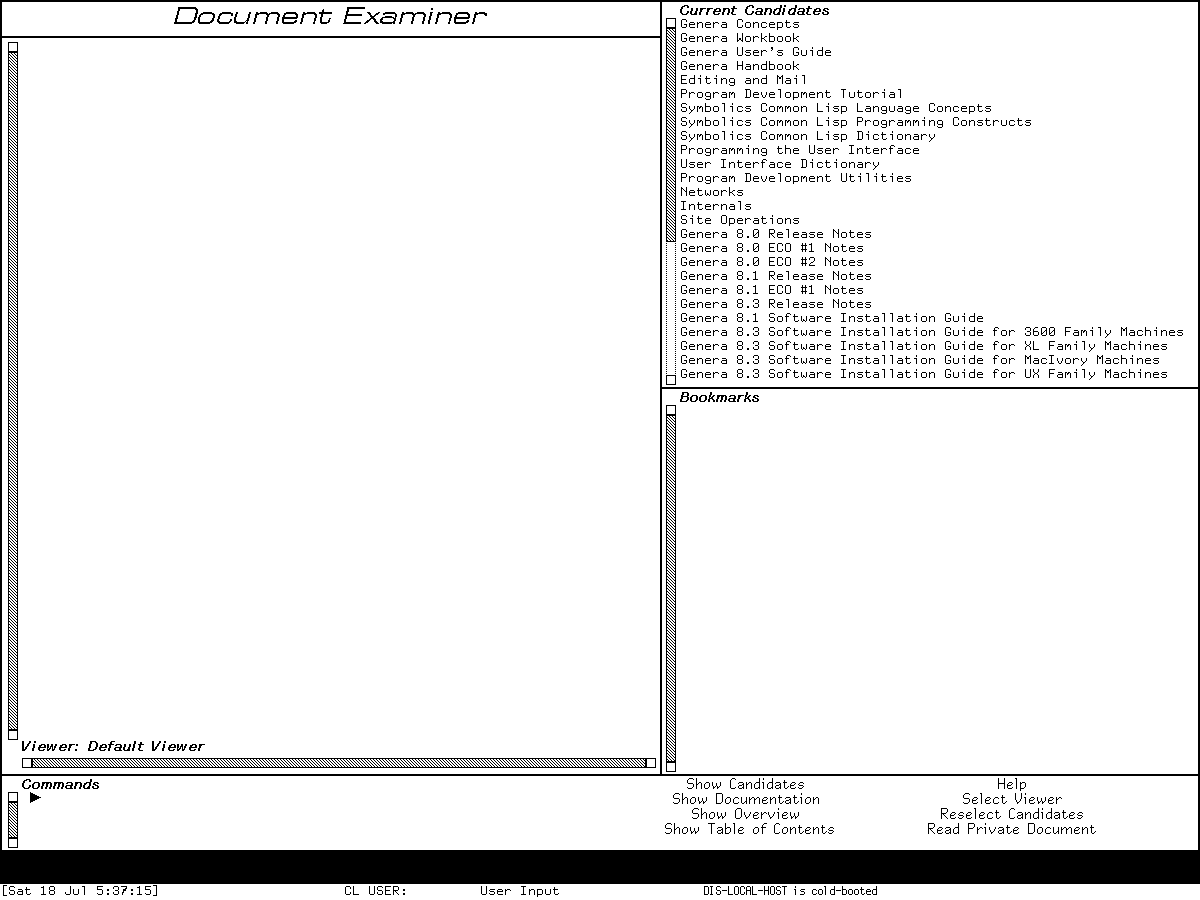
Runtime observation: Select D opened this 1200-pixel Standard Document Examiner on 2026-07-18. The initial frame is published as the minimum visual evidence for the six-pane layout and menu; it shows only short installed-document titles rather than documentation prose. Symbolics retains interests in the licensed software. It is published under the page-specific fair-use review to support historical criticism of the layout, and inclusion implies no endorsement.
The initial frame visibly confirmed all six standard surfaces: title, empty Default Viewer, populated Current Candidates, empty Bookmarks, Commands interactor, and the two-column eight-item menu. Current Candidates began with installed documentation families and release-note sets. Pressing host F12, the harness mapping already established for Genera Help, inserted the computed Document Examiner Command Summary into the viewer and its bookmark pane. The displayed accelerator list matched the static core inventory above. Its named-command list included Hardcopy Documentation and Hardcopy Viewer, so the optional hardcopy command layer is installed in this exact world; source presence alone was not used to make that claim.
The controlled command sequence then entered Show Candidates, accepted the string buffer, and supplied no nondefault search controls. The source defaults were therefore heuristic matching and words in any order. The Current Candidates pane was replaced with a sorted mixture of topics and keyword hits, including flavor methods, buffer commands, and conceptual buffer sections, while the Help record remained in the viewer and bookmark context. This directly confirms that candidate search updates one pane without discarding the reading context.
| Provenance item | Recorded value |
|---|---|
| Licensed archive | opengenera2.tar.bz2, 206,213,430 bytes; SHA-256 89fb3e76b91d612834f565834dea950b603acf8f9dbacacdd0b1c3c284a2d36e |
| Base and private world | Genera-8-5.vlod, 54,804,480 bytes; SHA-256 a8ee5e86cc7e322f7385af3e0cd579d7650d4dcfc3ce328acbf8b25515dd0672 at start and stop |
| VLM / debugger | SHA-256 9f5e18d5770f973879716182b6856ef5a8ee9d3b2bb907476ea0cf35986aa4c7 / 2db918cfe8f35f52c7ff4b7695b0ecd3bb85e41a3327ea5a94874edf05edb54a |
| Compatibility preloads / configuration | SHA-256 f45f45461622975996ab41138f64bb84a4b17c51fba0dbb649208914898c26b7, acd71dbcb948f05b7fd2730b2b4706c08f16f46d792bd9aa6aa64370e855e4b1, and 5ce6509f5adf2cf2d054d34eb4ba777ce462285b8cd9b01bc071bf819139e086 |
| Time responder | Source/executable SHA-256 cc3a2274149c5593b52e6608d732d4048518c766134df5e0f018746ad5cf98bb; validated responder exit zero |
| Harness / toolchain | Python harness SHA-256 bc9276ac766913bc15018dd334a2a2704ae5a926e1fcbc30ccfcff08af8cb48a; manifest.scm SHA-256 3adae999bbe420182f22adc2499fcc82449a46eaf580a362de9c0e718fa6b37d; Guix revision 230aa373f315f247852ee07dff34146e9b480aec |
| Input record | Eight records, four intents and four linked successes; SHA-256 e2a4fc8c15f9f108245f20bb8604767e4789ae9874b6afeec3de751894aa0eb9 |
| Curated capture | Raw 0002-document-examiner-initial.png, captured 05:37:15 EDT, 1200 by 900, 6,475 bytes; PNG SHA-256 2579d041983693aec1a794ba1efa23ca70e21421c2a2ca5b7eaab8d39e908834; normalized-pixel SHA-256 0f6cf810c2665a4f3d36c6ec6fce918d3149d2489c1c01a3cef77545365d7bdc; action prefix two records, SHA-256 aeb83393dc85ed3d90ab081717e341a7b01068090e6bcda5080778f61b6b831b |
| Final record | 25,592 bytes; SHA-256 75ab0372da63728ffeaad0d08aa4ac65e639485d7478eb8f9740485e9d09a83c |
| Isolation | Separate user, mount, network, PID, IPC, and hostname namespaces; no external route or host file service; MIT-SHM live-verified absent |
Shutdown reproduced the already bounded public-VLM defect: the prompt appeared, yes was sent and accepted, cleanup progress began, and the confirmed stall then required SIGKILL. Thus forced_stop=true, state_may_be_incomplete=true, and the host shutdown was not orderly. The harness invoked neither Save World nor a process checkpoint; the private and base worlds remained byte-identical. Any unsaved Lisp state was discarded conditionally, not proved persisted.
The sparse initial frame above passed an image- and use-specific review and was copied byte-for-byte to the curated Genera asset tree. It is sufficient for the layout claim. The computed-summary capture has PNG/pixel SHA-256 e4d95337f28796ea53dadf16cd7b449c1d14edb1f0ab69fdfce62fd4e06e4957 / cbfde31cc403ffc21932163e81f3bf626de90e5c8dfbb2a7e03d157bac6e3a50; the controlled candidate result has 9fd940a4c91dd9e35caf3ad2213100c35d5a30c11d8693d0dd1f482b2722c827 / 2e038fa0f1b63c79b8c8f4c78d418652a3ebcf615cd172da61b0606dd7c8cd98. Those two richer displays remain ignored local evidence: their behavior is reported from direct observation, but publishing the additional Help/result text is not necessary to establish the present claims.
Preservation and rights
The public System 46 recovery may retain source-context extracts under its source license. The maintained LM-3 cross-check remains metadata-only where the tree's mixed rights signals are unresolved. Genera's SAB databases, standalone tutorials, decoded records, pictures, and licensed source remain ignored local inputs.
A runtime screenshot is a separate, image-specific publication decision. A sparse command summary or frame layout may be used as evidence after review; substantial manual pages or Help prose, decorative galleries, and bulk interaction sequences are not appropriate. The governing review is Publishing runtime screenshots for museum documentation. The exact CADR dispatcher, Genera dispatcher, and initial Document Examiner images passed page-specific review for this dossier and the linked D07 specification only; that review does not authorize redistribution of the underlying documentation corpus or any other capture.
Open questions
- Enumerate the live Genera Help Program subclasses and compare their installed topic mappings with the 7,809 static help-bearing source candidates.
- Determine whether the source-conditional Development Utilities
Edit Definitionand the higher-priority ConcordiaEdit Documentationoverlay are installed in the exact Genera 8.5 world. The fresh computed summary confirms hardcopy names, but it is not an exhaustive effective-table dump. - Audit compiled-only System 303 documentation records so
NILfrom a few probes is not mistaken for a census of the world. - Recover or identify the intended System 46 Basic ZWEI file without substituting the 53-byte placeholder or material from a later release.
Sources
- MIT CADR System 46,
nzwei/doc.31, 14,517 bytes, SHA-2569e379b908a508565d3115216dc65abab4db279768b579df6a9e18db17eb63d06. - MIT CADR System 46,
nzwei/basic.zwei, the 53-byte placeholder reached by theBoption, SHA-25627ff8f344dc9bd48f4b3ee0178d9eb5df92626c3ef0969e36475203b3b63cc36. - MIT CADR System 46,
lmwin/basstr.163, 37,385 bytes, SHA-25619e0771ff876d5325f18b97a2ccbf392f7d5950d3a89751d633d27d7cbe01e72, the selected loaded System and Terminal implementation. - MIT CADR System 46,
lmwind/operat.27, 85,337 bytes, SHA-256a5ab658210dc09891b0886b58af705368e33a41f013073c8b9a637d99ab0f02d, especially System Help, the Help key, and Terminal Help. - LM-3 System 303,
zwei/doc.lisp, 23,055 bytes, SHA-256533a733139c6de028462f15363edff5cdfcceebfb217a165b830f9838d8d9f6e. - LM-3 System 303,
window/basstr.lisp, 81,846 bytes, SHA-2568ba3a16e726ed043e6585c7a68b7096bb2dcc5d6f05476afd89f84a48dff2645, for System and Terminal registry Help. - LM-3 System 303,
sys/qmisc.lisp, 83,123 bytes, SHA-256d8c022999c40033b0073c0bec364fbe28ac20c4aa4ecb77afa4c70d1bfc9d840, for general Lisp documentation lookup. - Symbolics, Genera User's Guide, “Using the Online Documentation System” and “Document Examiner”.
- Symbolics, Genera Workbook, Document Examiner overview, frame, commands, walk-through, and bookmarks.
- Licensed local Genera 8.5 sources:
zwei/doc.lisp.~110~, 24,234 bytes, SHA-256571f3fe9114376c9e13434e1825f4610198c227594cc3cb44eb35fc65edd0bcd;dynamic-windows/help-program.lisp.~4013~, 14,996 bytes, SHA-2569863229903ce00a32262862d2cbc0ff22447ffafcae6169f2a418969b3e70c04;window/help-frame.lisp.~22~, 17,047 bytes, SHA-25693f9421715235bb3d1fee377cdee353724b43aee3603a45aafe6c8a8f6397db6;sys/extended-help.lisp.~21~, 4,330 bytes, SHA-2562123c65102bbcb0a8d00b3fe5427e39c4c72d7f90216f52f6b162cd22c963979;nsage/ddex/examiner.lisp.~81~, 31,580 bytes, SHA-256dece335c917703acf440812d857af0e3e1d03dfe2b8118d21efcf6bfe4c22654;nsage/ddex/dexcom.lisp.~59~, 44,235 bytes, SHA-256f07593f5ecf076ad9c6b8ce9f979747414a9cf975615bdae7774ce027db5948d; and optionalhardcopy-dexcom.lisp.~1~, 7,965 bytes, SHA-2565c5cb342877a5ac3e70480c9239f6ccefa530b06d7108f56c8ddbf549eb3a952. - Fresh System 303 Xvfb session
d06-d07-20260718, generation 1, observed 2026-07-18; reviewed Generazmacs-research, generation 1, editor-Help observation; and fresh isolated Generad06-d07-genera-20260718, generation 3, Document Examiner observation.
Last verified: 2026-07-19.