Peek on the MIT Lisp Machine
Peek is the Lisp Machine's continuously updating system-status browser. Its modes expose processes, memory areas, counters, file-system connections, windows, network state, devices, and other implementation data. The display is not merely a passive dashboard: many rows are mouse-sensitive and open menus that can inspect, arrest, reset, close, delete, or kill the represented live object.
Peek therefore combines the roles of process viewer, resource monitor, network-status display, and direct system-control surface. Read-only viewing is safe; its context menus are not uniformly read-only.
This page keeps the public MIT CADR System 46 source separate from the maintained LM-3 System 303 restoration source. The fresh runtime observation is of the latter only.
Evidence sets
MIT CADR System 46
The public System 46 tree is pinned at Git revision 8e978d7.
| File | Role | Bytes | SHA-256 |
|---|---|---|---|
src/lmwin/peek.75 |
Peek modes, update loop, and action menus | 30,280 | 837bc1a5fe7ce31ddcee9923db98e804896c8a9c21356a5bdbfd02b464ccdc31 |
src/lmwind/operat.27 |
contemporary operations-manual source | 85,337 | a5ab658210dc09891b0886b58af705368e33a41f013073c8b9a637d99ab0f02d |
LM-3 System 303
The maintained LM-3 System repository is pinned separately at Fossil check-in 4df393c, tag system-303.
| File | Role | Bytes | SHA-256 |
|---|---|---|---|
l/sys/window/peek.lisp |
extensible mode framework, local modes, update loop, and menus | 46,418 | fa0f22439888127aa59a1dbea1efe57d3587f4663fd8fdce6a647c852a88b9ff |
l/sys/network/chaos/peekch.lisp |
Hostat and Chaosnet modes and host/connection interactions | 17,890 | 0078cfd4571e238440ce2c8704e9a2f2ba0464ab5b9f10bf4510d5e194c32f35 |
LM-3 is a maintained restoration tree. Its additional modes and safety prompts are evidence for this check-in and the loaded System 303 band, not automatic claims about historical System 46 behavior.
Purpose and entry points
Peek can be reached through:
System P, which selects or creates a Peek frame;- Peek in the System 303 System Menu's Programs column;
- Create, then Peek, in the System Menu;
- the Lisp function
(PEEK), optionally with an initial mode.
System 46 has a process-bearing PEEK window with no mode menu. One is pre-created for the System key, and its standalone top level initially invokes Help. The System 46 function (PEEK) is a different entry: it temporarily binds a BASIC-PEEK display over a supplied terminal window and defaults to Active Processes.
The System 303 source distinguishes two later window forms. PEEK-FRAME combines a mode menu with the display pane. PEEK-WINDOW is a standalone process-bearing display without that menu; it is controlled entirely by keyboard commands. A standalone instance initially invokes Help before entering the normal update loop.
The function (PEEK initial-mode) selects or creates a frame and injects the first character of a string or symbol argument, or the supplied character, into its input stream. The requested mode is therefore selected through the same command loop as user input rather than by a separate private API.
Update model
Normal modes produce scrolling display items whose dynamic fields are reevaluated on redisplay. The default interval is 120 sixtieths of a second, or two seconds. Each mode can combine:
- fixed text and headings;
- functions that recompute displayed values;
- maintained lists whose members can appear and disappear;
- nested rows inserted or removed by clicking a parent item;
- mouse-sensitive values that open an object-specific menu.
System 303's wait loop treats exposure explicitly. While Peek is deexposed it notices that an update deadline has passed without drawing into the hidden window. When the window becomes exposed again, it resumes redisplay instead of waiting indefinitely for a deadline that expired while hidden.
Some modes are one-shot operations rather than continuously updated displays. Selecting one lets it write into the typeout window, then restores the prior mode's label and highlighted menu item after the temporary output is dismissed.
If typeout is still present when Peek needs to resume, it prompts for any character. Space dismisses the typeout and is consumed. Any other character is put back into the input stream and handled as a Peek command. This small detail prevents the acknowledgment from swallowing a requested mode switch.
Keyboard command inventory
System 46
| Input | Effect in peek.75 |
|---|---|
| a mode character | switch to that status display |
| decimal digits | accumulate a numeric argument |
Q |
quit Peek |
n Z |
set the interval to n raw sixtieths of a second |
? or Help |
display the help and mode list |
| Space while dismissing typeout | dismiss it without becoming another command |
| non-Space while dismissing typeout | dismiss it, then process that character as a command |
The old n Z unit is easy to misread: in the pinned System 46 source the numeric argument becomes the sleep time directly, so 120 Z requests two seconds.
System 303
| Input | Effect in peek.lisp |
|---|---|
| a mode character | switch to that status display |
| decimal digits | accumulate a numeric argument |
Q |
quit Peek |
n Z |
set the update interval to n seconds by multiplying it by 60 |
| Space | force a redisplay |
Help |
generate Help from the currently registered mode list |
| Space while dismissing typeout | dismiss it without becoming another command |
| non-Space while dismissing typeout | dismiss it, then process that character as a command |
Thus 2 Z, not 120 Z, requests a two-second interval in System 303. The short operations-manual description does not expose this source-line change.
Peek also accepts internal forced-input commands used by its menus. These can start Supdup or Telnet, send a message with Qsend, enter the error handler, inspect or describe an object, evaluate a form, or dispatch a System Menu request. They are application integration messages, not additional printable key bindings.
System 46 mode inventory
The pinned System 46 peek.75 defines eight modes:
| Key | Mode | Display |
|---|---|---|
P |
Active Processes | processes, wait state, scheduling information, and recent activity |
M |
Memory Usage | memory use organized by area |
C |
Chaosnet Connections | connections and expandable Chaosnet details |
A |
Areas | Lisp areas and expandable allocation information |
H |
Hostat | one-shot Chaosnet host statistics |
% |
Statistics Counters | system and microcode counter values |
F |
File System Status | remote file-system channels and open files |
W |
Window Hierarchy | window inferiors and exposure hierarchy |
The System 46 application has no mode-menu pane: the source starts in ? Help and expects these characters. The contemporary manual lists the broad subsystems but calls the individual displays self-explanatory; the source is needed for the action menus and nested interactions below.
System 303 mode inventory
System 303 makes the mode registry extensible. DEFINE-PEEK-MODE adds or replaces a character entry at load time and rebuilds the command menu from the effective list. Help reads that same registry. The list can therefore vary with loaded subsystems.
The pinned core and Chaosnet files, and the fresh loaded System 303-0 band, provide these twelve modes:
| Key | Menu label | Source-defined meaning |
|---|---|---|
P |
Active Processes | each process's wait state, priority, quantum, recent utilization, and idle time; also the clock-function list |
R |
Counter Rates | rates of change for maintained counters |
% |
Statistics Counters | current values of the microcode meters |
A |
Areas | area allocation and use, with expandable per-region details |
M |
Memory Usage | percentage of each area's pages currently paged in |
F |
File System Status | FILE-protocol remote-file-system access and open streams |
W |
Window Hierarchy | screens, inferiors, and exposure hierarchy |
S |
Active Servers | servers, clients, processes, connection state, and optional connection details |
D |
Devices | shared-device lock holder and bus owner |
G |
General Status | processor-switch and other internal processor state |
H |
Hostat | one-shot Chaosnet statistics for known hosts |
C |
Chaosnet | connections, meters, routes, queues, packets, and expandable details |
The mode menu uses the compact display font rather than the window system's usual larger menu font. It highlights the active mode, and refreshes its item list if modes were added while the frame was deexposed.
Active Processes
The process table has columns for name, state, priority, remaining and total quantum, recent utilization percentage, and idle time. Idle durations are rendered as seconds, minutes, or hours; an absent duration is shown as forever. Arrest reasons and runnable or stopped states are reflected in the state column. A separate section lists clock functions.
Clicking a process name opens the process menu. The Debugger choice is omitted for a simple process without a stack group.
Areas and Memory Usage
Areas begins with physical memory, free space, and wired-page counts. It hides low-numbered implementation areas behind an expandable “uninteresting” row. Clicking an area inserts or removes its region list, including origin, length, used words, scavenger progress, space type, and volatility.
Memory Usage answers a different question: it computes the percentage and count of pages resident for each applicable area. The A and M modes are not two labels for the same table.
File System Status
The file mode enumerates pathname hosts with live access and asks each host implementation for its Peek header and details. Open streams display direction, pathname, character or binary mode, byte position, and, for input streams with a known length, completion percentage.
The label refers to FILE-protocol remote file systems in this source. It should not be generalized into a filesystem checker for the local load-band device.
Active Servers
The server mode joins contact name, remote host, server process and state, and connection. The process, host, and connection are independently sensitive. For a Chaosnet connection, detail can be inserted into the live display; a static Hostat can also be nested beneath a host.
Devices and General Status
Devices lists objects of the shared-device class found among pathname hosts, showing the process holding the lock and the current owner or bus slot. Its menu can select a window associated with the lock holder or clear the lock.
General Status builds named records for processor-switch bits. The record type contains both getter and setter function slots, but the core display path only renders the getter result and name. No editing gesture is established by this source, so the mere presence of a setter function is not counted as a visible General Status editing feature.
Chaosnet
The Chaosnet mode exposes connections, routing and subnet information, meters, and packet queues. Connection rows can expand received or transmitted packets. Packet display includes direction, host, opcode, byte count, sequence and acknowledgment numbers, indices, selected words, and a sanitized string view. Clicking host fields can insert host statistics or open communications tools.
These views expose mutable network objects. A “Close” menu item closes a real connection; an inserted detail view is only presentation state.
Findings not evident from the manual's overview
- Peek's mode set is a load-time registry in System 303, so Help and the mode menu describe the effective loaded system rather than an immutable manual table.
- The
n Zinterval changed units: raw sixtieths in System 46, seconds in System 303. - Hidden Peek windows track missed deadlines and deliberately redisplay after reexposure.
- One-shot modes restore the prior label and menu highlight after typeout.
- A non-Space typeout acknowledgment is put back and interpreted as a command.
- Areas can expand into live region and garbage-collector state; it is not merely an aggregate memory chart.
- General Status records have setter functions, but the displayed row spec does not expose an edit operation. Internal representation is not being promoted into a claimed UI feature.
- Later process, window, file, host, and connection menus add inspection and description paths and, for several dangerous operations, confirmation. Other dangerous operations remain immediate.
Runtime observation: System 303-0
A fresh Xvfb computer-use session selected Peek with System P. The initial Help view visibly listed all twelve modes above, followed by Q, nZ, and Help. Selecting P produced the Active Processes table with the source-defined columns and clock-function section. Clicking the first process opened the eight-item process menu; it was dismissed without selecting an action.
| Item | Recorded value |
|---|---|
| Session | core-env-20260718, generation 1; 2026-07-18 03:55:07–04:06:40 EDT; boot ID 3ee4cfb0-9636-4c5c-8661-a1b04ab7aa07; non-resumed |
| Load band | System 303-0; banner Experimental System 303.0, ZWEI 129.0, microcode 323 |
| Disk | base/private-start SHA-256 bb16e46ad81decfe1efe691d36b6aa4ce3fd4ffb82474365de3520989d397cb5; base unchanged after stop |
| Public revisions | L d1250f90044f09b6c92014a9aef65f9574e1bcbf8a7163004e53cc6dbed0f2d6; System 4df393c68d7f083ce42d5c377039d26043cc18a9031ace28258dc97f4137eb91; usim 330d8248ec2e12af071e287920e681600f75df9ffd854aada5f8a64c9adad64d; usite 8f717978b458b40adf1e238aaf177f5bc54ef46881268e03b787ba57b0d30a0e; Chaos db2953fde68d726a605d1d1699bab6c926ef252bd4991f692bae6ee5a634764e |
| Private copy | copied 2026-07-18 03:55:03 EDT at those revisions; System tree 21f5215de973aa6ccbddb817f2d64edd95ee1014c3028a9b0711ea7c741b807e, Chaos 34ab197641aae909e9a224edc307020fddec263e732207a74573d51dac0daa87, usite adbb720339db225e6635977a869cf3f3d50b507e614b37a976f4a6548d212a81; copy/start hashes matched and changed flags were false |
| Emulator | start and execution SHA-256 707a77d23e28ea1c45ae0eb0145dc181fa7ba649b9defc30044d4f847ac2c5be |
| Machine artifacts | promh.mcr 2c667f99f014a7130a55b255d31df02588d9396beace78abfe9325269e4ff3e6; promh.sym e9e3dd6a541511dd9541ae96b99dae19cb185d8b79fa09959f21fa52224f233d; ucadr.sym 9071decf16fa8f11d7970c4662db0d6e95600fe43ec86ac41c77b37dbd7caa2a |
| Toolchain | manifest 3adae999bbe420182f22adc2499fcc82449a46eaf580a362de9c0e718fa6b37d; Guix channel 230aa373f315f247852ee07dff34146e9b480aec; Python 3.11.14, Xorg 21.1.21, ImageMagick 6.9.13-5, xdotool 3.20211022.1 |
| Host window | LOCAL-CADR [running], XID 2097202, x=0, y=0, 768×963 |
The relevant ordered input was System P, Space and P to select or refresh Active Processes, left click on the first process row to open its action menu, then a click outside the menu to dismiss it. No action-menu command was chosen.
Three raw 768×963 captures remain in the ignored session:
| Raw capture | State | PNG SHA-256 | Decoded-pixel SHA-256 |
|---|---|---|---|
0010-peek-initial.png |
Help and twelve-mode inventory | 4fb16332dd675a3ce8f92f97e48b659effa5fe41e2214e488e0f6ea9fe63d09a |
76c01a60f78b3a332c6973e8e2fb62438d519e009a197e44a574caf53a4c8311 |
0011-peek-processes.png |
Active Processes | 3685ff9b1c43a40d7992abcc2f3d54e4e1ba7d43a8a4c7d4413bc3fa3368881d |
fc0edbad746e5a6ef921f249f84c38cc3398fae3311522c9707c2d1d9f8a0772 |
0012-peek-process-menu.png |
process action menu | 9267bbfe11f4df7024b991fc88a3e52615a132596bdcd19ea5e4614592d57203 |
628acfabd44e250e8fa004c06a0f8b5d29c20bd5878335536ca082f0948b5b88 |
The image-by-image review selected only the non-menu Active Processes state for the curated CADR screenshot catalog. The Help and process-action-menu captures remain ignored: the former contains more explanatory text than this claim needs, and the latter is unnecessary to show the monitoring table.
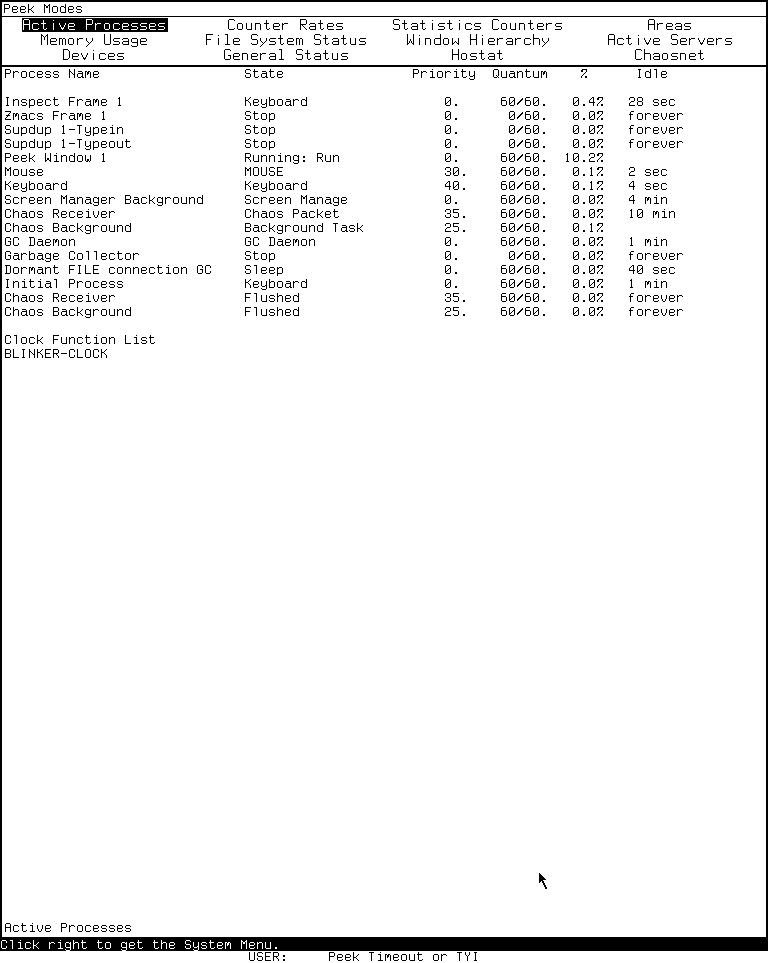
Runtime observation: Peek's Active Processes mode in LM-3 System 303, captured 2026-07-18. Underlying software and display material remain the property of their respective rightsholders; reproduced here for criticism, scholarship, and historical documentation under 17 U.S.C. section 107. No affiliation or endorsement is implied.
The 6,781-byte run record has SHA-256 2d877843f58a8a261bafe68afca846919963dec5584a39bbb5275fcbe6615e22. Shutdown was clean: forced_stop and state_may_be_incomplete are false, the emulator and Xvfb both exited zero, and the base disk was unchanged. The computer-use harness article explains the evidence schema and repeat procedure.
Limits and open questions
- Only Help, Active Processes, and the process-menu surface were exercised in the runtime pass. The other mode descriptions and menus are source-grounded, not individually runtime-confirmed.
- No destructive command was selected. Confirmation behavior is established from source and remains to be exercised only against disposable objects.
- No runnable System 46 band was used. Its behavior here is source- and manual-grounded only.
- The twelve-mode list is complete for the pinned core/Chaos files and observed band, but the registry design allows another configured band to add modes.
- The exact history of when individual modes and confirmation prompts entered the code line has not been established.
- The Active Processes capture received a separate per-image publication review; the Help and action-menu captures remain ignored and unreviewed for publication.
Sources
Source links and pinned revisions last verified 2026-07-18.
- MIT CADR System 46,
PEEK.75, Peek implementation. - MIT CADR System 46,
OPERAT.27, window-system operations manual source. - LM-3 System 303,
window/peek.lisp, maintained Peek framework and local modes. - LM-3 System 303,
network/chaos/peekch.lisp, Chaosnet modes and interactions. - Local System 303-0 Xvfb observation, session
core-env-20260718, generation 1, 2026-07-18; raw evidence identified above.