Finding your way around System 303
The easiest way to become comfortable with CADR is to stop thinking in terms of desktop icons. You normally work in one selected, nearly full-screen TV window. Other windows still exist behind it. The System menu and keyboard selectors expose, select, create, reshape, or remove those windows.
Read the screen from top to bottom
A typical application has:
- a large application area;
- a mode line near its lower edge, naming the buffer, mode, package, file, or application state;
- a separate two-row who line at the very bottom of the display.
The first who-line row is contextual pointer documentation. Move over a menu item and read that line before clicking. The other fields report the selected process, package, run state, time, and related status. This is active interface state, not a decorative footer.
Open the System menu
In the tested System 303 Listener, click Right near the middle of the application area. The menu has three columns:
| Windows and layout | Current-window operations | Programs |
|---|---|---|
| Create, Select, Split Screen, Layouts | Kill, Refresh, Bury, Edit Screen, and related operations | Lisp, Edit, Inspect, Trace, Mail, Emergency Break, and registered tools |
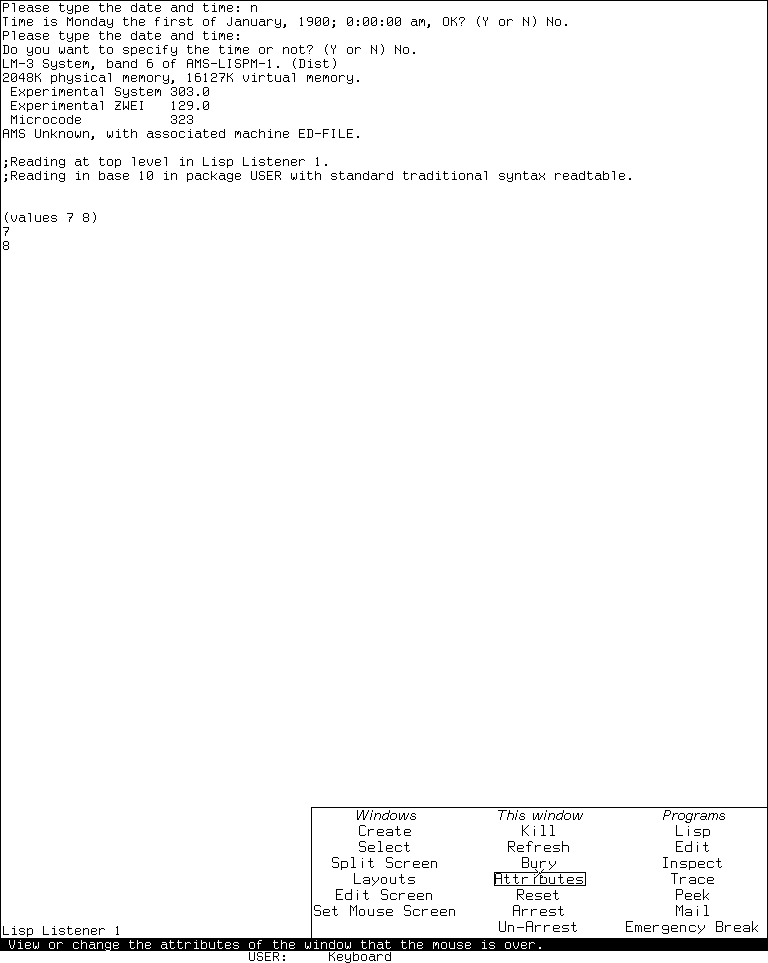
Runtime observation, 2026-07-18: Right at framebuffer position 400,500 opened this three-column menu. The image establishes visible labels and the contextual who-line text for the current item, not every callback or destructive result. MIT and the named contributors do not endorse this project.
Three menu verbs are easy to confuse:
- Create asks for a kind of window and a rectangle, then constructs a new one.
- Select lists existing selectable windows and exposes the one you choose.
- A program name may select an existing registered program window or create one according to that registration.
Press Abort or move out of a momentary menu without committing a choice when you only wanted to look.
Use System-key selection
System selection is a prefix gesture followed by one selector character. In the tested band, System Help prints the live registry. The exact table can vary with loaded software, so Help is more trustworthy than a memorized universal list.
The useful starting gesture is:
System
├─ Help or ?  show the live selector registry
├─ E          select or create the registered editor
├─ L          select or create a Lisp Listener
└─ other      dispatch only if the live registry owns that character
Do not hold System as though it were Control unless your emulator mapping explicitly requires that physical action. Think of it as a prefix in the Lisp-machine input language.
Try the Lisp Listener
- Select a Lisp Listener from the System menu or the live System-key registry.
- At the prompt, type
(+ 40 2)and press Return. - Observe
42as the value. A form may return more than one value; these appear as separate value lines. - Use Abort to abandon an incomplete or unwanted interaction.
The Listener is both a REPL and a window-system citizen. Its input editor, history, package, and process state are richer than a bare terminal line discipline. The Listener tour dossier explains the complete observed model.
Try Zmacs and named commands
- Use
System E. - If prompted for a buffer, choose a scratch name rather than an irreplaceable file.
- Type a small definition.
- Press Help twice to expose the editor's contextual dispatcher.
- Invoke
Meta-X, typeText Mode, and press Return. - Invoke
Meta-Xagain, typeLisp Mode, and press Return.

Keybinding illustration: the complete tracked frames were captured in one System 303 Zmacs session after Meta-X Text Mode Return and Meta-X Lisp Mode Return. The 4.8-second loop pauses on the two verified states; it is not a real-time recording and makes no claim about redisplay latency or omitted completion prompts.
Meta-X runs a named command from the active editor command tables. Modes change the effective tables, so a binding can mean something different—or be absent—in another mode. Read the mode line before diagnosing an unexpected key.
Help and Abort are part of the grammar
Help is contextual: in Zmacs it opens the editor dispatcher; in the System prefix it describes system selectors; in another program it may explain that program's current keys. Abort unwinds the current interactive operation. It does not mean “close the application,” and a destructive operation may have explicitly documented partial effects before an abort.
Where to go next
- Continue into the linear CADR working session
- CADR application atlas
- System Menu and System selection evidence
- ZWEI and Zmacs
- Complete CADR ZWEI/Zmacs bindings
- TV window-system specification
Last runtime evidence verified: 2026-07-18.