Namespace administration and the Namespace Editor in Genera
Genera's Namespace is a distributed, typed site database, not a host-table file loaded into one world. It represents namespaces, sites, hosts, networks, printers, users, and file systems as validated objects. The Namespace Editor edits one namespace view of one object at a time; a local save changes only the current Lisp world, while a global save updates the namespace's primary server. Separate Command Processor commands show, create, edit, delete, and bulk-change objects, and the much more consequential Set Site and Define Site commands can replace the local site configuration or create an entire database and SYS translation set.
This is a different architecture from the MIT/LMI DEFSITE, LMLOCS, and generated host-table lineage. That earlier history and the later LMI Site Data Editor are documented in Login, site data, host tables, and the later Site Data Editor.
Evidence and rights boundary
The implementation source, installed Help, release notes, world image, VLM, and raw runtime captures used here come from licensed Open Genera media. They remain untracked. This article records short interface labels, factual inventories, checksums, and original analysis; it does not reproduce the source, database contents, or Help prose.
Licensed implementation evidence
| Artifact basename | Bytes | SHA-256 | Principal use |
|---|---|---|---|
sys2/login.lisp.~165~ |
19,201 | a53bea33343ddd4e76f684648271dd068cfec2734112f73b41aad5b38c660240 |
namespace-aware login, init file, logout, history |
cp/comtab.lisp.~103~ |
36,295 | f60724c8e2526950000f090f2dae4745b3394079713b3601606be865c23b98e1 |
Site Administration and Namespace command-table hierarchy |
network/namespace-editor-activity.lisp.~4033~ |
56,636 | 39714a46ce1060e7901fc9cd1e2a21eb85cf162548089bfdc3c45f169b6163ab |
frame, menu, commands, accelerators, defaults, history, validation path |
network/site-commands.lisp.~18~ |
47,153 | 7f62137bca7fd72c3525e84a2b58ca4dbd1b369f792706f3a2ebc96fd9a7fbbb |
Set Site, Define Site, site creation, compatibility functions |
network/class-definitions.lisp.~31~ |
14,488 | 2703e275c78d0c4eca9afda7d6835306ac8181f5f1071ff38ceaf39aab92f3fc |
all seven Namespace classes and fields |
network/namespaces.lisp.~858~ |
108,127 | 12e635827cc6e00835eebffe6831c206855203217fdd6937bb112c638d66f8a5 |
object/database core |
network/namespace-access-paths.lisp.~90~ |
19,883 | 705cdfc4fd02e9b7ce4e017a4e26384f0c7fb08727158652e1d66fb71151aeb4 |
server access paths |
network/namespace-local.lisp.~74~ |
21,047 | 09012253a7ee804f71f75986281dd10ddca0b47ac4b36f9b28160048b3ffeec0 |
local object state and cache behavior |
network/namespace-server.lisp.~55~ |
15,654 | f7b663d4deeaf4e57512423f835eaf1c64736855e473d3f7a13ca768c5e54085 |
primary/secondary service behavior |
network/namespace-parse.lisp.~56~ |
24,132 | 79f9c8ddf16ef422fea40f6f4be85222aab474b9b05994340dee0905965e4cdc |
text record parser |
network/namespace-validation.lisp.~1506~ |
12,226 | b4e5ec84a05b789bfb1324dfb2294b3e472961b12c4ed235b0c85b1fd0bb864e |
address, name, service, and property validation |
network/namespace-presentation-types.lisp.~1531~ |
44,993 | bf42bb9a811836669bf6381f8c3feacb847c29b019bc6e5275a6a1d7f655914a |
typed input and presentation behavior |
Installed Help and release-note evidence
These are the identities of the original Sage Binary inputs, not the decoded text products in the ignored help build tree.
| Artifact basename | Bytes | SHA-256 | Coverage |
|---|---|---|---|
site/site10.sab.~50~ |
34,697 | ed52514ece29030016cb74d6f14b08ba976947ab520e40ca1e6458f183605685 |
Namespace Editor use and commands |
site/site11.sab.~39~ |
86,454 | d04500aa6678a03a79e45491a5b3e8b1c5f3747612b98a1be91e6c87c6ae7129 |
Host, User, Printer, and Network fields |
site/site12.sab.~36~ |
52,381 | 844fd697ce9ce89f6b8fff1b9d8912508aa691c23896094dec3e35323d5a7bae |
Site, Namespace, and database-file formats |
cp/cp2.sab.~152~ |
164,164 | 2dda47b43c53edcab060da0d5b513f2d5735d7d4d447157aa2cdd269a3dae7b6 |
Edit, Create, and Delete Namespace Object |
cp/cp3.sab.~184~ |
404,196 | 24ed5565a80c9857feae331466cffc9cecbdf6439ae30a3de0f650e0f4b1c484 |
Show Namespace Object and Set/Define Site |
cp/cp5.sab.~74~ |
140,448 | 0b9508993f742a02158c356ac7da2570fcdd46f5f382556d7dc2105b2c53e25a |
Add Services to Hosts |
cp/cp6.sab.~50~ |
76,382 | 26e2b0a9a81295f7d3af4aab7c91a51c0bd04c9873dec96d646d873413297d51 |
Remove Services From Hosts and Define Site references |
rn8-0/site.sab.~22~ |
27,595 | 1ffe437ef33b050fee52a14a1300db09cb75de35ce852fad4ebb9d1404144aef |
Genera 8.0 Namespace and Site Operations changes |
All licensed artifacts were verified locally on 2026-07-18.
Login identity is a Namespace object
Genera login normally resolves its first argument as a Namespace User object. That object supplies the Lisp Machine display name and home host; its class also contains file-server login names and the mail address. If a host is specified explicitly, login can construct an uninterned user identity for that host rather than using the user's normal home-host view.
The inspected Lisp entry points are:
| Entry point | Complete interface and behavior |
|---|---|
LOGIN |
user-name; keywords :HOST, :LOAD-INIT-FILE (default true), :NO-QUERY-WHEN-UNKNOWN, and :INIT-FILE-TO-LOAD. It logs out first, resolves or constructs the user, sets user variables, runs login initializations, records user/local-host/time/init-file history, establishes home-directory defaults, and normally loads the LISPM init file. An unknown user can be retried, used on a specified host, or, after confirmation, offered for addition to the user database. |
LOGOUT |
Evaluates registered undo forms, runs logout initializations, logs out of the file layer, installs the not-logged-in user, and recomputes user variables. |
SHOW-LOGIN-HISTORY / PRINT-LOGIN-HISTORY |
Displays user, host, time, and init file, presenting still-resolvable User and Host objects semantically. |
LOGIN-TO-SYS-HOST |
Logs in the required LISP-MACHINE user without an init file; source notes that this user must exist in each namespace with the correct local account. |
Login and the Namespace Editor are related but distinct. Editing a User object does not itself log anyone in, and a local-only User edit is not a durable account change. The login path may query a namespace server and the file host, so its error/retry behavior is part of network and site state rather than a purely local password dialog.
Namespace database architecture
Four text-file roles
Namespace data is stored as text records on namespace servers. The supported administrative interface is the editor and CP commands; the installed manual explicitly warns not to hand-edit the files.
| File role | Contents and invariant |
|---|---|
| Descriptor | One per namespace. Maps a class name to an object file, * to the catch-all object file, VERSION to the log, and CHANGES to the incremental changes file. Its pathname is a required Namespace-object field. |
| Object | Current full descriptions. A record starts with class and primary name; following lines are indicator/value attributes; a blank line terminates the record. |
| Log | Human-readable audit history. Its file-system version identifies the database version used in change records. |
| Changes | Chronological changes since the server world's saved state, including timestamp/version context, changed object records, and deletion identities. Superseded old entries can be pruned once their state is represented elsewhere. |
Tokens are whitespace-delimited unless quoted; semicolon, newline, and quote have syntactic roles. This textual representation is serializable, but it is not merely a configuration archive: server state, caches, validity timestamps, access paths, and primary/secondary update behavior determine which version a machine sees.
Primary, secondary, cache, and namespace views
One Namespace object can name primary and secondary name servers and search rules. A global update is sent to the primary server. The editor reports that other servers and hosts acquire it when they next ask the primary; saving does not synchronously push every cache. A secondary is a backup/query participant, not a second writable master.
An object can have views in more than one namespace. Edit and Delete therefore ask which view to operate on when an object is multihomed. Show Namespace Object displays each view. Removing services is especially careful: it checks and changes all namespace views of each selected host, except the source's special excluded DIAL view.
Complete object-class and field inventory
An asterisk below marks source-required data. Name is internal to every class. Fields can be repeated where their template says element or set.
| Class | Release-bounded fields in class-definitions.lisp.~31~ |
|---|---|
| Namespace | Name; Primary Name Server; Secondary Name Server; Search Rules*; Descriptor File*; Internet Domain Name; User Property |
| Site | Name; Pretty Name; Local Namespace*; Site Directory*; Site System; Default Printer; Default Bitmap Printer; Host for Bug Reports*; Timezone*; Secure Subnets; Don't Reply to Mailing Lists; All Mail Addresses Forward; Other Sites in Mail Area; Root Domain Server Address; Query Root Domain Servers Recursively; Standalone; Validate LMFS Dump Tapes; Terminal-F Argument; Host Protocol Desirability; User Property |
| Host | Name; Site; Nickname; Short Name; Machine Type; System Type*; Address; Pretty Name; Console Location; Printer; Bitmap Printer; Print Spooler Options; Spooled Printer; Service; Server Machine; File Control Lifetime; Peripheral; Default Secondary Name Server; Internet Domain Name; User Property |
| Network | Name; Nickname; Site; Type*; Subnet; Global Network Name; User Property |
| Printer | Name; Type*; Site; Pretty Name; Format; Interface; Interface Options; Host; Protocol; Body Character Style; Heading Character Style; DPLT Logo; Character Size; Page Size; Fonts Widths File; Printer Location; User Property |
| User | Name; Login Name; Lispm Name*; Personal Name*; Nickname; Work Address; Work Phone; Home Address; Home Phone; Home Host*; Mail Address*; Birthday; Project; Supervisor; Affiliation; Remarks; Type; User Property |
| File System | Name; Host*; Type*; Root Directory*; Pretty Name*; Nickname; Short Name; User Property |
File System is declared as introduced in Namespace protocol version 5. It is not described in the inspected site10–site12 class chapters, which cover the other six classes. This is a source-only feature finding, not grounds to retrofit the older manual silently.
Namespace Editor frame and entry points
The program framework has no fixed Select key by default. Its supported entry surfaces are:
Select Activity Namespace Editor, verified in the Genera 8.5 runtime;- activity selection through the loaded system menu;
- a site-selected Select-key assignment; and
Edit Namespace ObjectorCreate Namespace Object, which select the activity and inject the corresponding editor command.
The last two CP commands reject remote terminals: object editing and creation must occur on the local display. Show Namespace Object remains a textual CP operation.
The frame has a title pane, one Accept Values object pane, a current-object title, a two-column command menu, and a command interactor whose prompt is Namespace:. The source enables a system-menu entry and inherits the Help Program, Accept Values keyboard commands, full-command syntax, standard arguments, and input-editor compatibility. Inherited facilities are not mistaken here for custom Namespace bindings.
Complete Namespace Editor command inventory
Complete editor-specific keys and gestures
| Key or gesture | Exact custom behavior |
|---|---|
| Space | enter the highlighted Accept Values answer, or remove exposed typeout |
| Control-Meta-L | Previous Object with default count 2; numeric argument supplies the count |
| Control-0 Control-Meta-L | show object history |
| Scroll or Control-V | forward by screen without an ordinary numeric count, by line with a finite count, or to end with the infinity argument |
| Meta-Scroll or Meta-V | backward by screen, by line with a finite count, or to beginning with the infinity argument |
| Meta-tilde | Not Modified |
| Refresh | Refresh command |
| Help | inherited Help command |
| Return, Tab, Clear Input, Rubout, Line, End at the top-level prompt | explicit no-op; the Accept Values field editor handles appropriate field-local uses |
| Select on an object in Show History output | make that recorded history object current |
| Command Menu Help on a displayed field | open class-and-attribute-specific Help when a record is available |
| Select on a menu label | invoke that menu command through the Dynamic Windows command presentation |
alphabetic unknown accelerator at Namespace: |
treat it as the beginning of a typed command rather than beeping |
No additional Namespace-specific mouse button table was found. Editing field values uses the inherited Accept Values and presentation-type interaction: a typed object name, service, address, keyword, or set is parsed and completed by its semantic type, and mouse-sensitive presented choices can supply those values. This page does not relabel all generic Dynamic Windows editing gestures as Namespace Editor commands.
Defaults and validation
Insert Defaults does nothing for Network and Namespace objects. For the other classes it can derive:
| Field | Derived value |
|---|---|
| Pretty Name | capitalized object name |
| Site | for Hosts and Printers, the Site with the same name as the object's Namespace |
| Printer / Bitmap Printer | the Site defaults |
| File Control Lifetime | the file-system default, documented as 30 minutes in the installed Help |
| Home Host | host component of Mail Address, when available |
| Mail Address | User name plus Home Host, when available |
| Lispm Name | User object name |
| Printer Interface | Serial |
| Services | commonly supported services derived from System Type and Network |
Before Save, the source checks every required field and invokes registered validators. It checks network addresses; names, nicknames, and short names; service/medium/protocol triples; and structured field types. It rejects an incomplete Peripheral entry. For embedded Unix machine types it warns if an EMBEDDED-IN user property is absent. Genera 8 release notes also warn that adding TCP/UDP Namespace services can make pre-8.0 systems choose protocols they cannot boot with.
The primary server checks references before a global deletion and reports referrers. The release notes identify this as a post-7.2 safety improvement; older behavior could leave server errors after deleting a referenced object.
Complete Namespace CP command table
Namespace is a child of the broader Site Administration command table, alongside Access Control, Spelling, and World Building. The following eight commands are the complete Namespace administration surface defined by the two inspected implementation files; commands in sibling tables are not included.
| CP command | Arguments and keywords | Behavior and risk |
|---|---|---|
| Edit Namespace Object | optional object; namespace when multihomed; :Locally; :Insert Defaults |
Select the local Namespace Editor and inject Edit Object. Remote terminals are rejected. |
| Create Namespace Object | class; name; :Copy From; :Property List; :Locally; :Insert Defaults |
Select the local editor and inject Create Object. Remote terminals are rejected. |
| Show Namespace Object | object; :Locally; :Format Normal or Detailed |
By default refresh from a server, then print every namespace view; local mode uses the in-world copy. Detailed format includes fields without values. |
| Add Services to Hosts | service sequence; host sequence or All; for All, :Namespace, :Site, :Type; :Locally; :Verbose |
Validate service triples, find and deduplicate hosts, warn above five targets, require login globally, and add only absent services. |
| Remove Services From Hosts | same target filters and :Locally/:Verbose |
Refresh each host globally, traverse all its namespace views, warn above five targets, and remove only present services. |
| Delete Namespace Object | object; namespace when multihomed; :Locally |
Confirm, require login globally, and remove that namespace view. Primary-server reference checks can reject it. |
| Set Site | Site object/name or Get from network |
Discover by broadcast or interactive server/descriptor dialog. Moving between two nondistribution sites first requires a confirmed transition through the Distribution site, then changes local Site/Host and fetches the latest timestamp. |
| Define Site | Site name | Gather platform-specific server, SYS, descriptor, login, bug-host, timezone, and standalone parameters; require/restore Distribution-site context; write a new Namespace database and SYS translations; then switch to it. |
Genera 8 changed Add/Remove from one service to a sequence and pluralized their names. It also completely rewrote the Set Site and Define Site dialogs and introduced Insert Defaults.
Set Site discovery choices
When broadcast does not find a known Site, the dialog can identify a Namespace server by name and network address or use a local descriptor file. If the descriptor lives on an embedding/file host, the dialog also needs that host's name, system type, address, and file protocol. These inputs locate an existing site; Set Site does not create its database.
Define Site dialog and outputs
The single command argument is the Site name; the interactive dialog then asks for all configuration-dependent data:
| Scope | Fields |
|---|---|
| common | primary Namespace Server Name, Default Login, Host for Bug Reports, Local Timezone, Standalone Site |
| standard platform | System File Directory, Namespace Descriptor File; when SYS or descriptor hosts are distinct, their System Type, Address, and File Protocol |
| Unix embedding / VLM | System File Directory and descriptor file on the embedding host, Unix Host Name and its system/machine/address/protocol information, plus any distinct SYS or name-server data host |
| distinct bug host | System Type and Address for that host |
After confirmation, create-site creates directories and writes:
- the descriptor file;
- a log with the initial version timestamp;
- an object file containing the new Namespace, Site, networks, hosts, and initial
LISP-MACHINEUser; - a changes file with its initial timestamp; and
- the SYS logical-pathname directory-translations file.
It then reads the new descriptor and changes the local Site and Host. This is a site-construction operation, not a harmless way to preview dialog defaults.
Persistence and safety model
| Operation | Local-world effect | Durable/server effect |
|---|---|---|
| edit fields | changes editor database only | none |
| Save Object with Locally Yes | update current virtual memory | lost at cold boot unless a separate Save World captures it |
| Save Object globally | refresh/validate, require login, update primary server | database log/object/change files are managed through server protocol; other caches update later |
| Revert locally | undo current editor-session changes | none |
| Revert globally | request a fresh server view | may replace local cached view |
| Delete locally | remove local view | no primary-server deletion |
| Delete globally | require login and delete through primary server | durable if accepted; referrers can block it |
| Set Site | replace local Site/Host and database context | may fetch remote descriptor/data; not object creation |
| Define Site | construct and select an entire site | writes several files and translations and changes site context |
The editor's confirmation flag can suppress routine Save/Delete questions, but the second confirmation for creating globally named Namespace or Site objects is deliberately not bypassed. LINK-NAMESPACES is a source-only Lisp function, not one of the eight CP commands: it runs only on the primary server, and its optional network merge is permanent and carries a strong confirmation. Use of the same global name is preferred where applicable, but the source comment calls it GLOBAL-NAMESPACE-NAME while the inspected Network class actually defines GLOBAL-NETWORK-NAME. This page does not silently choose which spelling the comment intended.
Compatibility entry points retained by source include TV:EDIT-NAMESPACE-OBJECT, SI:COM-SET-SITE, and NET:SET-SITE. Their presence supports old scripts; it does not make the old dialogs the Genera 8 interface.
Runtime observation in the isolated Genera 8.5 world
The Xvfb harness opened the Namespace Editor without selecting an object or contacting a namespace server. The world reported Genera 8.5 / Open Genera 2.0 and also reported that it was not configured for a local site and that servers were disabled. The observation therefore verifies frame behavior and menu surface, not a configured site's database contents or global update protocol.
| Item | Recorded value |
|---|---|
| Session | d20-namespace-editor, generation 1; 2026-07-18 06:55:42–06:59:22 EDT |
| Licensed archive | opengenera2.tar.bz2, 206,213,430 bytes, SHA-256 89fb3e76b91d612834f565834dea950b603acf8f9dbacacdd0b1c3c284a2d36e |
| World | Genera-8-5.vlod, 54,804,480 bytes, SHA-256 a8ee5e86cc7e322f7385af3e0cd579d7650d4dcfc3ce328acbf8b25515dd0672 |
| VLM and debugger | VLM 1,533,760 bytes, SHA-256 9f5e18d5770f973879716182b6856ef5a8ee9d3b2bb907476ea0cf35986aa4c7; debugger 346,880 bytes, 2db918cfe8f35f52c7ff4b7695b0ecd3bb85e41a3327ea5a94874edf05edb54a |
| Configuration | execution SHA-256 5ce6509f5adf2cf2d054d34eb4ba777ce462285b8cd9b01bc071bf819139e086 |
| Compatibility preloads | X preload SHA-256 acd71dbcb948f05b7fd2730b2b4706c08f16f46d792bd9aa6aa64370e855e4b1; ifconfig preload f45f45461622975996ab41138f64bb84a4b17c51fba0dbb649208914898c26b7 |
| Network boundary | private tun0, no default/external route and no host file service; one validated RFC 868 reply, evidence SHA-256 0b0dcbbc87e4d766d486e763c45ef74199a09cbda682007f19c1b96259bc4b22 |
| Selected window | Genera on DIS-LOCAL-HOST, XID 4194310, x=72, y=55, 1200×900 |
| Action record | four intent/outcome records, SHA-256 ee358e6f0258353aa8fb140ccb911404bbc9330c6a1e275dddcc484e0c2bc62d |
The exact input sequence was:
- type
Select Activity Namespace Editorand Return; - observe the empty frame titled
Namespace Editor, current state(No Object),Namespace:prompt, and all thirteen menu labels; and - press Help once.
The Help key was delivered successfully but produced no visible change in the empty, unconfigured frame. That does not establish a broken Help system: no field or topic was selected, and the source's context-help path requires an installed matching record.
No object was selected, created, edited, saved, reverted, or deleted. Set Site, Define Site, service changes, server validation, login, and network discovery were not invoked. The base and private world hashes still matched at shutdown; the private world did not change. The harness invoked neither Save World nor a process checkpoint. Shutdown reached its prompt, accepted confirmation, and showed cleanup progress, then encountered the known VLM cleanup stall and was forcibly terminated. Accordingly forced_stop and state_may_be_incomplete are true, and the run is not called orderly.
Reviewed runtime screenshot
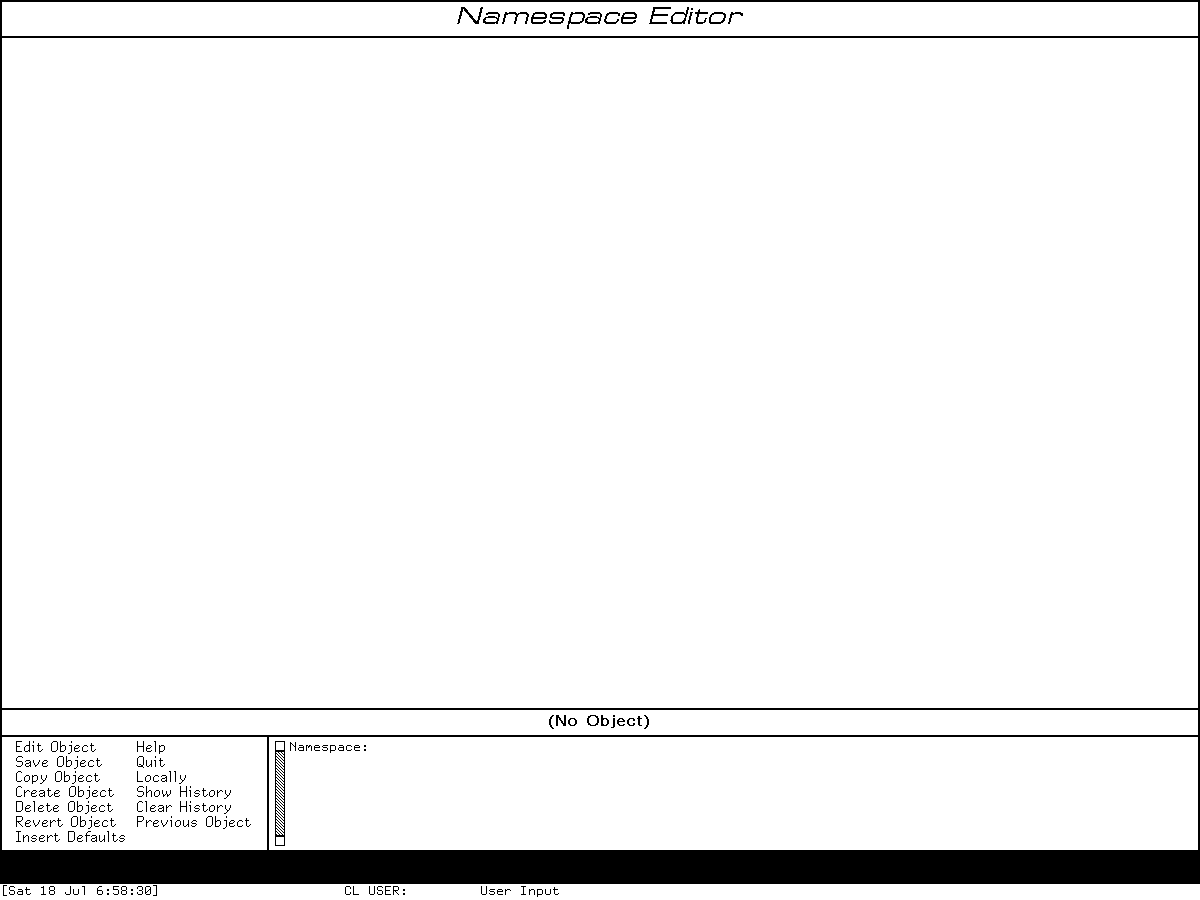
Runtime observation: Namespace Editor on Genera 8.5 immediately after Select Activity Namespace Editor, captured 2026-07-18. The frame is intentionally empty: no object or site data was selected, and no mutation was attempted. Underlying software and display material remain the property of their respective rightsholders; reproduced here for criticism, scholarship, and historical documentation under 17 U.S.C. section 107. No affiliation or endorsement is implied.
This one frame is published because the title, (No Object) state, prompt, pane division, and complete short menu are necessary to verify the source/manual interface analysis. It is a sparse functional display, contains no configured namespace record or Help prose, cannot substitute for Genera, and is the minimum image needed for that purpose. The image-specific review and exact raw-to-curated mapping are recorded in the screenshot rights review and Genera screenshot catalog. The PNG is an exact 2,921-byte copy, 1200×900 pixels, SHA-256 258afd1127848af24d2c3cc91ae6c369b5fa8febbda7b5e79742baace765582c; the normalized-pixel SHA-256 is 3b0b4de8249126f4e790474c13498edcd9e10f195b23ea0944204dcdcce3f7b7.
The initial Listener capture and the visually identical post-Help capture remain ignored because they add no necessary editor evidence. A later configured-site run would require a separate safety and rights review and should use a synthetic, nonprivate Namespace object.
Manual, source, and runtime differences
- Installed
site10presents the principal editor commands but the live/source menu also makes Quit and Insert Defaults plainly visible; Not Modified and Refresh are keyboard-only. - The manuals document six object-oriented Namespace CP commands in the editor chapter. Set Site and Define Site are documented elsewhere and are still in the same source command table; omitting them would understate the table's destructive end.
File System, introduced in Namespace protocol version 5, is present in the 8.5 source class list but absent from the inspected class chapters.- Source establishes top-level no-op keys, Space's typeout dual role, the infinity behavior of scrolling, the global-object second confirmation, the dangling-peripheral rejection, and the embedded-host warning; these details are not all apparent in the high-level editor overview.
- Runtime confirms the exact empty-frame menu and activity command in this unconfigured world. It does not validate object-specific fields, server propagation, or mutation commands.
Open questions
- TODO: identify which installed manual volume first documents the protocol-5 File System class and compare its exact fields with the 8.5 source.
- TODO: use a synthetic local-only object in an expendable private world to verify Accept Values field completion, validation errors, history selection, Revert, Not Modified, and Insert Defaults without contacting a server.
- TODO: test a synthetic primary/secondary namespace laboratory before making timing claims about lazy cache propagation.
- TODO: compare the source's
LINK-NAMESPACESbehavior with any administrator manual that documents the preferred global-name workflow and resolves theGLOBAL-NAMESPACE-NAMEversusGLOBAL-NETWORK-NAMEdiscrepancy. - TODO: do not exercise Set Site or Define Site in the purchased base world; construct a disposable synthetic file host and explicit rollback procedure first.
Sources
- Symbolics Genera 8.5 licensed source artifacts identified in the evidence tables above, inspected locally 2026-07-18; proprietary files remain untracked.
- Symbolics installed Namespace Editor, Site Operations, and Command Processor Help, original Sage Binary artifacts identified above, decoded locally with the repository's inert Help extractor and inspected 2026-07-18.
- Symbolics Genera 8.0 Site Operations release notes,
rn8-0/site.sab.~22~, SHA-2561ffe437ef33b050fee52a14a1300db09cb75de35ce852fad4ebb9d1404144aef, inspected 2026-07-18. - Local runtime observation
d20-namespace-editor, generation 1, performed 2026-07-18 through the isolated Genera computer-use harness.