Dynamic Lisp Listener in Symbolics Genera
The Dynamic Lisp Listener is Genera's interactive Lisp and command workspace. It is more than a printed read-eval-print loop: each Listener has its own process, the Command Processor can interpret the same input area as either a named command or a Lisp form, the Input Editor supplies structure-aware editing and history, and Dynamic Windows presentations make displayed commands and objects available to the mouse.
This page describes the implementation and the behavior observed in the inspected Genera 8.5 world. Its binding tables are complete for the configured base Input Editor entries found in the inspected source. They are not a promise that every Listener has an immutable global keymap: active input contexts, site code, patches, and applications can add, remove, or replace entries.
Evidence and rights boundary
The implementation and extracted Help files below came from licensed Open Genera media and remain untracked. This page publishes only artifact identities, small interface names, behavioral facts, and original analysis.
| Portable artifact | Bytes | SHA-256 | Use in this study |
|---|---|---|---|
sys.sct/sys/command-loop.lisp.~200~ |
25,251 | a7078b06d8513e8b06bee0746ad965bfdf6dd7be920909d60fbfc411f2c94a45 |
top-level evaluation loop and value histories |
sys.sct/cp/command-processor.lisp.~318~ |
131,639 | 248550a755130c40322b3a12c608cfa7a18213b504d18f36d5fcf3399dc4bca6 |
command/form dispatch, modes, completion, and presentations |
sys.sct/cp/defs.lisp.~5~ |
5,561 | 5ac493a550319da115b531e059ea803db1d42d4b879d88febb4a651b218c564e |
Command Processor definitions |
sys.sct/io/input-editor.lisp.~332~ |
110,515 | 856548d945403aa4f5fa3036bd2e8b936890b07b231673c9e2cab5f9e42707b3 |
base Input Editor command table and implementation |
sys.sct/zwei/ie-commands.lisp.~2~ |
21,451 | 8cde1a9f6c92aef707b4fb74054be33c98b127824310ff9fc7fba189173319b9 |
Lisp-structure editing added through Zwei support |
sys.sct/sys/standard-values.lisp.~17~ |
16,345 | d36373fc5648fb9105d94aa0bc9de1540ae09364c3983d6f1f1a68c6db1792f0 |
Listener value environment |
sys.sct/window/baswin.lisp.~713~ |
107,624 | 1f6a9ff8fdeae06518b0829e38c6c10769ddfe8b826368d4ce50922232b83297 |
process-owning Listener window behavior |
sys.sct/dynamic-windows/cometh.lisp.~65~ |
27,134 | a6a7cb4db4005b2bd6df10aa1610d6b4d962c43d151b75f9a95c9ec621cb5407 |
Dynamic Lisp Listener integration |
sys.sct/dynamic-windows/dynamic-window-combinations.lisp.~25~ |
17,542 | 87c40a87d4fb50ab3d45e19e31f265878e506b1cb5248badc924985c161c7b52 |
Dynamic Windows class composition |
sys.sct/dynamic-windows/program-framework-panes.lisp.~32~ |
18,999 | 4ebc7fac734b83b7f9c2be4e81fb47b6443157460c0fcdbbb864dd242eeb27ea |
interactor-pane and presentation integration |
Installed Document Examiner records cp1, cp1a, cp2, and cp3 were used to cross-check intended Command Processor operation:
| Portable Help source | Bytes | Records | SHA-256 |
|---|---|---|---|
sys.sct/doc/installed-440/cp/cp1.sab.~37~ |
54,674 | 25 | 3e283229a080e018f76508ae9139d134b343d7cf28b5f6bc8b1fb987f8bf6577 |
sys.sct/doc/installed-440/cp/cp1a.sab.~24~ |
53,350 | 22 | 6ad191966ab5aa39fb8613cc411331e82b5eeec83091eed62811538d75d39847 |
sys.sct/doc/installed-440/cp/cp2.sab.~152~ |
164,164 | 73 | 2dda47b43c53edcab060da0d5b513f2d5735d7d4d447157aa2cdd269a3dae7b6 |
sys.sct/doc/installed-440/cp/cp3.sab.~184~ |
404,196 | 80 | 24ed5565a80c9857feae331466cffc9cecbdf6439ae30a3de0f650e0f4b1c484 |
No decoded proprietary prose is tracked or reproduced here.
The public manuals are labeled Genera 8, while the local world identifies as 8.5. Manual statements are treated as product documentation and are cross-checked against the local 8.5 source or the running world before being stated as exact behavior.
Three cooperating layers
The visible facility is easiest to understand as three cooperating systems.
| Layer | Responsibility |
|---|---|
| Listener | Owns a process and standard-value environment, establishes stream bindings, runs the top-level loop, evaluates forms, prints values, and maintains Lisp input/result histories. |
| Command Processor | Parses commands and their typed arguments, decides whether input is a command or Lisp, completes names, and creates presentation-sensitive output. |
| Input Editor | Edits the current input before it is submitted, including movement, deletion, structure operations, kill/yank histories, searching, completion support, and typeout scrolling. |
The internal Listener mixin combines process behavior with the standard-value environment and defaults to SI:LISP-TOP-LEVEL1. A public Listener mixin adds an interactor and selection through Select L; the Dynamic Windows combination supplies the pane and presentation framework seen in the running system. The initial Listener is created during warm start, while additional Lisp windows can be created as separate processes from the System Menu.
At the top level, the command loop directs standard input, standard output, error output, query I/O, and debug I/O through the Listener's terminal stream. The trace output stream is deliberately not rebound in this setup. This matters when interpreting output that does not appear where ordinary evaluation results do.
The read-evaluate-print cycle
The Listener reads one object or command, evaluates it, collects all returned values, updates history variables, and prints each returned value on a fresh line. An error offers a top-level restart rather than requiring the process to be discarded.
The standard-value environment maintains these Lisp histories:
| Variables | Meaning in the inspected loop |
|---|---|
- |
The form currently being evaluated, or the most recently read form outside its evaluation. |
+, ++, +++ |
The three preceding input forms, newest first. They shift before the next input is read. |
*, **, *** |
The first value of the three preceding evaluations, newest first. |
//, ////, ////// |
Lists containing all values of the current/most recent and two preceding evaluations. |
There is an important timing detail that a static list of variable names does not show. While a new form is being evaluated, - already denotes that new form, but // still contains the previous evaluation's multiple-value list. Only after the new evaluation returns can the loop replace //. The runtime probe below visibly confirmed that ordering.
The loop dynamically binds its history variables only when an enclosing command loop has not already established them. Nested loops can therefore share an existing history environment, while independent Listener streams normally retain independent histories.
Command Processor modes and dispatch
The running Listener used Command Preferred mode and displayed Command: as its prompt. The implementation supports four input-preference modes:
| Mode | Prompt reported by the running Listener | Dispatch behavior |
|---|---|---|
| Form Only | empty string | Interpret submitted input as Lisp rather than looking for a command. |
| Form Preferred | empty string | Prefer Lisp syntax; explicit command syntax still reaches the command language. |
| Command Preferred | Command: |
Prefer a command when the beginning can name one; otherwise admit Lisp according to the dispatch rules. This is the observed Listener default. |
| Command Only | Command: |
Interpret input as Command Processor input rather than ordinary Lisp. |
In Command Preferred mode, alphabetic input first attempts command recognition. If it does not name a command but does name a bound symbol, its Lisp value can be used. A leading comma explicitly forces Lisp input; a leading colon explicitly forces a command. Thus the comma in ,(values 17 23) is dispatch syntax, not part of the Lisp form.
Blank input has a separately configured policy. The source supports reprompting, beeping, ignoring the input, returning NIL, and ending with NIL; this policy is orthogonal to the four command/form modes. Set Command Processor changes the configuration, Show Command Processor Status reports it, and the Command Processor can be turned on or off.
Command entry, completion, and Help
The Command Processor does not read a command line as undifferentiated text. It uses input contexts for a command name, positional arguments, keywords, and argument values. The base controls found in source are:
| Gesture | Command Processor role |
|---|---|
Space |
Terminate or complete the current command-name, argument, or keyword field as its input context permits. |
Return, C-Return |
Terminate the input line. |
End |
Terminate the command. |
Complete |
Complete the current field. |
M-Complete |
Display possible completions without committing an arbitrary one. |
Help |
Display context-sensitive assistance for the field currently being requested. |
leading , |
Force Lisp-form interpretation. |
leading : |
Force command interpretation. |
The actual completion population is broader than a list of command strings. The implementation maintains caches for such objects as pathnames, systems, symbols, numbers, arrays, functions, commands, and pseudo-commands. Completion and parsing can therefore return typed objects rather than merely copied text.
Presentations and mouse-oriented interaction
Command Processor output can retain a semantic link between a printed region and the object it represents. Commands, arguments, Lisp objects, and evaluation results can therefore become presentations with context-dependent mouse operations. The interactor is not simply a terminal emulator layered over a REPL: it participates in Genera's typed presentation system.
This design connects several behaviors that otherwise look unrelated:
- a displayed pathname, system, symbol, command, or object can supply input to a later command without being retyped;
- completion operates over typed populations;
- pointer documentation can describe operations appropriate to the object beneath the mouse; and
- command arguments can constrain which presentation types are acceptable at that point in an interaction.
The running world's Help Commands display reported 40 command areas. They are command-table categories, not 40 standalone applications:
| Broad area | Exact runtime-reported command areas |
|---|---|
| Interaction and session | Activities, Evaluation Context, Global, Lisp, Process, Session, Utilities, Window |
| Programming and diagnosis | Breakpoint, Callers, CLOS, Debugging, Editing, Flavors, Garbage Collection, Inspection, Presentation, Programming Tools, Tracing |
| Files and documents | Directory, Document Formatting, Documentation, File, File System, Fonts, Spelling |
| Communication and services | Communication, Conversation, Mail Reading/Sending, Mailer, Namespace, Networks, NFS, Printer, Printer Maintenance, Tape Administration |
| Operations | Demonstration, Site Administration, System Maintenance, World Building |
Complete configured base Input Editor bindings
The following tables enumerate every configured base entry found by the source audit, including hardware-key names and modifier variants. A gesture can be shadowed by a more specific active input context. “Configured” is deliberate: the Input Editor's command alist is localizable and globally modifiable, and some useful implementation commands are defined without being assigned a base gesture.
Notation uses C-, M-, and S- for Control, Meta, and Super. Shift is written out where it is part of the key identity. Names such as Line, Page, Scroll, Back-Scroll, Clear Input, Complete, and Overstrike refer to Symbolics keyboard characters, not generic PC-key labels.
Display, buffer bounds, and basic character editing
| Gesture or gestures | Configured operation |
|---|---|
Refresh |
Refresh the window. |
Page |
Erase typeout. |
M-<, M-Up, Home |
Move to the beginning of the input buffer. |
M->, M-Down |
Move to the end of the input buffer. |
Clear Input |
Clear the current input. |
C-F, Right |
Move forward one character. |
C-B, Left |
Move backward one character. |
C-D |
Delete the next character. |
Rubout |
Delete the previous character. |
C-T |
Transpose characters. |
Line |
Insert a newline followed by two spaces. |
Overstrike |
Move backward one character for overstriking. |
C-L |
Refresh the input display. |
C-O |
Open a line. |
C-Q |
Quote the next input character. |
C-M-J |
Change or select the typein character style. |
Lines, words, case, and Lisp structure
| Gesture or gestures | Configured operation |
|---|---|
C-A, M-Left |
Move to the beginning of the line. |
C-E, M-Right |
Move to the end of the line. |
C-P, Up |
Move to the previous line. |
C-N, Down |
Move to the next line. |
C-K |
Kill to the end of the line. |
M-F |
Move forward one word. |
M-B |
Move backward one word. |
M-D |
Kill the next word. |
M-Rubout |
Kill the previous word. |
M-T |
Transpose words. |
M-U |
Uppercase a word. |
M-L |
Lowercase a word. |
M-C |
Capitalize a word. |
C-M-F |
Move forward across a Lisp expression. |
C-M-B |
Move backward across a Lisp expression. |
C-M-K |
Kill the following Lisp expression. |
C-M-Rubout |
Kill the preceding Lisp expression. |
M-\\ |
Delete horizontal whitespace. |
M-| |
Reduce horizontal whitespace to one space. |
Help and input histories
| Gesture or gestures | Configured operation |
|---|---|
Help |
Describe the current Input Editor context. |
C-Help |
List the active Input Editor commands. |
Escape |
Display the input history for selection. |
C-Escape |
Display the kill history for selection. |
The implementation also defines these operations without assigning base gestures:
| Unbound operation | Role |
|---|---|
| Display Internal State | Show implementation state for diagnosis. |
| Display Recent Input Matching; Display All Input Matching | Filter the input history by a supplied string. |
| Display Recent Kills Matching; Display All Kills Matching | Filter the kill history by a supplied string. |
| Scroll Vertical Beginning; Scroll Vertical End | Jump to a typeout boundary. |
| Clear History | Ask the current interactive stream to clear its history. |
Their lack of a base binding is significant: a defined debugging or support command is not automatically a user-visible keystroke.
Mark, kill, copy, and yank
| Gesture or gestures | Configured operation |
|---|---|
C-Space |
Set the mark. |
C-< |
Set the mark at the beginning of the input. |
C-> |
Set the mark at the end of the input. |
C-W |
Kill the region. |
M-W |
Save the region without deleting it. |
S-W |
Push all marked text available through the window into the kill ring, without falling back to the current Input Editor region. |
C-Y |
Yank the latest killed text. |
M-Y |
Replace the preceding yank with an earlier kill. |
C-M-Y |
Yank from input history. |
C-Shift-Y |
Matching yank. |
M-Shift-Y |
Matching yank-pop. |
C-M-Shift-Y |
Matching yank from input history. |
S-G |
Clear marked text. |
Cut |
Delete all marked text found through the console and push the combined text into both the Zwei and console kill histories. |
Copy |
Copy all such marked text into both kill histories without deletion. |
Paste |
Yank from the console kill history. |
M-Paste |
Replace the preceding console paste with another console-history entry. |
Scrolling and saved scroll position
| Gesture or gestures | Configured operation |
|---|---|
Scroll, C-V |
Scroll vertically forward. |
M-Scroll, M-V, Back-Scroll |
Scroll vertically backward. |
S-Scroll |
Scroll horizontally forward. |
M-S-Scroll, S-Back-Scroll |
Scroll horizontally backward. |
C-Scroll |
Scroll typeout forward. |
M-C-Scroll, C-Back-Scroll |
Scroll typeout backward. |
C-M-S |
Save the current scroll position in a prompted character register. |
C-M-R |
Restore a scroll position from a prompted character register for the same window. |
Searching
| Gesture or gestures | Configured operation |
|---|---|
C-S, S-S, Find |
Search forward. |
C-R, S-R, M-Find |
Search backward. |
Numeric arguments
Every Control- or Meta-modified digit begins or extends a numeric argument. Control- or Meta-modified minus supplies a negative sign, and C-U multiplies the current argument by four. This handling is implemented specially rather than as ten unrelated ordinary editing commands.
Additional Lisp-structure bindings supplied by Zwei support
The Input Editor is not Zmacs, but it deliberately reuses a small part of Zwei. The inspected ie-commands module installs these additional Lisp-oriented operations:
| Gesture | Operation |
|---|---|
C-M-Close |
Move forward and upward out of a parenthesized expression. |
C-M-Open, C-M-U |
Move backward and upward out of a parenthesized expression. |
C-M-D |
Move down into a Lisp expression. |
C-M-A |
Move to the beginning of a definition. |
C-M-E |
Move to the end of a definition. |
C-M-T |
Exchange Lisp expressions. |
M-Open |
Insert matching delimiters. |
C-Shift-A |
Describe a function's arguments. |
C-Shift-V |
Describe a variable. |
C-Shift-D |
Display documentation for a symbol. |
The same module defines, but does not assign base gestures to, backward-up-list killing, generic symbol description, disassembly, and completion-internal helpers.
Findings that are easy to miss in manuals
- The Input Editor constructs a small temporary Zwei node and selects a Common Lisp or Zetalisp syntax table for structural operations. The Listener therefore gets syntax-aware movement without becoming a Zmacs buffer.
- Symbol completion considers both the package recorded for the input entry and the current package. Its implementation tries not to intern a new symbol merely as a side effect of asking for completion.
- Lisp-oriented yanking is whitespace-aware. It can insert separation appropriate to the surrounding input rather than treating every yank as a blind byte splice.
- Input Editor Help enumerates the active command alist. Because contexts can localize that alist, Help can be more authoritative for the current prompt than a printed global reference card.
- A command for displaying internal Input Editor state exists but is deliberately unbound in the base table. Static function-name inventories overstate the ordinary user interface if they ignore installation.
- The multiple-value history is updated after evaluation. During evaluation of the next form,
//still denotes the preceding value list even though-already denotes the current form. - The Listener rebinds ordinary and debugging streams to the window but intentionally leaves the trace stream alone. “All output goes to the Listener” is therefore too broad.
Runtime observations in Genera 8.5
A fresh isolated session named core-dossiers-20260718, generation 1, exercised the Listener, System Menu, Inspector, and Peek in one boot. Its Listener observations were made before opening the other applications.
| Item | Recorded value |
|---|---|
| Session | core-dossiers-20260718, generation 1; 2026-07-18 03:59:21–04:08:08 EDT |
| Licensed release archive | 206,213,430 bytes; SHA-256 89fb3e76b91d612834f565834dea950b603acf8f9dbacacdd0b1c3c284a2d36e |
| Base and private world | Genera-8-5.vlod; 54,804,480 bytes; SHA-256 a8ee5e86cc7e322f7385af3e0cd579d7650d4dcfc3ce328acbf8b25515dd0672 at start and stop |
| Debugger and VLM | debugger SHA-256 2db918cfe8f35f52c7ff4b7695b0ecd3bb85e41a3327ea5a94874edf05edb54a; VLM SHA-256 9f5e18d5770f973879716182b6856ef5a8ee9d3b2bb907476ea0cf35986aa4c7 |
| Harness | execution-time SHA-256 bc9276ac766913bc15018dd334a2a2704ae5a926e1fcbc30ccfcff08af8cb48a |
| Toolchain | manifest.scm SHA-256 3adae999bbe420182f22adc2499fcc82449a46eaf580a362de9c0e718fa6b37d; Guix channel 230aa373f315f247852ee07dff34146e9b480aec |
| X compatibility preload | source SHA-256 4db1dee8e71d5ddc5cfd8289ecc3607738370ac97f856853786cfe713e94e392; executable SHA-256 acd71dbcb948f05b7fd2730b2b4706c08f16f46d792bd9aa6aa64370e855e4b1 |
| Network/configuration helpers | ifconfig interposer SHA-256 f45f45461622975996ab41138f64bb84a4b17c51fba0dbb649208914898c26b7; configuration SHA-256 5ce6509f5adf2cf2d054d34eb4ba777ce462285b8cd9b01bc071bf819139e086 |
| Time responder | executable SHA-256 cc3a2274149c5593b52e6608d732d4048518c766134df5e0f018746ad5cf98bb; validated RFC 868 evidence SHA-256 20362e5593d8b810a63e268dbc9b6644d71baf90999e5aeb8ff9a7a1d008c65c |
| Selected window | Genera on DIS-LOCAL-HOST, XID 4194310, x=72, y=55, 1200×900 |
The VLM ran in separate user, mount, network, PID, IPC, and hostname namespaces. The session had no external route or guest-visible host file service, and Xvfb did not advertise MIT-SHM. Bubblewrap exposed a read-only Guix store, the exact read-only helpers and X socket, and the writable private runtime. The two byte-exact X request substitutions and one local RFC 868 request/reply were observed and validated; the time responder exited zero. These controls reduce the native process's reach but do not claim a complete kernel security boundary.
Multiple values and history timing
The session began at a Command: prompt in a Dynamic Lisp Listener. The screen also reported that the local site was not configured and that servers were disabled. Submitting
,(values 17 23)printed 17 and 23 on separate lines. The next probe was:
,(list * // - + ++ +++)It visibly returned:
(17 NIL (LIST * // - + ++ +++) (VALUES 17 23) NIL NIL)This establishes in the running 8.5 world that the first-result history already held 17, the current-form variable held the second probe, and the preceding-input history held (VALUES 17 23). The NIL in the // position is also consistent with the source-defined update ordering: during the second evaluation, // still held the multiple-value list from before the first probe rather than the values being computed by the second form.
Show Command Processor Status visibly reported Command Preferred; it explained that alphabetic starts are treated as commands, comma forces Lisp, and the displayed prompt is Command:. Select I opened an independent Inspector, Select P opened Peek, and Select L returned to the Listener with the earlier output preserved.
Local capture evidence and published screenshot
Three 1200×900 raw captures preserve the Listener states. They remain in the ignored session tree and are not linked from this page:
| Capture | Observation | Capture/action prefix | PNG SHA-256 | Normalized-pixel SHA-256 |
|---|---|---|---|---|
0002-listener-multiple-values.png |
two values printed on separate lines | 2026-07-18 04:00:04 EDT; 2 action records, prefix SHA-256 05564580417f9901acb71585872e56a8bf5fe0b4004f7e8251528b3d7c9506a2 |
39061d7b9ea5b55428020cfaf7558b5566c101ab56822cbd951905c520c3ebac |
99003664b87974790051046a01a9579ffa77b48e25e2d7c406e7c87e42ee5c37 |
0003-listener-history-variables.png |
visible history-variable result | 2026-07-18 04:00:27 EDT; 4 action records, prefix SHA-256 5dc657a7f88f7cd50e15b5067bfa0bda38a6a82bc7e55071d9f0dcc207bf99ad |
7f34e301754fb2eca6dbfeb619a82e944f261534a95e8e43f1d83353bb8287a4 |
2e0200a6e9b8dbb42a265897b4676016bb94e807ad4073be1550dca5cc3bfd68 |
0027-listener-command-processor-status.png |
Command Processor mode and dispatch summary | 2026-07-18 04:07:31 EDT; 66 action records, prefix SHA-256 02df861d873714eb7f75e4fe450d65ec4c965cc407717f0725e1e49e34bb3565 |
1f42a7d91de6ca749d079796bbb2c8137053f75f88b32e1e8c157289b777a2bd |
1424ac3d862c179da6358d84dd7a5559078396ecfc88c02f1b4f94cfd2af3dd4 |
The capture- and use-specific review selected only the multiple-value screen for the curated Genera screenshot catalog. The history-variable and Command Processor status captures remain ignored because their additional text is not needed to establish the visible multiple-value behavior.
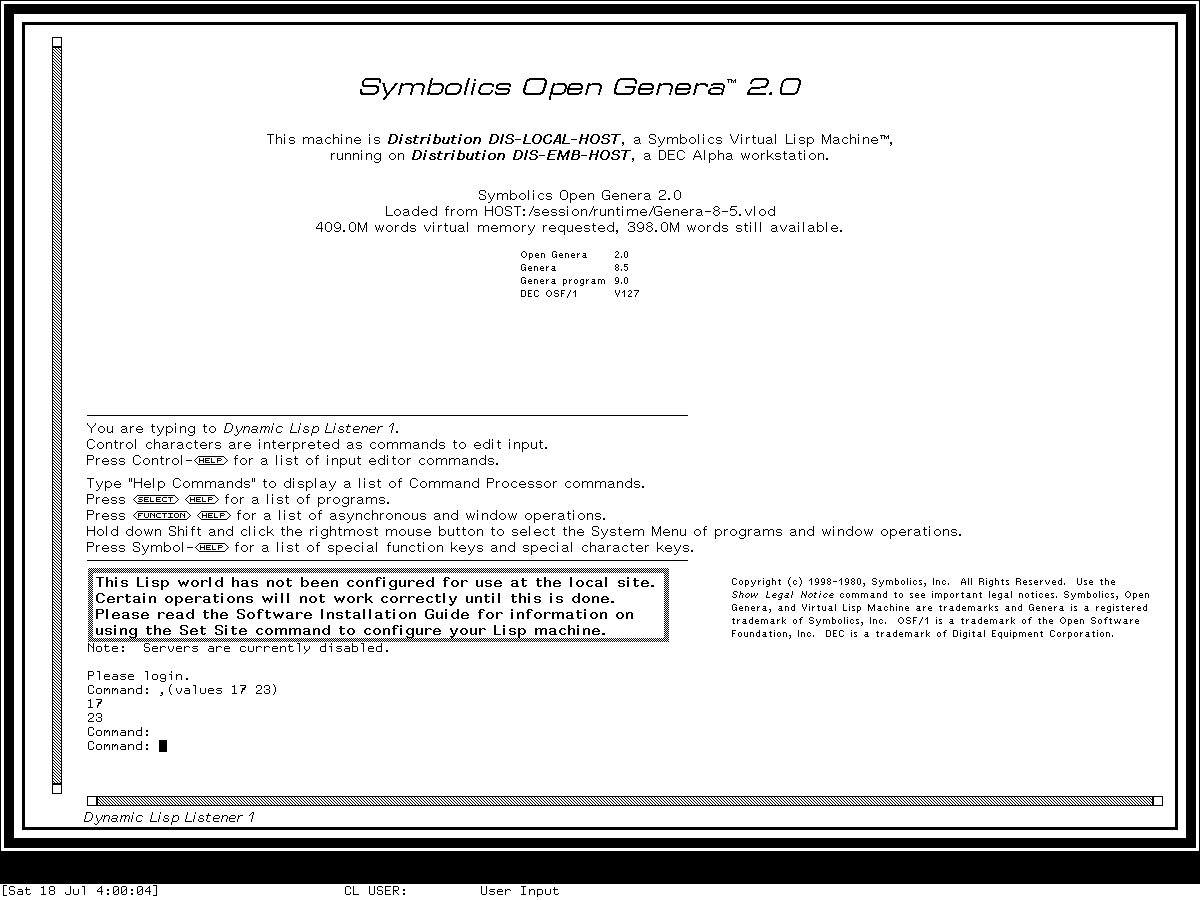
Runtime observation: the Dynamic Lisp Listener in Genera 8.5 after evaluating
(values 17 23), captured 2026-07-18. Underlying software and display material remain the property of their respective rightsholders; reproduced here for criticism, scholarship, and historical documentation under 17 U.S.C. section 107. No affiliation or endorsement is implied.
The 25,569-byte final run record has SHA-256 03f497f39e3afc2d34916f6ab817a6664cde14a32224031bf52f90443ea94810. The 31,489-byte action log contains 33 linked intent/outcome pairs (66 records) and has SHA-256 02df861d873714eb7f75e4fe450d65ec4c965cc407717f0725e1e49e34bb3565.
The shutdown prompt was observed, yes was sent and accepted, and cleanup progress appeared. The known cold-load channel mutex stall then required bounded host cleanup. The final record says forced-stopped, forced_stop=true, forced_after_confirmed_shutdown_stall=true, state_may_be_incomplete=true, orderly_vlm_host_shutdown=false, and unsaved_lisp_state_discarded=true. The harness did not request Save World or create a host process checkpoint; save_world_performed and guest_checkpoint_created remain unknown. The private world stayed byte-identical to the base, and no session process remained. See the Genera computer-use harness article for the provenance and isolation model.
Scope limits and open questions
- The binding census covers the configured base source entries and the inspected Zwei integration. It does not dump every application-local Input Editor context in the world.
- The runtime probe exercised Command Preferred mode. The other three modes are established by source and documentation but were not separately demonstrated in this session.
- Presentation-sensitive mouse operations were not exhaustively enumerated because they depend on the displayed object type and current input context.
- The session was deliberately isolated and unconfigured. Network-, namespace-, printer-, mail-, and site-dependent commands being named in Help does not establish that those services were operational.
Sources
- Symbolics, Genera User's Guide, Genera 8, Dynamic Lisp Listener, Command Processor, and interactive input sections; verified 2026-07-18.
- Symbolics, Genera Workbook, Genera 8, Listener and command-interaction exercises; verified 2026-07-18.
- Symbolics, Programming the User Interface, Genera 8, presentations and interactive-stream context; verified 2026-07-18.
- Licensed local Genera 8.5 source and extracted Document Examiner help, identities recorded above; inspected 2026-07-18.
- Fresh
core-dossiers-20260718Genera Xvfb session, generation 1, input, image, and shutdown evidence recorded above; observed 2026-07-18.