Inspector and Peek in Symbolics Genera
Inspector and Peek are live instruments, not passive report viewers. Inspector turns Lisp objects into a mouse-navigable graph and can rewrite slots, symbol cells, arrays, lists, hash entries, closures, and even compiled-code constants. Peek continuously reconstructs views of processes, storage, timers, files, windows, servers, and networks; many of its object menus can arrest, reset, kill, close, delete, or otherwise change the objects being displayed.
The two applications therefore show an important part of the Lisp-machine working style: runtime state remains inspectable as structured objects, and the same display used for diagnosis can lead directly to intervention. This study uses the public Genera 8 manuals for intended behavior, the licensed local Genera 8.5 source and on-line documentation for implementation detail, and one fresh isolated Genera 8.5 run for visible behavior. A claim from one release or evidence class is not silently generalized to all Genera worlds.
Genera's distinct Presentation Inspector is documented separately. It diagnoses presentations, input contexts, handlers, translators, gestures, menus, and priority rather than following arbitrary Lisp object structure.
Evidence and rights boundary
The following source files came from the licensed Open Genera tree. They remain untracked. Only their portable identities and original analysis are published here.
| Portable artifact | Bytes | SHA-256 | Use in this study |
|---|---|---|---|
sys.sct/window/inspct.lisp.~4053~ |
61,536 | 0f2f2f9f437846f20ca418e2495d1cdf2360332630bb408b7b802f8dc6829f62 |
Inspector frame, object dispatch, menu, navigation, cache, and setters |
sys.sct/window/peek.lisp.~4073~ |
53,972 | 5e77404cbd17c26b21d457a99354da3c0a755b696597e35e8749b37596b56bcf |
Peek frame, registry, base modes, keys, and general menus |
sys.sct/window/peekch.lisp.~4015~ |
20,974 | 7cba80aa6db6aad71ac9a5350f7c7e15193ffd2644ac84e107f74983621c6ad4 |
Chaosnet detail, Hostat registration, and Chaos-specific actions |
sys.sct/window/peekfs.lisp.~4009~ |
11,822 | 273dc6b26d6252ebb60d0c3fce149232377de7d3c951abbb5dcdd1b4c85ffe70 |
QFILE and NFILE status rows and menus |
sys.sct/scheduler/timer.lisp.~149~ |
60,877 | 3844bdbb958751301d14403c6e67f126b7bb557438a41b33f365e2ebe28b53ea |
current timer display |
sys.sct/sys2/timer-queue.lisp.~56~ |
16,245 | acea648828b684a9a88dff64d1ecd83f8a64b2ba13121ddbc549a9bf9f627ae4 |
old timer queue and mouse menu attachment |
sys.sct/network/servers.lisp.~97~ |
26,788 | f7d84b54df843af0eea3cba86cc790ccb1d06896655906e8b2bfc307bbf1740b |
active-server rows and process/host sensitivity |
The locally decoded Document Examiner payload also remains ignored. Its relevant source Sage Binaries are:
| Portable Help source | Bytes | Records | SHA-256 | Use |
|---|---|---|---|---|
sys.sct/doc/installed-440/misct/misct1.sab.~20~ |
153,803 | 12 | d0f08b4c4a4d6f9461424f54b33720f1d304b2195dc1ea4372dfba2b388214f3 |
Inspector documentation |
sys.sct/doc/installed-440/miscu/miscu1.sab.~36~ |
26,371 | 19 | 216987d719b74507226a5b360c09decb72c09d398ceb289549bc37fb97da14fc |
Peek documentation |
sys.sct/doc/installed-440/rn8-0/notes.sab.~18~ |
12,056 | 8 | b974be3eafef008cf56bf820f3676bccdc0077f79dd5a197dfc410085e6ea02d |
Genera 8.0 notes cross-check |
sys.sct/doc/installed-440/rn8-0/utilities.sab.~30~ |
50,564 | 33 | aec4663ac6a81cc7fe662531bd4c6279014dfcfff3c755934d94345ef287ed70 |
update interval and timer-display notes |
No decoded vendor prose is tracked or reproduced here.
The public Program Development Utilities manual supplies the Inspector description and another Peek account. The public Genera User's Guide supplies the user-level Peek account. Both are Genera 8 documents; exact 8.5 statements below require corroboration from local source or runtime.
Raw runtime images, sidecars, action records, logs, and the licensed private world remain in the ignored computer-use session. Two separately reviewed, byte-identical captures are published under Published runtime screenshots; every other capture from the study remains ignored.
Inspector
What it is and how it is entered
Inspector is a standalone activity and also a callable subprogram. The difference matters because a call can temporarily take over the invoking Listener, whereas the activity has its own process and can simply be selected away from.
| Entry path | Established behavior in this source/world |
|---|---|
Select Activity Inspector |
Selects or creates the registered Inspector activity. |
Select I |
Select-key registration for Inspector; freshly exercised in the runtime session. |
System menu Inspect |
Programs-column entry that calls the Inspector. |
System menu Create -> Inspect |
Creates an Inspector frame with its own process. |
Command Processor Inspect object |
The implementation accepts a name string, resolves an optionally package-qualified symbol, and inspects its value only if the symbol is bound. It is not an arbitrary-form reader. |
lisp:inspect |
Calls the Inspector on an object. When invoked from a Listener, the caller must leave through Inspector rather than assuming Select L will unwind the call. |
The top-level inspect function rejects a remote terminal and reports that the facility is available only from the main console. That restriction is in the implementation, not merely a recommendation in the manual.
Frame and data-flow architecture
The default frame contains six visible panes:
- a three-line interaction pane;
- a history pane and command menu arranged side by side;
- three vertically arranged inspection panes, the last of which owns the Inspector typeout window.
The number of inspection panes is an initialization option; three is the default, not a structural limit. All panes share an input buffer. The interaction pane reads and evaluates a form, then appends the resulting object to history instead of printing it. The last history objects populate the inspection panes, with the newest in the large bottom pane. Each inspection pane remembers its own scroll position. Top and bottom margin regions and a scroll bar provide object-local navigation.
History is more than a transcript. It stores object identity and a cached display description. Before an object is appended, an EQ-identical occurrence is removed; the same object therefore does not accumulate duplicate history rows. The cache enables quick redisplay but can become deliberately stale when an object changes outside Inspector. DeCache, deleting the history row, or a successful modification invalidates the relevant cached material.
Inspector-specific keyboard controls
Ordinary form editing is supplied by the system Input Editor. The table below is the complete set of special top-level Inspector characters configured in the inspected file, plus the activity selector. Input Editor movement, correction, history, and completion keys are inherited facilities rather than additional Inspector bindings.
| Input | Effect | Evidence boundary |
|---|---|---|
Select I |
Select or create the Inspector activity. | source and runtime |
Control-Z |
Exit the Inspector top level. | source and manual |
Escape |
Read and evaluate a form, then print its result in the interaction/typeout context instead of inspecting it. Full rubout cancels this subsidiary read. | source and manual |
Suspend / manual Break |
Enter a break loop in the typeout window. The implementation's input command is named Suspend; the manual labels the user operation Break. |
source/manual naming difference; not runtime-tested |
Return while entering a form |
Finish Input Editor input so the form can be evaluated and inspected. | inherited Input Editor behavior, not a separate Inspector command |
Object displays and mutation semantics
The local type dispatch has eleven principal cases. A component is only exposed in Modify mode when its presentation type has a registered setter.
| Object case | Displayed structure | Writable fields in the inspected implementation |
|---|---|---|
| Inspector stack frame | Interpreted form or compiled function view, with current-PC/source-position context where available | compiled-code fields described below, not arbitrary stack-frame fields |
| Flavor message handler | selector-to-handler entries | handler entries can be replaced directly in the dispatch structure |
| Basic hash table | instance information followed by key/value pairs | the selected key anchors replacement of its value |
| Basic table | instance information followed by table entries | entry values through the hash-key setter path |
| Named structure | named slots and values | slots through their generated reference/setf accessors |
| CLOS or flavor instance | class/flavor, dispatch information, slot names and values | a SET-<slot> message when handled, otherwise direct slot-value assignment |
| Array | leader cells; one-dimensional elements; a summary for higher-dimensional arrays | leader cells and one-dimensional elements |
| List | ground list structure with selectable cars and tails | cars and cdrs through destructive list update |
| Symbol | value, function, property list, and package | value cell, function cell, and property list; not the package |
| Dynamic closure | function and closed-over variable names/values | closure slots, preferring a setter message where one exists |
| Compiled function | source correspondence when available and preferred; otherwise disassembly and embedded objects | constant or indirect-object operands; the Ivory path writes code storage and clears the instruction cache |
The public manual also describes a Select Method display whose keyword/function pairs are editable. In this source revision, that implementation is guarded for CADR builds and is absent from the Ivory/Open Genera type dispatch. It is therefore historical/manual evidence, not asserted as active Open Genera 8.5 behavior.
Modify is consequently much stronger than a form-field editor. It can alter global function bindings, property lists, object dispatch, live list topology, array leaders, closed-over state, and executable-code constants. Some operations use an abstraction-preserving setter message; others deliberately write the representation. The source itself questions the safety of replacing a flavor message handler. A museum demonstration should use newly allocated probe objects and avoid modifying system objects unless the mutation itself is the subject of the experiment.
Inspector findings the manuals do not fully expose
- Type redirection is intentionally under-annotated. A malformed object handler can substitute another object or force another display type without telling the user that redirection happened; an unknown type has no graceful fallback.
- Function-following is a normalization loop, not merely “look up a symbol's function.” It peels symbols, closures, lexical closures, and valid function-definition lists until no further canonical function is found.
- Source display is conditional on both correspondence information and a Lisp language model. The menu toggles a global preference, but missing source or a non-Lisp function still produces disassembly.
- The source-aware compiled stack-frame path can mark the range associated with the current program counter. The disassembly path can instead mark the instruction index.
- Cache staleness is part of the design. Reinspection is not a guarantee of a fresh read until the cache is invalidated.
- The standalone command's apparent object argument is implemented as a symbol name string lookup, whereas the frame interaction loop evaluates arbitrary forms. The two input paths are not equivalent.
- The own-process
Returnsuppression in source and the visible 8.5 menu do not agree, as recorded above.
Peek
Architecture and lifecycle
Peek is an initially invisible, process-owning frame with two panes sharing one input buffer: a one-row dynamic mode menu and a scrolling status pane. The mode menu highlights exactly one item and sends the selected registry entry to the status process. The source deliberately leaves precreation disabled to avoid increasing world size.
On frame start the top level selects Help. The Lisp function zl:peek defaults its optional argument to P and force-types that mode character, while selecting the activity with Select P creates the frame without that function call. The fresh activity therefore opened on Help, matching the top-level source path.
The normal loop:
- waits for input, a redisplay request, or the next update time;
- uses interactive priority when input is pending and noninteractive priority for unattended refresh work;
- stops refreshing while the frame is deexposed and wakes immediately when it becomes visible again;
- notices changes to the dynamic mode registry and reconstructs the frame menu;
- preserves scroll-display objects so changing numeric fields can be refreshed rather than rendering an unrelated text report each cycle;
- waits for a user character before flushing incomplete typeout, preventing a background refresh from erasing diagnostic output.
The default refresh interval is twenty seconds. Genera 8.0 release notes explicitly corrected older documentation that had said two seconds; the local source constant and runtime Help both say twenty.
Complete configured keyboard controls
This table covers every character handled by Peek's top loop in the inspected base source plus the dynamically registered Chaosnet mode.
| Input | Effect |
|---|---|
P, A, M, F, W, S, N |
Select Processes, Areas, Meters, File System, Windows, Servers, or Network. |
Help |
Select the Help mode. |
Q |
Bury Peek and restore the previously highlighted mode item; the nominal peek-quit function is bypassed by a special case. |
H |
Select Hostat when the Chaosnet extension has registered it. |
| digits | Accumulate a decimal numeric argument. |
n Z |
Set this Peek loop's update interval to n seconds and reschedule the next refresh. With no numeric argument, Z leaves the interval unchanged. |
Space |
Request immediate redisplay in a normal mode. |
Control-V, Scroll |
Scroll forward by the numeric number of lines, or approximately one visible screen without an argument. |
Meta-V, Meta-Scroll |
Scroll backward by the numeric number of lines, or approximately one visible screen without an argument. |
Meta-< |
Move to the beginning. |
Meta-> |
Move near the end, leaving roughly the final two-thirds of a screen visible. |
| any other character | Clear a pending numeric argument and beep. |
Hostat has a subsidiary loop after a host-status pass: Space requests another pass and any other character is pushed back so Peek can resume normal handling. That subsidiary loop is reached only if the underlying Chaosnet hostat call returns. The manual's Control-Abort instruction belongs to that underlying operation.
Modes in the inspected source and world
The base file registers seven status modes, Help, and the special Quit menu row. peekch appends Hostat through the same public registry function. The live 8.5 menu therefore contained ten items in this order: Processes, Areas, Meters, File System, Windows, Servers, Network, Help, Quit, Hostat.
| Mode | What the implementation displays | Mouse-sensitive behavior |
|---|---|---|
Processes (P) |
Every process with name, state, priority, idle time, utilization and optional progress note; an alternate detailed layout adds real-time, CPU, and paging percentages. Current timers, old timer-queue entries, and the clock-function list follow. | process menu; expandable current and old timer sections; old timer-entry menu |
Areas (A) |
physical, swapping, wired-page, and region totals, followed by each allocated area, region count, free percentage, and used/allocated words | click an area to add or remove ephemeral-level and individual-region detail |
Meters (M) |
a registry of Storage, GC, Disk, and ZWEI Sectionization counter groups | click a group to add or remove its counters |
File System (F) |
pathname hosts that expose Peek data, direct streams, legacy QFILE host units, and NFILE server units/channels | stream, access-path, unit, channel, network-stream, and host menus |
Windows (W) |
every screen and its complete recursive inferior-window hierarchy | one window-operation menu per displayed sheet |
Servers (S) |
active server protocol, host, process/state, and connection detail | host, process, connection, and stream menus supplied by the server/network type |
Network (N) |
local network state, packet-allocation counters, and network interfaces | network and process menus; protocol modules can insert connection, packet, meter, routing, and host detail |
Help (Help) |
a display generated from the live mode registry plus Z and Space |
no object-control menu |
Quit (Q) |
no status display; buries the frame while preserving the prior highlighted mode | menu-row selection or key |
Hostat (H) |
Chaosnet status typeout followed by a small repeat/return loop | the underlying Hostat interaction rather than normal scroll-maintained redisplay |
The manual's generic Meter description includes Netboot. The local source guards that meter group with #-IMACH; the Open Genera/Ivory runtime showed only the four groups listed above. This is a platform-conditional difference, not missing runtime evidence.
Peek findings the manuals do not fully expose
- The mode menu is a runtime registry. Hostat is not hard-coded in the base frame layout; loading the Chaosnet module appends it, and an already existing Peek frame notices the changed list and reconfigures itself.
- Help is generated from that registry, so it can enumerate a mode supplied by another module. It documents
ZandSpacebut omits the six scrolling bindings that the same top loop handles. - Quit is represented as a mode entry but is not a display mode. The selection path buries the frame and restores the previous highlight; the defined Quit display function is intentionally never called.
- The four base meter groups form another extension registry. Netboot is compiled out on IMACH, explaining its absence from the observed Open Genera menu without treating the manual as universally wrong.
- Processes can switch between compact utilization and a more detailed real/CPU/paging layout through a process subsystem variable. Static screenshots from different worlds can therefore show different columns without implying a different Peek version.
- Current timers and old timer-queue entries come from two different scheduler facilities. Only old queue entries receive Peek's five-operation timer menu.
- Typeout is intentionally modal with respect to refresh: Peek waits for a user character before replacing incomplete diagnostic output.
- Hostat does not implement the scroll-maintained function contract used by the normal modes. It performs a potentially blocking network operation inside Peek's own top-level process. The runtime consequence is recorded below.
- The File System menu's
Deleteoperation leaves the stream open, a sharper operation than the broad manual phrase “close streams” suggests. - Hidden-detail lists carry mutable redisplay state in scroll-item leaders and compare some canonicalized objects by identity. These are active display structures, not a freshly printed report on every update.
Fresh Genera 8.5 runtime observations
Session boundary
The isolated session was named core-dossiers-20260718, generation 1, and ran from 2026-07-18 03:59:21 to 04:08:08 EDT. Its reproducibility boundary was:
| Item | Recorded value |
|---|---|
| Licensed release archive | opengenera2.tar.bz2, 206,213,430 bytes; SHA-256 89fb3e76b91d612834f565834dea950b603acf8f9dbacacdd0b1c3c284a2d36e |
| Base and private world | Genera-8-5.vlod, 54,804,480 bytes; SHA-256 a8ee5e86cc7e322f7385af3e0cd579d7650d4dcfc3ce328acbf8b25515dd0672 at start and stop |
| Debugger and VLM | debugger SHA-256 2db918cfe8f35f52c7ff4b7695b0ecd3bb85e41a3327ea5a94874edf05edb54a; VLM executable SHA-256 9f5e18d5770f973879716182b6856ef5a8ee9d3b2bb907476ea0cf35986aa4c7 |
| Harness | execution-time Python harness SHA-256 bc9276ac766913bc15018dd334a2a2704ae5a926e1fcbc30ccfcff08af8cb48a; shell entrypoint SHA-256 e10d07a1c745d37044f1a97903455d334d6dcdb0c1d0e6854598e10fab24fa05 |
| Toolchain | manifest SHA-256 3adae999bbe420182f22adc2499fcc82449a46eaf580a362de9c0e718fa6b37d; Guix channel commit 230aa373f315f247852ee07dff34146e9b480aec |
| X compatibility | source SHA-256 4db1dee8e71d5ddc5cfd8289ecc3607738370ac97f856853786cfe713e94e392; preload SHA-256 acd71dbcb948f05b7fd2730b2b4706c08f16f46d792bd9aa6aa64370e855e4b1 |
| Network/configuration helpers | ifconfig preload source SHA-256 a4d126dbb6fd6f4903835bbb41c39652cfc53c91e942267dc9166c1c938c36e7; executable SHA-256 f45f45461622975996ab41138f64bb84a4b17c51fba0dbb649208914898c26b7; configuration SHA-256 5ce6509f5adf2cf2d054d34eb4ba777ce462285b8cd9b01bc071bf819139e086 |
| Time responder | source/executable SHA-256 cc3a2274149c5593b52e6608d732d4048518c766134df5e0f018746ad5cf98bb; validated evidence SHA-256 20362e5593d8b810a63e268dbc9b6644d71baf90999e5aeb8ff9a7a1d008c65c; responder exit status 0 |
| Selected window | Genera on DIS-LOCAL-HOST, XID 4194310, x=72, y=55, 1200x900 |
The VLM ran in separate user, mount, network, PID, IPC, and hostname namespaces. Bubblewrap exposed the read-only Guix store, exact read-only helpers and private X socket, generated minimal host lookup files, and the writable private runtime. It did not expose the host root, home, repository, unrelated runtime sockets, or session metadata. The isolated tun0 had no default or external route and no guest-visible host file service. This is native-process reach reduction, not a claim of a complete kernel security boundary.
Xvfb did not advertise MIT-SHM. Both pinned guest-X request substitutions were observed before the harness declared the session running. The one-shot RFC 868 responder received the expected local Ethernet request, sent one validated reply, and exited successfully.
Inspector observation
Host F1 was the harness translation used for the Genera Select key; this is not a Symbolics-keyboard layout claim. Select I opened a blank own-process Inspector with the interaction line, history, menu, and three empty object panes. The menu visibly read Exit, Return, Modify, DeCache, Clear, Set //, and Source, establishing the source/runtime Return disagreement discussed above.
Entering the project-owned probe form '(alpha (beta . gamma) #(1 2 3)) evaluated it and placed the result in history and in the bottom pane labelled a list; the two upper object panes remained empty. A pointer action over the displayed list changed the bottom documentation to the list-specific CAR wording. No system object was modified, and the Modify, Set, and Source operations were deliberately not exercised.
Peek observation
Select P opened Help with the ten-item row described above. Subsequent keys reached Processes, Areas, Meters, File System, Windows, Servers, and Network. Specific visible cross-checks were:
- Processes showed process, state, priority, idle-time, and utilization columns, followed by timer headings. A right click on
Peek Frame 1opened the exact eight-item process menu from source. No operation was chosen. - Areas showed the memory/region header and live areas. A pointer action on an area inserted a region-detail row, confirming expandable hidden data.
- Meters showed exactly Storage, GC, Disk, and ZWEI Sectionization groups, with no Netboot group.
- File System was empty, consistent with the session's lack of a guest-visible host file service; this does not prove that the mode is normally empty.
- Windows displayed the active screen hierarchy, including Peek, the Inspector and its panes, and the Dynamic Lisp Listener.
- Servers displayed its headings but no active servers in this isolated run.
- Network displayed the local Internet network, counters, and the VLM Ethernet interface on isolated
tun0. The screen is evidence about the harness network, not a configured Symbolics site.
Pressing H selected the dynamically registered Hostat row. The status pane entered Chaosnet host-status typeout and the process state became Await Chaosnet enabled, because this session had an Internet interface but no enabled Chaosnet. While that call remained blocked, dispatched P, 5 Z, and Space inputs did not replace the Hostat body. Clicking the Processes menu row changed its highlight and the mouse-documentation line, but the body and process state still showed blocked Hostat. Thus the menu pane handles highlighting before Peek's top-level process consumes the queued menu event.
Two host-side attempts to synthesize the expected Control-Abort combination did not unblock this run. That result is specific to this X translation and a Hostat call already waiting for Chaosnet; it does not establish that Control-Abort fails on Symbolics hardware. Select L subsequently selected the Listener, allowing the session to continue without claiming that Hostat itself returned.
The complete action log contains 33 intents and 33 linked successful dispatch outcomes. “Successful” here means XTEST delivery succeeded, not that the guest performed the intended semantic operation; the blocked Hostat probes illustrate the distinction.
The application-specific intent sequence, in order, was: host F1, then i (Select I); type the probe form and Return; Left at client coordinates (120,492); host F1, then p (Select P); p; Right at (110,59) to expose the process menu; Abort; a; Right at (1100,800) on an area row; m, f, w, s, n, and h; p, 5, z, and Space while Hostat was blocked; two Control/Abort translation probes around another p; Left at (55,9) on the Processes menu row; and finally host F1, then l (Select L). Every intent was recorded before dispatch and linked to its outcome afterward.
Raw capture evidence
All entries below are ignored local evidence identifiers, not links or publishable assets. Each is 1200x900. The action-prefix count and hash bind a capture to the ordered intents and outcomes that preceded it.
| Raw capture identifier | Captured (EDT) | Observed state | PNG SHA-256 | Pixel SHA-256 | Action prefix |
|---|---|---|---|---|---|
0005-inspector-initial |
04:01:08 | empty own-process Inspector and full visible menu | 3b320e6c1456b43a097d58745f442f2bdc97c12bf86f0d8a13fd9e89634ffae7 |
4838b17a6c604eb3fb96d334bdb4be4ba13f153287e951beb4754b64491d26e5 |
14 records; 289b2b6d5bb5077a7addee2d7061e22c60e7698ad9952229a69d625e57431adc |
0006-inspector-list |
04:01:23 | probe list in history and bottom inspection pane | f58fc2395aae855c5db1fe42752684d200373afb3fa8be6e13334c6835514234 |
17201261652263d7f8474829636ca6dc003d7c75f88cf98ca32ce3ab75413ba6 |
16 records; 69d0ab419aea81284fef70fa24d26285950cfff2e78bd40a3c6e354920b50b13 |
0007-inspector-follow-value |
04:01:41 | list-sensitive CAR mouse documentation; no claimed follow result |
b9a35f869d5dbd1ce659fb534d545fca45251e97e99465f8abb17e341cef15ab |
42b300ff6a8f7433d0e0d2cf28893128413b9a79c33576b41e2508244f06a854 |
18 records; e4ba0d684b3dc390f2d5e7fecf3df7cc6739f1ad7c2e0cfb047ccecec3761a36 |
0008-peek-initial-help |
04:02:01 | Help and ten live menu items | 35e056462f4552b9907375fbb67860ea6886d5c649062fc66452bd2d0a902e67 |
49ee3af4c9f3e3835d1f57cabb26a58befa1ee9e27f8d557571f073e91a20560 |
20 records; 4a5f63f5a2cabb139fe07a0c050e861e6147f06110084ea1b681db9db22f1aaf |
0009-peek-processes |
04:02:16 | process table and timer headings | 495197133b56601af46a6bda975643d46a3de66fe17eca927969c66ad3a65920 |
b44a3d83b78d71591adbad3896280b8d1ef573586dd17b31db46db0f42ddd02d |
22 records; c8f3c54d6f8ccd95e8b942df194a4c9daa7c1bf3e41be89ef3aa4be5f9d75c29 |
0010-peek-process-menu |
04:02:30 | eight process operations on Peek Frame 1 |
cf40aaeabf9332b1a4be33a8ac730ad67a2f2753c2627343f730d99215b02d15 |
0b225178a6c7b8985015fb4b8b6144e27a870d394185cadba7458430f69e6ac2 |
24 records; 4008ef2db66a53035758769eb225e4cab2ca5e3b2e9587b491e7a29d7ff668b9 |
0013-peek-areas-verified |
04:03:24 | Areas with inserted region detail | 33cfd3d45eda84402367827266eb4e4220ce78697715a09d9ff238859edfeb7e |
338a101aeccc49be53c513bbf452f8e9e7d2f8a5057d2298fc19599a3db7b27e |
30 records; 6fd165a5483b355468660d71e3e0dddc4d2ddc7bc16dec62cddf73f88cc927f2 |
0014-peek-meters |
04:03:34 | four IMACH meter groups | 5ce570622661b2562030cb9c68ceca0951ce7b7328324a64e1af99c3062a2edd |
c0d377a8c2de97c48b5a9b71757096dab731412d1a2e25bf5c50cdeac675cebc |
32 records; 2f2d1623245c409942338af9caccd06a21c19835ebd9db80a93e53af827c2d80 |
0015-peek-file-system |
04:03:48 | empty isolated File System view | b003c4efd72bfe89b6fe24459e7c33c0c0647ef41ac1ebd0e0c66ea004adac15 |
2632ad799223870e77f348434a1d344e2d73a863406649bf30e3d2c6ac1f9209 |
34 records; da02ea59cb855b63e93b35340483f2d925f50711f7c9b27544bb903b2bc9b0dc |
0016-peek-windows |
04:04:00 | recursive live window hierarchy | f5b472ebd98b3b073e8325f68c716b96fe3c05faee3a153621a6dae6a6443913 |
783b8257b1ff63093f89f0d72b222bd6cb1e972fc969e81cc6c5fdbad2b905dc |
36 records; 20c58dcbc05e0ed36e82eee5ed3aa9e7a904a8d025042686f213ea36ae271a10 |
0017-peek-servers |
04:04:17 | empty isolated active-server table | 75b282ffcd56ae6ac0c13d405aa177a91633c3a8fb5a71f7d44b9dcf396f940d |
315209cc6b6bb6c8b1a007a947f7aaf47ff97b1a00cd1135f1c6c240b0a1a3ba |
38 records; 1e8f528e0bcd0c59ceea5e019aeef356f11e12f7124d5fa509b8d753f32e387e |
0018-peek-network |
04:04:33 | Internet counters and isolated tun0 interface |
0cc31f4cf044eb849f34833ea09ddae4ad1f2c4ddb5ed845dbfdff589418ede5 |
a69a345892d918e7e75f14206241d0900eb9dd9d107757f64f3d92dbf10e6861 |
40 records; 5cd0337330f4a341d7b7cd01bae1b2ee86db7172eb9d6367bdfc3a2eff04c8fa |
0019-peek-hostat |
04:04:46 | Hostat selected and waiting for Chaosnet | 5ee2d030873b1d66c7ed07fdbf52c7ad922491e635d5c8986b07dbd94e4aeed6 |
5e2eaf4c556d8a1a2ae8e4aadd03bc40abd038314d44ae01e171192cc135f815 |
42 records; acca1cc1310971a3e951317b8e723cd06524b0ec8c1e7748749d57ed643ad966 |
0020-peek-processes-five-second-update |
04:05:09 | despite the intended P, 5 Z, Space actions, Hostat remained blocked |
b50fdd369502a7e536ee39b61c615b6128468dcef1a97d5a4c7b1aa4e9f7d0f4 |
fddf16a7a5437fac738691ff5707786fd44f7b2a57e0ac26ee5780dd60db6127 |
48 records; 25a6e8582b5e55d3fd8919a43f246753475a1815834fdb7d4c3c37ad9c30d20a |
0022-peek-hostat-control-abort |
04:06:01 | Hostat still blocked after a host key-translation probe | e5833d45e61db161dfb4d98adc828244d1d5d447c16f37e6cf990c1cafc4e6ae |
0b723dbe85370cc5e8b73431e29b8261c0efa161ae798c90f723b59d31f53010 |
56 records; edc38f90d8e0c8e2a6e30256628f6ac7545011efd9f3dd2355c98ed738b9d1dc |
0024-peek-click-process-during-hostat |
04:06:36 | Processes highlighted while Hostat body/process wait persisted | 1191f08f9f03d9040c6f72f58fafdf5ed838ee55ee3fd800baa72b9a11244ba1 |
2f37a42b3ca533a86d84038ad14c9796d406968056021ce99387fbe3859b8759 |
60 records; 43ccf7057378cde0cb21f8900f15dbc78625ef401f89827f6fa5998bb10f7afd |
Capture names record the researcher's intended state, not an automatic semantic verdict. In particular, the 0020 image is evidence that the intended mode and interval actions had not taken visible effect.
The final 25,569-byte run record has SHA-256 03f497f39e3afc2d34916f6ab817a6664cde14a32224031bf52f90443ea94810. The 31,489-byte, 66-record action log has SHA-256 02df861d873714eb7f75e4fe450d65ec4c965cc407717f0725e1e49e34bb3565.
Shutdown and persistence
The shutdown prompt was observed, yes was sent and accepted, and cleanup progress appeared. The current VLM then reached the previously established cold-load mutex stall and required bounded host termination. The final status is forced-stopped, with forced_stop=true, forced_after_confirmed_shutdown_stall=true, state_may_be_incomplete=true, and orderly_vlm_host_shutdown=false.
The harness did not invoke Save World and did not create a host-process checkpoint. save_world_performed and guest_checkpoint_created remain unknown. The private world was byte-identical to the base at start and stop; that establishes no world-file change, not a general claim that every guest subsystem lacked other persistence. The run record marks the session's possible unsaved Lisp state as discarded. The process boundary and shutdown model are described in Operating Genera through the Xvfb computer-use harness.
Published runtime screenshots
The capture-specific review selected one sparse state from each application. The Inspector image contains only the project-owned probe object and functional chrome. The Peek image avoids both the full Help prose and the process action menu. All other raw captures—including Areas, Network, blocked Hostat, and pointer-state screens—remain ignored because these two images are sufficient for the claims made here.
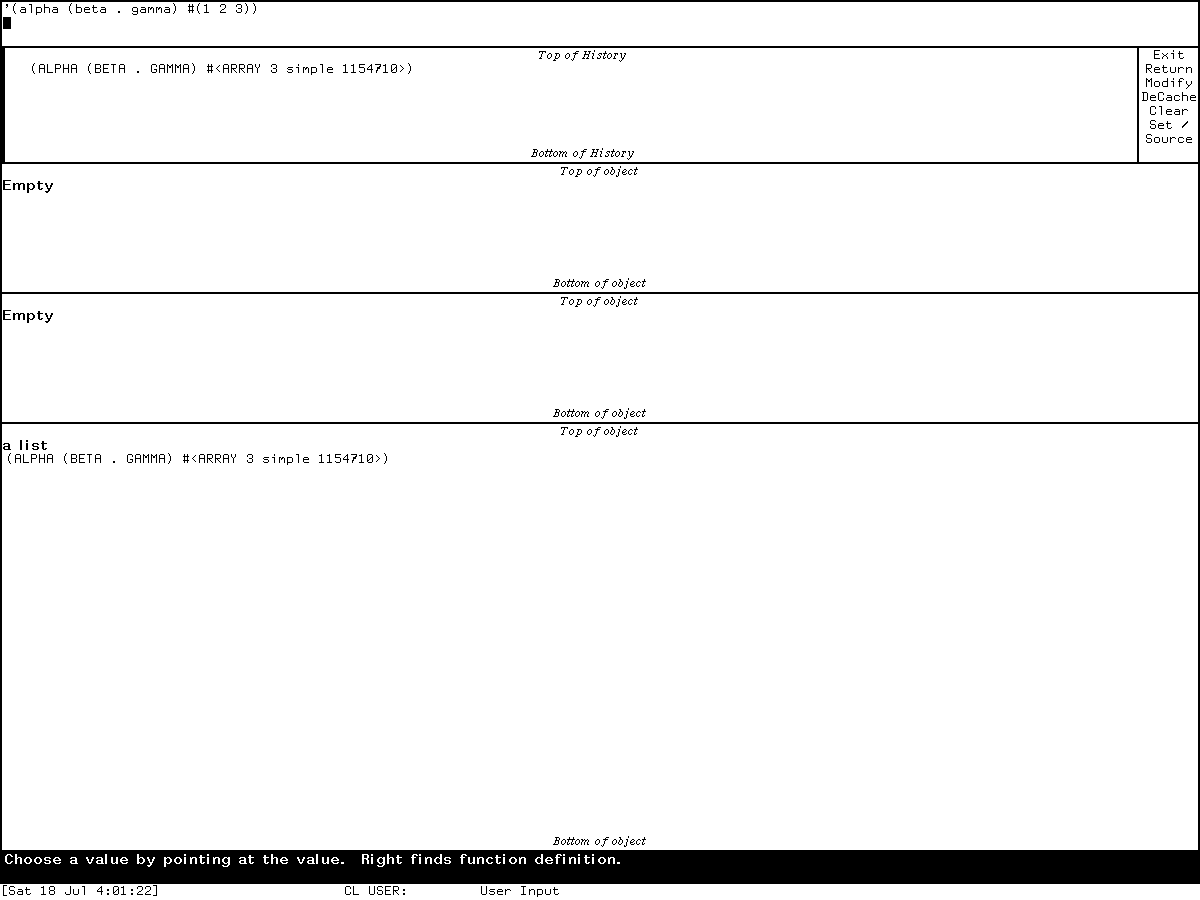
Runtime observation: the Genera 8.5 Inspector displaying
'(alpha (beta . gamma) #(1 2 3)), captured 2026-07-18. Underlying software and display material remain the property of their respective rightsholders; reproduced here for criticism, scholarship, and historical documentation under 17 U.S.C. section 107. No affiliation or endorsement is implied.
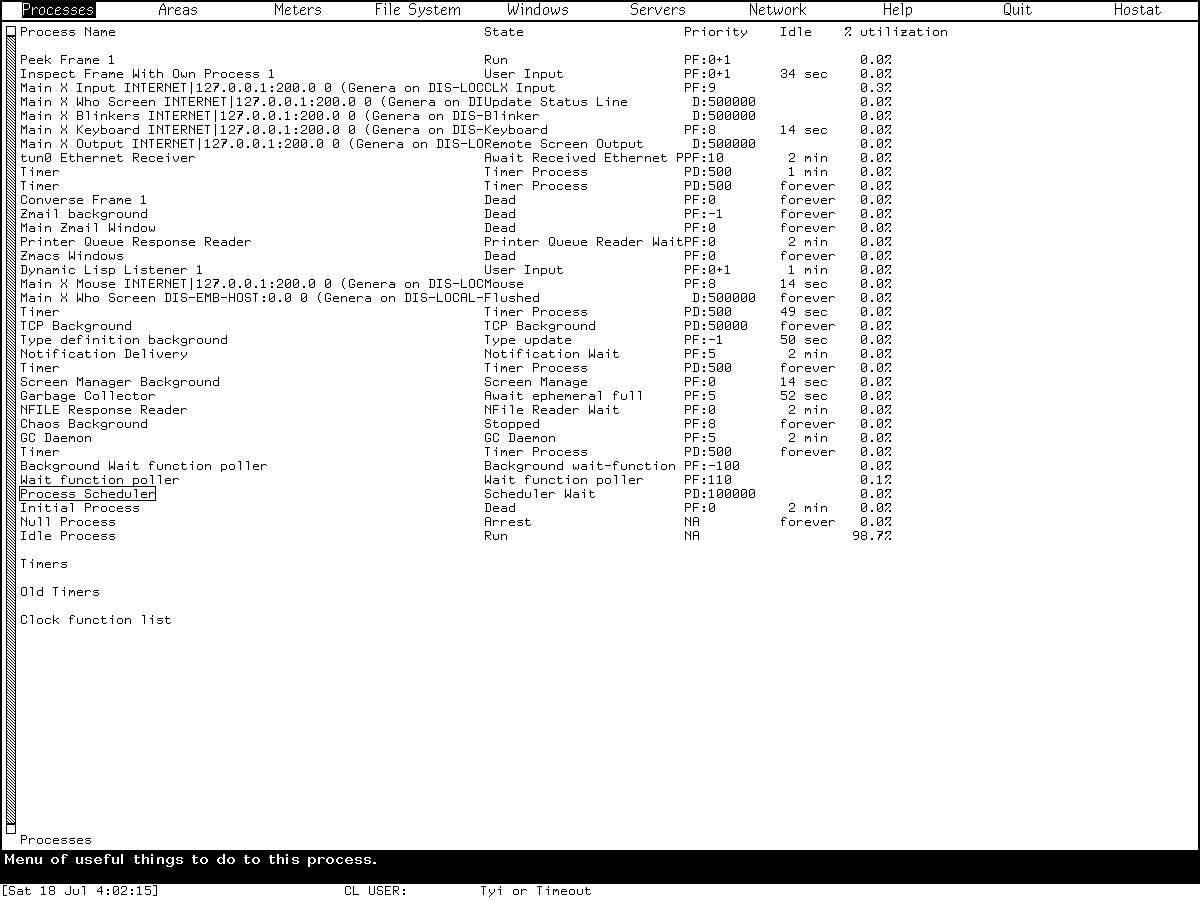
Runtime observation: Peek's Processes mode in Genera 8.5, captured 2026-07-18. Underlying software and display material remain the property of their respective rightsholders; reproduced here for criticism, scholarship, and historical documentation under 17 U.S.C. section 107. No affiliation or endorsement is implied.
Open questions
- Why does the own-process Inspector display
Returnalthough the inspected source wrapper removes it? A future safe probe should inspect the installed method combination and source pathname in the running world. - Does
Sourceshow source correspondence for a newly compiled project-owned function in this exact world, and does toggling it affect all Inspector frames through the global preference? No licensed source display should be captured for publication while testing this. - How does Hostat return and hand queued menu events back to Peek on a safely isolated world with a functioning local Chaosnet peer? The present session proves only the no-Chaosnet blocked path.
- Context menus whose object types were absent in the isolated run are fully source-audited but not runtime-exercised. Future probes should use disposable project-owned streams, processes, windows, timers, and local network objects and should avoid destructive operations on system state.
Sources
- Symbolics, Program Development Utilities, Genera 8, “The Inspector” and “The Peek Program,” especially PDF pages 264-271; verified 2026-07-18.
- Symbolics, Genera User's Guide, Genera 8, “Using Peek,” PDF pages 159-162; verified 2026-07-18.
- Symbolics, Genera 8.0 Release Notes, timer-display addition and correction of Peek's default update interval; verified 2026-07-18.
- Licensed local Genera 8.5 source and extracted Document Examiner help, portable identities recorded above; inspected 2026-07-18.
- Fresh
core-dossiers-20260718Genera Xvfb session, generation 1, action, capture, isolation, and shutdown evidence recorded above; observed 2026-07-18.